VTR93MHD Streaming Media Rear-View Mirror Monitor
7
B. Home Screen Icons
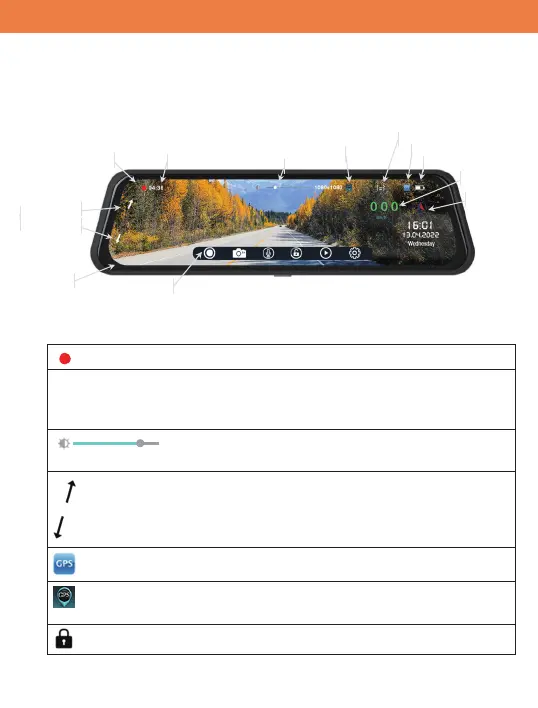
VTR93MHD will display the homepage after it is powered ON.
Homepage screen:
Homepage screen Icons:
“Recording Indicator” – when recording, it will be flashing.
04:36 “Loop Recording Timer” – when recording, it will count (by a
second) to recording time limit. See the “Loop Recording”
menu.
“Brightness Control” – Drag the white button to
increase or decrease the screen brightness.
“Digital Camera Tilt” – Due to elongated shape of the display, the
display shows the limited vertical portion of camera. Press
up or down arrow to select vertical section of camera to be
displayed.
“GPS” – If show, the GPS antenna is detected.
“GPS” – If shown, GPS active and speed and compass direction
is computed based on GPS data.
“File Protection” – the recorded file is being protected.
04:36
Recording Indicator
Loop Recording Timer
Quick Menu Bar
Digital
Camera
Tilt
Up
Down
Brightness Control
Compass & Speed Sensor
Impact Sensor On/OīIndicator
GPS Antenna Connect Status
BaƩery Charge Status
Vehicle ID
Digital Speedometer
Compass


 To Next Page