NO.5
* Do not leave objects generating magnetism near the speakers.
NO.7
NO.6
NO.4
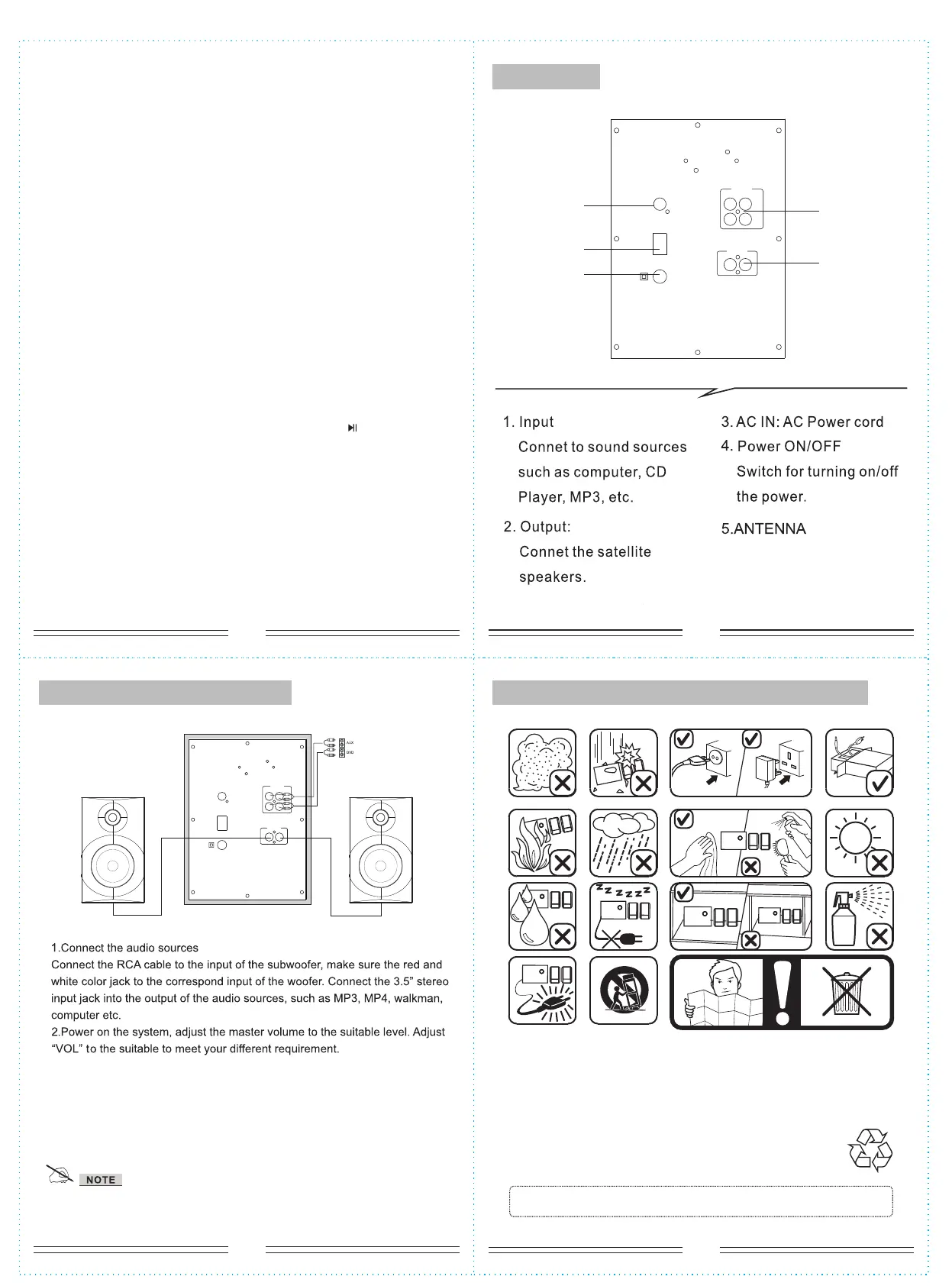
System connection diagramIn use please pay attention to the following items:
Rear panel
*if the remote control cannot function, it is because the battery of
remote control has been used up. thank you.
SPEAKER TERMINALS
Connect the left & right channel satellite to 2.1 speaker output
terminals.
ANTENNA
LR
AUX
DVD
R
L
POWER
OFF
ON
AC IN
OUTPUT
INPUT
(5)
(1)
(2)
(4)
(3)
ANT ENNA
LR
AUX
DVD
R
L
POW ER
OFF
ON
AC IN
OUTPUT
INPUT
6. When entering into USB/SD mode. “NEXT” means next song; “PREV”means
previous song; “PLAY/PAUSE”means play/pause;pressing the number “0-9”on
the remote control,you can choose the corresponding song.
7. VOL+/- means you can increase or decrease volume.
8.“TUNING-”means decrease the frequency of channel selection. Press
“TUNING-” for a long time means decrease the frequency of channel selection
continuously
9.“TUNING+”means increase the frequency of channel selection. Press
“TUNING+”for a long time means increase the frequency of channel selection
continuously.
10.“PLAY/PAUSE”means play/pause for USB/SD.
11.“PREV” means previous song for USB/SD.
12.“NEXT” means next song for USB/SD.
13. Press “SOURCE” buttons on the remote to convert to Bluetooth input
mode, LED display right bottom start to flashing (2 seconds) to search the
Bluetooth device. Turn on your mobile Bluetooth device and search the device
name “BT SPEAKER ”, paired them well.When you have successfully paired
your mobile to the speaker system, the LED right bottom stop flashing. When
start to play your mobile music, the LED flashed every one second.The
functions as "PREVIOUS/NEXT", "PLAY/PAUSE", can operate via the front
panel. On BL mode, when connecting with mobile, press “ ” for 3 seconds,
bluetooth function can be force-disconnected .


 To Previous Page
 Loading...