Need help?
Do you have a question about the boytone BT-210FB and is the answer not in the manual?
Details output power, drive units, frequency response, separation, S/N, distortion, power supply, and dimensions.
Lists key attributes like built-in amplifier, full audio spectrum performance, and wired remote control.
Lists all included items such as subwoofer, satellites, remote control, and manuals.
Explains the function of each button on the front panel, including volume, source, and tuning.
Identifies each button on the remote control by number and function.
Describes how to use the remote for power, mute, source selection, volume, tone, and FM tuning.
Details the input, output, AC power, power switch, and antenna connections on the rear panel.
Instructions for connecting audio sources via RCA and 3.5mm stereo jacks.
Guidance on connecting the left and right channel satellite speakers.
Advises against placing magnetic objects near speakers and notes remote battery depletion.
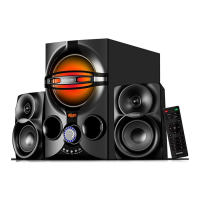
This document describes the Boytone 2.1CH Multimedia Speaker System, available in models BT-210FB, BT-215FD, and BT-225FB. This system is designed to provide a comprehensive audio experience for various entertainment needs, from music playback to movie viewing.
The Boytone 2.1CH Multimedia Speaker System is a versatile audio solution featuring a built-in amplifier and a 2.1 speaker configuration, which includes a subwoofer and two satellite speakers. This setup is engineered to deliver full audio spectrum performance, making it suitable for a wide range of audio sources.
The system supports multiple input modes, allowing users to connect various devices. These modes include AUX, DVD, USB/SD, FM radio, and Bluetooth (BL). The "SOURCE" button on both the front panel and the remote control allows users to cycle through these input options. When an input mode is selected, the LED display on the unit will indicate the active mode (e.g., "Au18" for AUX, "Du18" for DVD, "87.5" for FM, "BI18" for Bluetooth).
For USB/SD mode, the system can play audio files directly from a USB drive or SD card. Users can navigate through songs using the "NEXT" and "PREVIOUS" buttons on the remote or the "TUNING+/NEXT" and "TUNING-/PREVIOUS" buttons on the front panel. The remote control also allows direct song selection by pressing numbers 0-9.
In FM radio mode, the system enables users to tune into radio stations. The "TUNING+" and "TUNING-" buttons on the front panel and remote control allow for incremental frequency adjustments (0.1M). A long press on these buttons initiates a semi-automatic search for radio stations. The "MEMORY" function allows users to save their favorite FM channels. When "MEMORY" is pressed, the number on the LED display blinks, indicating that the system is in save channel state. Users can change the blinking number using "NEXT" or "PREV" and then press "PLAY/PAUSE" to save the channel. A long press (3-5 seconds) on "MEMORY" initiates an automatic search and save of channels, overwriting previously saved channels.
The Bluetooth function allows for wireless audio streaming from mobile devices. To activate Bluetooth, users press the "SOURCE" button on the remote until the LED display's right bottom starts flashing, indicating that the system is searching for a Bluetooth device. Users then enable Bluetooth on their mobile device, search for "BT SPEAKER," and pair with it. Once successfully paired, the LED stops flashing. During Bluetooth playback, the LED flashes every second. Functions like "PREVIOUS/NEXT" and "PLAY/PAUSE" can be controlled via the front panel. A long press (3 seconds) on the "I" button in Bluetooth mode can force-disconnect the mobile device.
The system also features tone control, allowing users to adjust the audio output to their preference. By pressing the "TONE" key, users can select either TREBLE or BASS. The volume knob can then be used to adjust the TREBLE from -6 to +6 and BASS from 00 to 30.
The Boytone speaker system is designed for ease of use with both front panel controls and a comprehensive remote control.
To ensure optimal performance and longevity of the Boytone 2.1CH Multimedia Speaker System, several maintenance guidelines are provided:
The manual includes several pictograms indicating proper usage and environmental considerations:
By following these guidelines, users can ensure a reliable and enjoyable audio experience with their Boytone 2.1CH Multimedia Speaker System.
 General
| Brand | Boytone |
|---|---|
| Model | BT-210FB |
| Type | Portable Bluetooth Speaker |
| Connectivity | Bluetooth, USB |
| Impedance | 4 Ohm |

 To Next Page