Need help?
Do you have a question about the boytone BT-324F and is the answer not in the manual?
Technical details including output power, frequency response, and dimensions.
Key attributes like audio performance and included accessories.
List of items provided in the product packaging.
Controls power, standby mode, and playback.
Changes the audio input mode of the system.
Selects Treble or Bass for adjustment using volume.
Decreases FM frequency or selects previous track.
Increases FM frequency or selects next track.
Adjusts the overall volume level up or down.
Identifies each numbered button on the remote control.
Explains the operation of specific remote control buttons.
Port for connecting the FM radio antenna.
Connects external audio sources like computers or players.
Connects the satellite speakers to the subwoofer unit.
Connection point for the main power cord.
Guide for connecting satellite speakers to output terminals.
Lists items to avoid near speakers and remote battery advice.
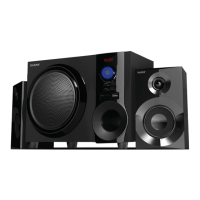
The Boytone BT-324F is a 2.1 channel multimedia speaker system designed to provide a rich audio experience for various entertainment needs. This system includes a subwoofer cabinet and two satellite speakers, along with a remote control, user manual, audio input cord, and an FM antenna, ensuring a comprehensive package for immediate use.
The core function of the BT-324F is to amplify and reproduce audio from multiple sources, delivering a full audio spectrum performance. It is equipped with a built-in amplifier, making it a self-contained audio solution. The system is ideal for enhancing the audio from MP3 players, MP4 players, CD/DVD movies, and digital playbacks, providing clear sound and deep bass.
The front panel of the subwoofer cabinet features several controls for easy operation. The "ST-BY/PLAY/PAUSE" button serves multiple purposes: a short press turns the speaker on, a long press puts it into standby mode, and in USB/SD/BT mode, it functions as a play/pause control. The "SOURCE" button allows users to switch between different input modes, including AUX, DVD, USB/SD, FM radio, and Bluetooth.
For audio customization, the "TONE" button enables selection between TREBLE and BASS adjustments. Once selected, the volume knob can be used to fine-tune the TREBLE level from -6 to +6 or the BASS level from 00 to 30, allowing users to tailor the sound to their preferences. The "VOLUME-/+" control adjusts the overall volume of the system.
The "TUNING+/NEXT" button has dual functionality: a short press increases the FM frequency by 0.1Mhz, while a long press initiates a seek mode for FM radio stations. In USB/SD/BT mode, this button advances to the next song. Similarly, the "TUNING-/PREVIOUS" button decreases the FM frequency by 0.1Mhz with a short press and starts a search mode for FM radio with a long press. In USB/SD/BT mode, it navigates to the previous song.
The system also features a "LED EFFECT" button on the remote control, which allows users to change the visual effect of the LED display. A long press on this button deactivates the LED effect.
The BT-324F offers versatile connectivity options to accommodate a wide range of devices. It includes an AUX/DVD input, allowing connection to sound sources such as computers, CD players, and MP3 players. The system also supports USB and SD card playback, providing convenient access to digital music files.
Bluetooth connectivity is a key feature, enabling wireless audio streaming from compatible devices. To connect a Bluetooth device, users simply press the "SOURCE" button until the system enters "bL" mode, indicated by a beeping sound. Then, they can activate Bluetooth on their transmitting device (phone, tablet, PC, etc.) and search for "BT Speaker" to pair.
For radio enthusiasts, the BT-324F incorporates an FM radio tuner. The included FM antenna should be connected to the designated port on the rear panel to ensure optimal reception. The "TUNING+/-" buttons on the front panel or remote control allow for manual tuning of FM frequencies. The remote control also offers a "MEMORY" function for saving favorite FM stations. A short press on "MEMORY" makes the displayed station flash/blink, indicating that the machine is in station memorization mode. Users can then use "NEXT" or "PREV" to select a station number and "PLAY/PAUSE" to save it. A long press (3-5 seconds) on "MEMORY" initiates an automatic seek and save function, though this will delete previously saved channels.
The remote control provides a comprehensive set of functions for convenient operation from a distance. In addition to the front panel controls, it includes a "MUTE" button to temporarily silence the audio, numerical buttons (0-9) for direct track selection in USB/SD mode, and dedicated "PREV/|<<" and "NEXT/>>|" buttons for navigating tracks. The "PLAY/PAUSE" button on the remote also controls playback in USB/SD mode. The LED display on the system provides visual feedback on the current input mode (e.g., "Au18" for AUX, "Du18" for DVD, "87.5" for FM, "BL" for Bluetooth) and other settings.
The speaker system is designed with a specially crafted woofer cabinet to enhance bass response and overall sound resolution. The satellite speakers are magnetically shielded, which helps prevent interference with other electronic devices.
To ensure the longevity and optimal performance of the Boytone BT-324F, a few maintenance considerations are outlined. Users are advised not to leave objects that generate magnetism near the speakers, as this could potentially affect their performance or cause interference.
The manual also addresses troubleshooting for the remote control. If the remote control stops functioning, the most common cause is a dead battery. Users are instructed to change the batteries in the remote control to restore its functionality.
The system's design emphasizes ease of connection. The left and right channel satellite speakers connect to the 2.1 speaker output terminals on the rear of the subwoofer cabinet. The AC power cord connects to the "AC IN" port, providing power to the unit.
Overall, the Boytone BT-324F is a user-friendly and versatile multimedia speaker system, offering a range of features for an enjoyable audio experience with straightforward operation and basic maintenance guidelines.
 General
| Brand | Boytone |
|---|---|
| Model | BT-324F |
| Type | Portable Bluetooth Speaker |
| Features | AUX Input |
| Connectivity | Bluetooth, AUX |

 To Next Page