62 Bradyprinter 200MVP and 300MVP User’s Guide
3ULQWKHDG3UHVVXUH$GMXVWPHQW
This adjustment may be necessary if printing is too light on one side or if thick media
is used.
Refer to Figure 29.
The pressure adjustment dials each have four possible settings designated by blocks of
increasing size embossed on the print mechanism. The smallest block (fully
counterclockwise) is considered “position 1” and the largest block (fully clockwise) is
considered “position 4.”
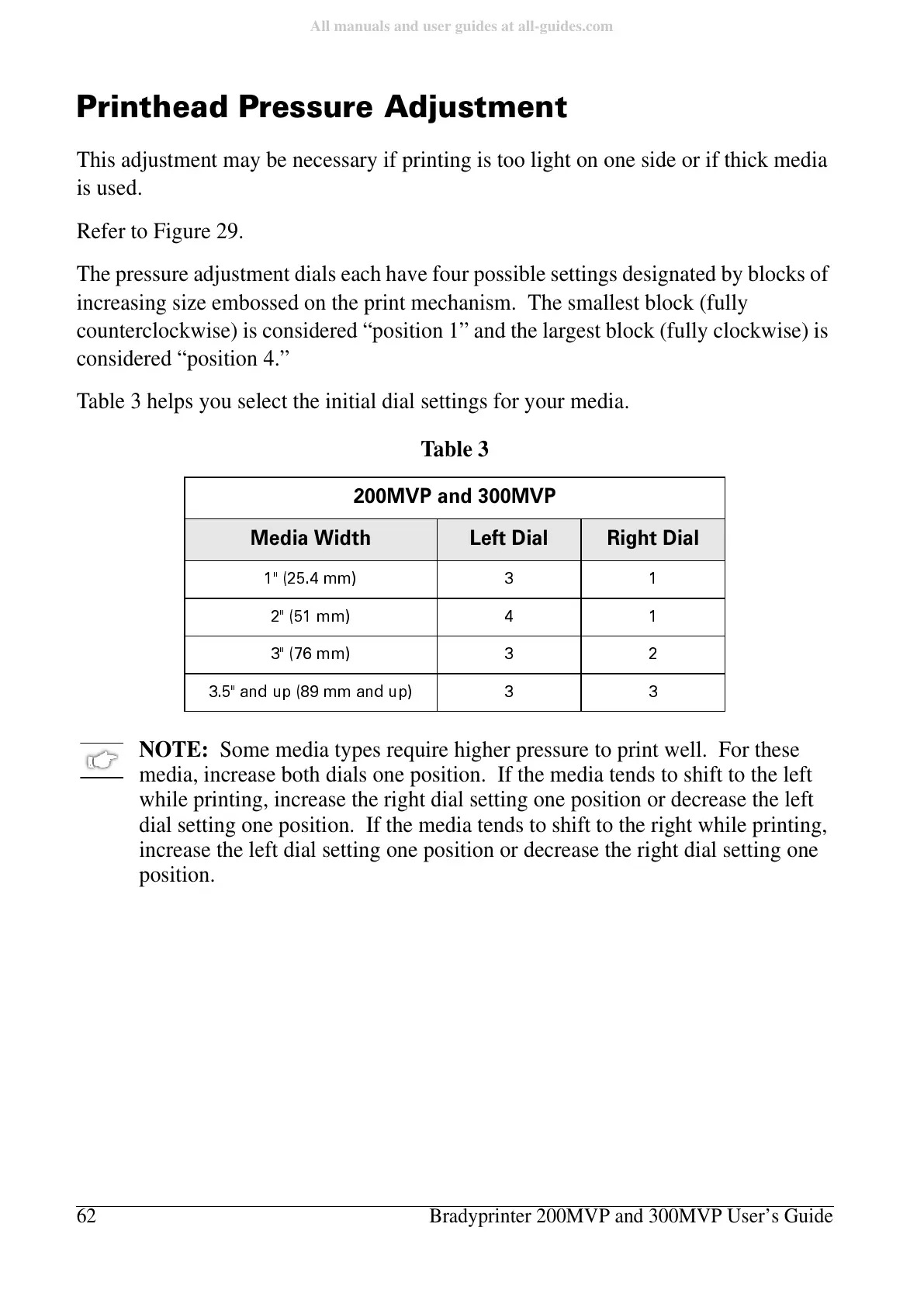
Table 3 helps you select the initial dial settings for your media.
NOTE: Some media types require higher pressure to print well. For these
media, increase both dials one position. If the media tends to shift to the left
while printing, increase the right dial setting one position or decrease the left
dial setting one position. If the media tends to shift to the right while printing,
increase the left dial setting one position or decrease the right dial setting one
position.
Table 3
093DQG093
0HGLD:LGWK /HIW'LDO 5LJKW'LDO
PP
PP
PP
DQGXSPPDQGXS















 To Next Page