...............................................................................................................................................................................................................................................
Note: This guide does not replace the user manuals.Page 3-4
DOCKING AND TRANSPORT
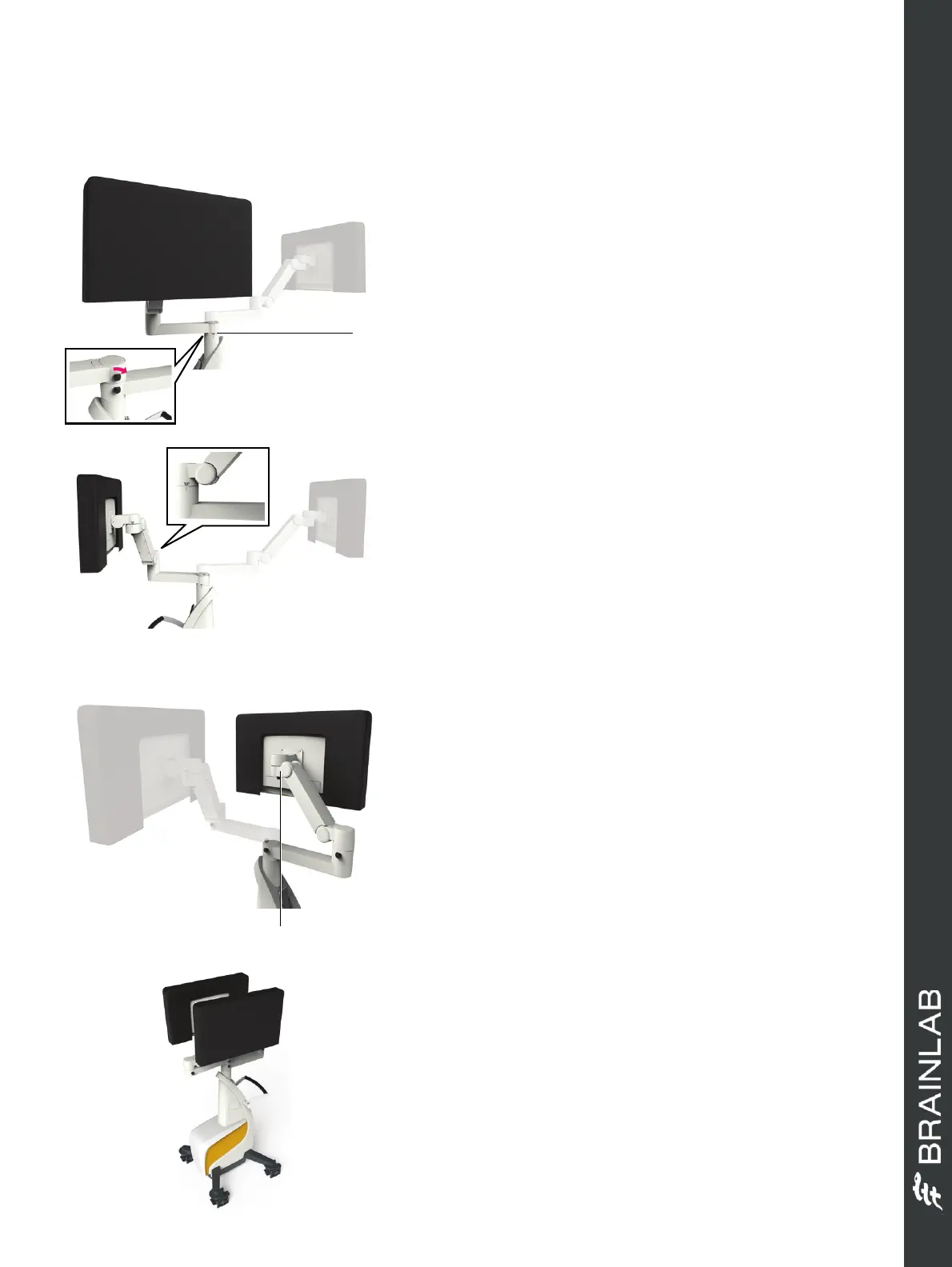
POSITION MONITOR CART: STEP 1
• Place protection covers over monitors and camera.
• Loosen all locking knobs.
• Rotate the lower arm to the position indicated until
the park symbols align a.
• Tighten the locking knob (insert shows the view from
the other side).
NOTE: You may need to move the upper arm out of
the way of the lower arm.
POSITION MONITOR CART: STEP 2
• Raise the lower arm up as high as possible.
• Rotate the inner joint of the lower arm until the park
symbols align.
• Tighten the locking knob.
POSITION MONITOR CART: STEP 3
• Rotate the monitor joint a until the park symbols
align.
• Tighten the locking knob.
POSITION MONITOR CART: STEP 4
• Repeat steps 1 and 2 for the upper arm until Monitor
Cart is in its final position.
Hardware: Curve 1.1
a
a



 To Next Page