OPERATION INSTRUCTIONS
FIG. 9
VEHICLE WEIGHT FORMULA
1,500 – 2,000 680 – 907 25 35
2,000 – 2,500 907
– 1,134
35
45
2,500 – 3,000 1,134 – 1,361
40
50
3,000 – 3,500 1,361 – 1,588
45 55
3,500 – 4,000 1,588 – 1,814 50 60
4,000 – 4,500 1,814 – 2,041 55 65
4,000 – 4,500 1,814 – 2,041 55 65
1999+ Jeep Gr. Cherokee
4,500 – 5,000 2,041 – 2,268 65 75
5,000 + 2,268 + 75 85
Pounds
Kilograms Psi.
With Tow
Doll
y
31
1-0288-053 Rev
. A 11/05
© 2004 Hopkins Manufacturing Corporation Printed in U.S.A
Phone (800) 470-2287
w
ww.brakebuddy.com
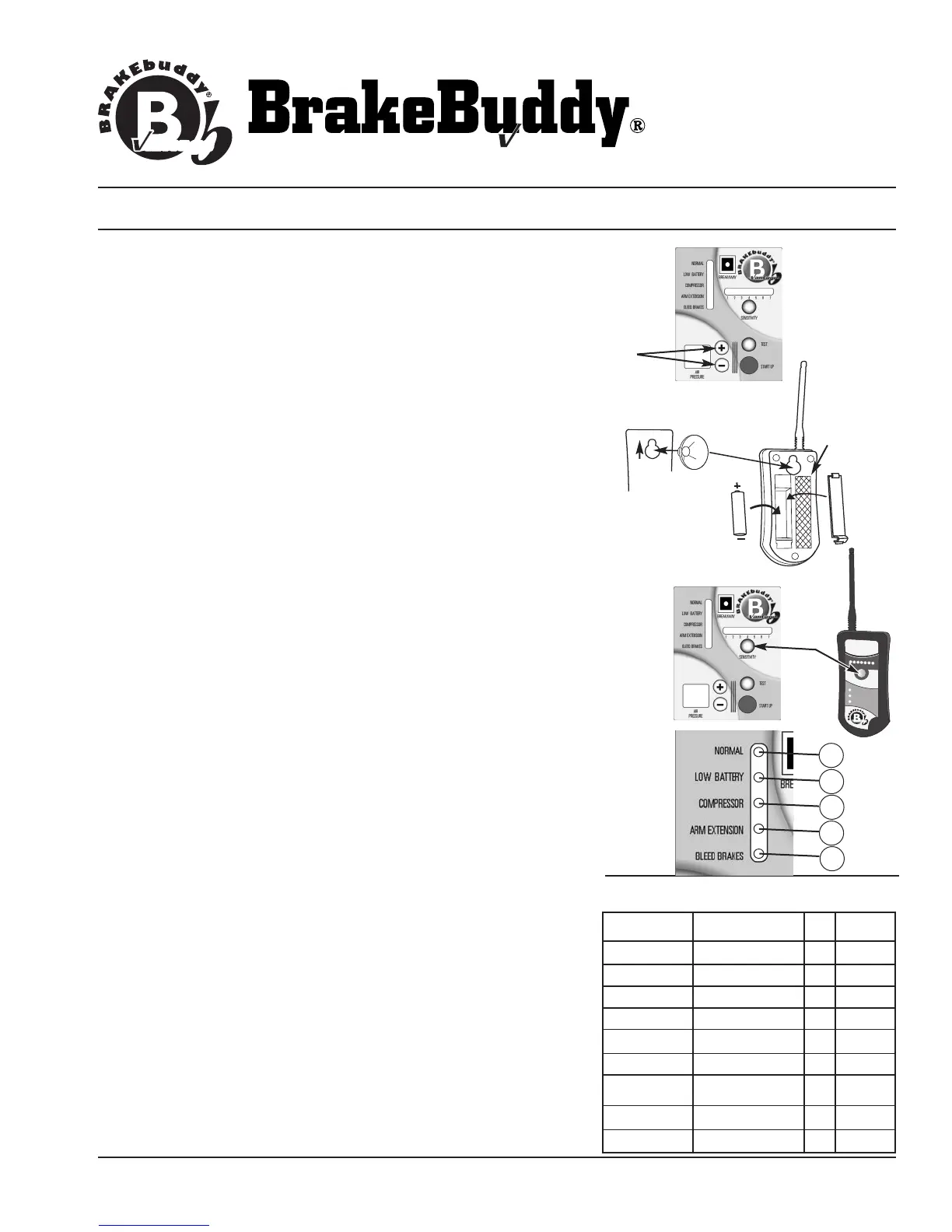
1. Adjust the air pressure to match the weight of your towed
vehicle. The braking pressure, or how hard your towed vehicle
will brake in tow, is adjusted by the
+ / - Buttons located on top
of the BrakeBuddy (Fig. 9). To find the correct pressure setting
specific for your towed vehicle, please refer to the Vehicle
Weight Formula Chart below. The display will adjust in
increments or decrements of 1 when held down and displays air
pressure from 20 to 90 PSI. After 5 minutes the display will
“power down.” Upon a button press, the display will “power on.”
NOTE:
The DIGITAL DISPLAY shows how much pressure is set to
apply the brake; it does not display the air pressure inside the air
tank that is automatically filled when the BrakeBuddy is plugged
into the 12-volt receptacle.
2. Install the AA battery (included) to the wireless alert system (Fig.
10) and mount in a suitable location in the RV (a suction cup or
hook and loop closure is included for mounting). Adjust the
Sensitivity Button either on the remote or on top of the
main BrakeBuddy unit. The sensitivity button determines how
hard you must apply the brakes in the RV before the
BrakeBuddy will engage the brakes in your towed vehicle. The
sensitivity of the BrakeBuddy is adjusted by each push of the
Sensitivity Button (Fig. 11). The more lights are illuminated, the
easier the BrakeBuddy will activate. Each time the BrakeBuddy
is installed, the sensitivity setting remains in the last used setting.
Start at setting #4 and adjust to your preferred setting as you are
driving (using the remote).
NOTE:
Y
our RV must be moving faster than 15 mph for the
BrakeBuddy to engage the brakes in the towed vehicle.
DIAGNOSTIC FEA
TURES:
The BrakeBuddy Main Unit provides visual indication on problems
that are occurring (Fig. 12).
A - System Normal (present on main unit)
B - Battery Low (battery voltage has dropped below 10 volts)
Recharge towed vehicle battery before traveling.
C - Compressor Error (air tank is not holding pressure or
compressor is running longer than 3 minutes) Call technical
service immediately 1-800-470-2287.
D - Arm Extension Error (arm is not retracted) Call technical
service immediately 1-800-470-2287.
E - Bleed Brakes (depress the
Auto Start button)
FIG. 10
FIG. 11
1
2
3
4
B
R
A
K
ING
O
C
C
U
R
I
N
G
S
EN
S
IT
IVI
TY
C
HE
CK
BB
UNI
T
BR
E
AKA
WAY
E
ME
R
G
E
NC
Y
RE
P
L
AC
E
BA
TT
E
RY
ON
RE
M
O
T
E
5
6
7
Van
t
ag
e
FIG. 12
A
B
C
D
E
S
uction Cup
I
nstallation
Hook and
Loop Position



 To Next Page
 Loading...