24
Trouble Shooting
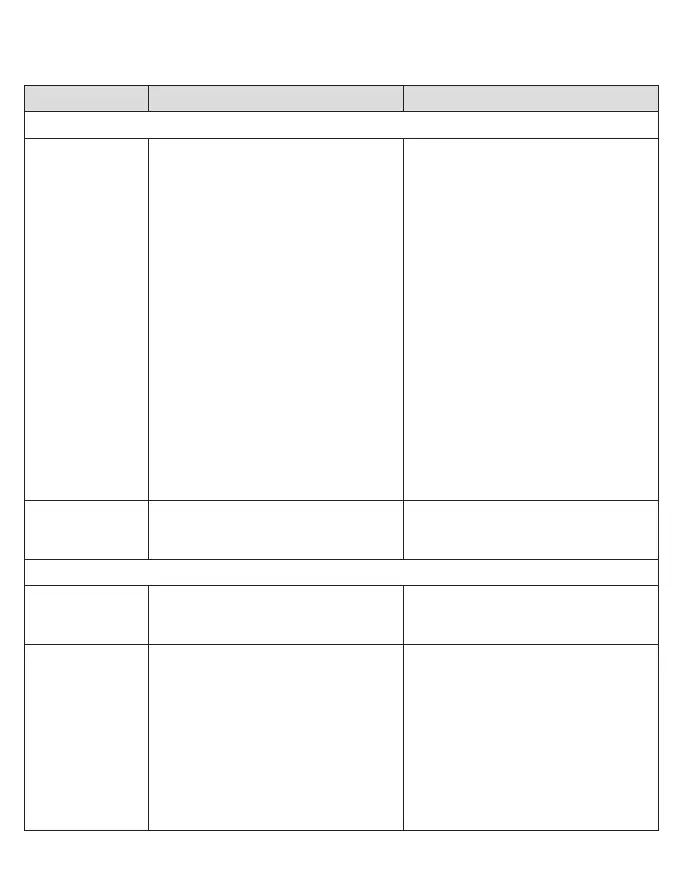
Problem Possible reason Remedy
APP
Handle does
not operate
(properly) with
Oral-B
TM
App.
1. Oral-B
TM
App is turned off.
2. Bluetooth interface is not activa-
ted on smartphone.
3. Radio transmission is deactiva-
ted on handle; radio transmis-
sion display (7) is turned off.
4. Bluetooth connection to smart-
phone has been lost.
5. Your smartphone does not sup-
port Bluetooth 4.0 (or higher)/
Bluetooth Smart.
6. Handle on plugged-in charger.
1. Turn on Oral-B
TM
App.
2. Activate Bluetooth interface on
smartphone (described in its
user manual).
3. Activate radio transmission by
simultaneously pressing on/off
(3) and mode button (4) for
2 seconds until radio transmis-
sion display (7) turns on.
4. Pair handle and smartphone
again via app settings. Keep
your smartphone in close prox-
imity when using it with handle.
5. Your smartphone must support
Bluetooth 4.0 (or higher)/ Blue-
tooth Smart in order to pair han-
dle. Check App Store
(SM)
or
Google Play
TM
for compatible
smartphones.
6. Radio transmission is deacti-
vated while handle is placed on
plugged-in charger.
Reset to factory
settings.
Original app functionality wanted. Press and hold on/off button (3)
for 10 seconds until all indicator
lights double blink simultaneously.
TOOTHBRUSH
Handle is not
operating (dur-
ing first use).
Battery has a very low charge
level; no lights illuminate.
Charge at least for 30 min.
1. Short stutte-
ring sounds/
flashing light
every
30 seconds
or after -
2 minutes.
2. Handle does
not operate
any timer.
1. «Professional timer» or
«2-Minute timer» activated.
2. Timer has been modified/deac-
tivated via app.
1. Set your timer to 2-Minute timer
(stuttering sounds/flashing light
after 2min); or set your timer to
Professional timer (stuttering
sounds/flashing light every
30 seconds). Follow steps under
«Timer setup».
2. Use app to change timer set-
tings or perform factory reset
(see App Trouble Shootings).
91657528_D700_JP.indd 2491657528_D700_JP.indd 24 01.02.18 11:1101.02.18 11:11
CSS APPROVED Effective Date 27Feb2018 GMT - Printed 29Mar2018 Page 24 of 28



 To Next Page