Need help?
Do you have a question about the Braven 570 and is the answer not in the manual?
Explains the meaning of different colored battery indicator lights on the speaker.
Details how much charge the speaker can provide to external devices.
Explains how to answer, end, and manage calls using the speaker.
Provides solutions for audio playback issues.
Offers tips for resolving Bluetooth connection interruptions.
Guides users on how to resolve pairing problems with devices.
 General
| Speaker type | - |
|---|---|
| Number of drivers | 2 |
| Number of speakers | 1 |
| Audio output channels | 2.0 channels |
| Subwoofer included | No |
| Impedance | - Ω |
| Frequency range | - Hz |
| RMS rated power | 6 W |
| AUX in | Yes |
| Bluetooth range | 10 m |
| Bluetooth version | 3.0+HS |
| Bluetooth profiles | AVRCP |
| USB 2.0 ports quantity | USB 2.0 ports have a data transmission speed of 480 Mbps, and are backwards compatible with USB 1.1 ports. You can connect all kinds of peripheral devices to them. |
| Connectivity technology | Wired & Wireless |
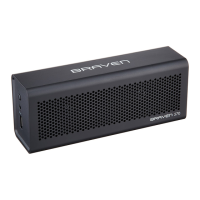
| Product type | Stereo portable speaker |
| Product color | Black, Red |
| Product design | Soundbar |
| Volume control | Digital |
| Housing material | Polymer |
| Recommended usage | Universal |
| Power source type | Battery |
 Weight and Dimensions
| Depth | 45 mm |
|---|---|
| Width | 158.5 mm |
| Height | 64 mm |
| Weight | 312 g |

 To Next Page