Model name:
Model
Content of Electronic Manual
Before Use ...................................... Precautions, disclaimer, etc.
Operating the Printer ......................Procedures for printing cards
Replacement ........... Procedures for replacing consumable items
Maintenance ................................................Cleaning procedures
Troubleshooting ................... Actions to take when troubles occur
Setup ................................... Installation, connection, setting, etc.
o
0
0
0
0
0
0
CD-ROM Content
Electronic Manual
Printer Driver
Status Monitor
Software Development Technical Information
o
•
•
•
•
Card Printer
Instruction Manual
LST1002-001B
Accessories
CD-ROM ................................................................................1
Instruction Manual ..................................................................1
READ ME FIRST :LST1004 ...................................................1
Power Cord (2 m).... ...............................................................1
Cleaning Card ........................................................................1
Card Stacker ..........................................................................1
USB 2.0 Cable (2 m) ..............................................................1
Gloves ....................................................................................1
Tweezers ................................................................................1
o
0
0
0
0
0
0
0
0
0
Products Sold Separately
To purchase these items, consult our authorized dealers.
Use the retransfer fi lm or ink ribbon within half a year after purchase.
Ink Ribbon(YMCK)1000 frames/roll, Model: CY-340-100E
Ink Ribbon (YMCKK) 750 frames/roll, Model: CY-35K-75E
Ink Ribbon (YMCKU) 750 frames/roll, Model: CY-35U-75E
Retransfer Film 1000 frames/roll, Model: CY-3RA-100
Cleaning Kit, Model: CX210-CKIT1
Magnetic Head Cleaning Card (5 Pcs),
Cotton Swab (5 Large and 5 Small), Cleaning Wipes (1 Box)
Cleaning Card, Model: CX210-CC1
10 Pcs/Set
o
•
•
•
•
•
•
Thank you for purchasing this product.
Please read through the “Electronic Manual” in the CD-ROM carefully in advance to ensure proper use of this product.
Also, to make sure that the product is used safely, please read through the “Safety Precautions” in the “READ ME FIRST”
booklet. Please store the manuals properly after reading so that they can be referred to whenever necessary.
Place this “Instruction Manual” near the printer and use it as and when needed.
Click
Print
in the “Electronic Manual” of the CD-ROM to print out the necessary PDF fi les.
Store the printed PDF fi les between the pages of this “Instruction Manual”.
Specifi cations
Operating environment conditions ....Temperature: 15°C to 30°C
(When peel-off ink, UV ink is used: 17 °C to 28 °C)
Humidity: 35 % to 70 % No condensation
(When peel-off ink, UV ink is used: 35 % to 60 % )
Storage environment conditions
<Printer unit>
Temperature : -15 °C to 55 °C
Humidity : 20 % to 80 %
<Printing media (retransfer fi lm or ink ribbon) / card>
Temperature : 5 °C to 25 °C
Humidity : 40 % to 60 %
Power supply..................................
AC 100 V - 120 V, 50 Hz/60 Hz
AC 220 V - 240 V, 50 Hz/60 Hz
Power consumption ........................................................... 310 W
(maximum power when all options are installed)
Current consumption ...................................3.5 A (100 V system)
1.6 A (200 V system)
Mass .................................................................... approx. 13.5 kg
(single-sided printer, including bend remedy unit)
Dimensions ............... 343 mm x 335 mm x 322 mm (W x H x D)
o
0
0
0
0
0
0
0
* The specifi cations and appearance of this product may be modifi ed
for improvement without prior notice.
CX-7000
Function Option
Single-sided
Printing
Double-sided
Printing
Bend Remedy unit Magnetic Encoder
Contact IC
Encoder
Non-contact IC
Encoder
Function & Option Checklist
Use the checklist below to identify the functions and options of the printer in use. Tick accordingly.
o
LST1002-001B
© 2014 JVC KENWOOD Corporation
Emphor Fzco
P.O.Box: 61232
Jebel Ali Free Zone, Dubai, UAE.
Tel : +971 4 8830233
Fax: +971 4 8830133
MEMO

 Need help?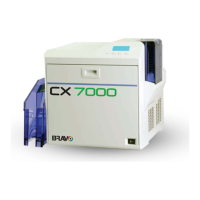

 To Next Page
 General