EasyManua.ls Logo

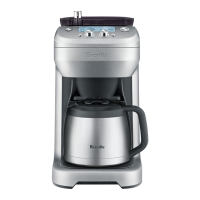
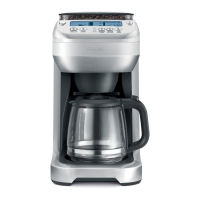
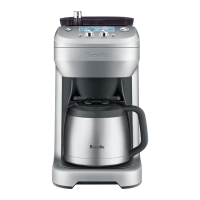
Breville BDC650 the Grind Control - User Manual

Breville BDC650 the Grind Control
33 pages
Print Icon
To Next Page IconTo Next Page
Loading...
BDC650
the Grind Control
Instruction Book - Manuel d’instructions
www.breville.com
USA
Mail: Breville USA
19400 S. Western Ave
Torrance CA
90501-1119
Phone: 1-866-273-8455
1-866-BREVILLE
Web:
brevilleusasupport.com
Canada
Mail: Breville Canada
3595 Boulevard Cote-Vertu,
Saint-Laurent,
Québec H4R 1R2
Phone:
1-855-683-3535
Email:
askus@breville.ca
Breville Consumer Support
Breville is a registered trademark of Breville Pty. Ltd. A.B.N. 98 000 092 928.
Copyright Breville Pty. Ltd. 2015.
Due to continued product improvement, the products illustrated/photographed
in this book may vary slightly from the actual product.
BDC650 USC C15

Questions and Answers

  • K
    kvazquezJul 26, 2025
    Why does my Breville Coffee Maker say 'DE-SCALE'?
    • S
      shannon30Jul 26, 2025
      If the LCD screen of your Breville Coffee Maker displays 'DE-SCALE', this indicates excessive mineral build-up is affecting the machine's performance. To remove the 'DE-SCALE' icon, press and hold the Strength button for 5 seconds, then proceed to de-scale the machine.
  • C
    Carlos RodriguezJul 30, 2025
    Why does my Breville BDC650 the Grind Control coffee basket overflow?
    • D
      Donald SilvaJul 31, 2025
      If the coffee basket overflows in your Breville Coffee Maker, it is likely clogged. Here are some things to check: * If using pre-ground coffee, ensure it is a drip coffee grind and not too fine. Never use Espresso grind. * Check that the coffee basket is lined with only one paper filter. * Check that either the gold tone filter or the paper filter is used. Do not use both together. * Check that the gold tone filter mesh is clear and unclogged. * The grinder may be set too fine, adjust coarser.
  • S
    salazarbrandonAug 4, 2025
    Why is my Breville Coffee Maker leaking water from the back?
    • R
      Rachael OconnorAug 4, 2025
      If water is leaking from the back of your Breville Coffee Maker, the water tank is likely overfilled. Ensure you do not exceed the 12-cup maximum. The machine will beep when full, and the water level float will rise to indicate the maximum level.
  • S
    Stephanie HallAug 8, 2025
    What to do if my Breville BDC650 the Grind Control is brewing too little or too much coffee?
    • V
      Valerie DownsAug 8, 2025
      If your Breville Coffee Maker brews too little or too much coffee, there are several possible causes: * Excessive mineral build-up may be affecting the machine's performance. If so, de-scale the machine. * The volume calibrations may need to be reset. Recalibrate the machine by flushing it twice. * The water tank was filled once the coffee machine had already started a brewing cycle. Always fill the water tank before starting a brewing cycle.
  • K
    Kimberly OdomAug 12, 2025
    How to stop coffee grinds in my Breville BDC650 the Grind Control coffee?
    • J
      Jasmine RayAug 12, 2025
      If you find coffee grinds in your coffee from the Breville Coffee Maker, it could be due to: * Using the gold tone filter. If you want to eliminate all grinds, switch to using a paper filter (8-12 cup, flat base basket style with ~ 3¼”/8.25cm base). * The coffee basket has not been properly cleaned, leaving residual grinds from previous use. After each use, wash the coffee basket, taking particular care to rinse the chute area. Dry thoroughly (especially the chute area). Ensure there are no grinds in the coffee basket before lining the coffee basket with the gold tone or paper filter.
  • M
    Mary PrestonAug 17, 2025
    What does 'CLEAN COFFEE CHUTE' mean on my Breville Coffee Maker?
    • C
      Charles LiuAug 17, 2025
      If the LCD screen on your Breville Coffee Maker displays 'CLEAN COFFEE CHUTE', the grinding burrs and coffee grinds chute need to be cleaned. Thoroughly clean the coffee basket and gold tone filter to ensure they are clear and unclogged of any coffee grinds. Also, check the bean hopper for any foreign body.
  • S
    Sandra DelgadoAug 21, 2025
    What does it mean when my Breville Coffee Maker beeps and shows '1'?
    • K
      Kelly LangAug 21, 2025
      If your Breville Coffee Maker beeps and displays '1' on the LCD screen, there is an issue with the coffee grinds chute disc. Check the coffee grinds chute disc for any build-up of coffee grinds. This is the stainless steel disc that is visible when the swing-out door is opened. A build-up of grinds on this disc can affect the performance of the machine. Wipe the disc clean then dry thoroughly.

Summary

Safety First

Important Safeguards

Key precautions for safe operation, setup, and handling of the appliance.

Electrical Safety and Warnings

Important Safeguards for All Electrical Appliances

Essential safety measures for all electrical appliances, including cord and plug handling.

Short Cord Instructions

Guidelines on using the short power cord and extension cords safely.

Operating Your Breville Product

Using the Grind Control - Carafe Mode

Instructions for brewing coffee in carafe mode, including filling the water tank and pre-warming.

Select the Brew Strength or PRE-GROUND Coffee Setting

Details on adjusting brew strength and using pre-ground coffee.

Select Single Cup Mode

Instructions for brewing single cups of coffee, including size selection.

Select Carafe Mode

How to choose carafe brewing mode and select the desired number of cups.

Start the Brew Cycle

Steps to initiate the coffee brewing process.

Advanced Features

Adjusting the Grinder

How to adjust the grinder fineness or coarseness for optimal coffee flavor.

Care & Cleaning

Cleaning the Grinding Burrs and Coffee Grinds Chute

Guide to cleaning internal grinder components for optimal performance.

Removing Calcium Build-Up

Descaling Process

Step-by-step instructions for removing mineral build-up using the descaling function.

Troubleshooting

DE-SCALE on LCD screen

Troubleshooting the 'DE-SCALE' notification and performing the descaling procedure.

Machine beeps 20 times in fast succession and 2 is displayed on the LCD screen

Troubleshooting repeated beeping and '2' display, indicating a specific error.

Grinder starts but operates with a loud noise.

Diagnosing and fixing issues with a noisy grinder.

Water is leaking from the back of the machine

Diagnosing and fixing water leaks from the rear of the machine.

CLEAN COFFEE CHUTE on LCD screen

Troubleshooting the 'CLEAN COFFEE CHUTE' notification and cleaning procedures.

Breville BDC650 the Grind Control Specifications

General IconGeneral
Capacity12 cups
Built-in GrinderYes
ProgrammableYes
Water Tank Capacity60 oz
Brew Strength ControlYes
LCD DisplayYes
MaterialStainless Steel
Auto StartYes
Keep Warm FunctionYes
Water FilterYes
Power1100W
Weight16 lbs
Bean Hopper Capacity8 oz
Grinder TypeBurr grinder
ColorStainless Steel

Related product manuals