EasyManua.ls Logo

Breville RM-BBL600XL - User Manual

Breville RM-BBL600XL
11 pages
Print Icon
To Next Page IconTo Next Page
Loading...
RM-BBL600XL
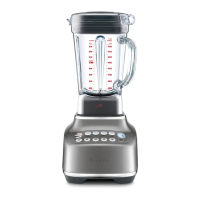
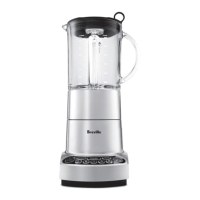
ikon Hemisphere
LCD Blender
Instruction Booklet
Breville is a registered trademark of Breville Pty. Ltd. A.B.N. 98 000 092 928.
Copyright Breville Pty. Ltd. 2012.
Due to continued product improvement, the products illustrated/photographed
in this booklet may vary slightly from the actual product.
Models RM-BBL600XL Issue - A11
Breville Consumer Service Center
Website:
brevilleusa.com/certified
Toll Free:
1-855-273-8456
Hours:
8am to 5pm (Pacific Time)
Monday through Friday, excluding holidays

Questions and Answers

  • T
    Thomas HollowayAug 1, 2025
    Why doesn't my Breville RM-BBL600XL Blender motor start?
    • A
      adamjohnsonAug 2, 2025
      If the Breville Blender motor doesn’t start or the blade doesn’t rotate, check that the power plug is securely inserted into the power outlet and switched on. Also, make sure that the blender jug and lid are securely locked into position. Check that the ‘Power’ button and the selected function or speed setting is illuminated. Be sure to press only one speed or function button at a time.
  • R
    Richard BellAug 6, 2025
    What to do if the Overload Protection warning flashes on my Breville Blender?
    • L
      Linda HernandezAug 6, 2025
      The 'Overload Protection' warning flashes and the keys don't respond because the motor is being overloaded. Once the flashing stops, the Breville Blender has cooled down and is ready for use again. Re-select the desired speed or function button. If you turned the blender off, switch it back on, wait for the flashing to stop, and then re-select the desired speed or function.
  • K
    karla78Aug 11, 2025
    What to do if food sticks to the blade of my Breville RM-BBL600XL Blender?
    • J
      Jamie GarnerAug 11, 2025
      If food sticks to the blade of your Breville Blender, it may be due to processing too much food. Turn the blender off by pressing the ‘Power’ button on the control panel, then switch it off at the power outlet and unplug the power cord. Once the blade stops rotating, remove the blender lid and take out some food using a spatula.
  • G
    Gregory BanksAug 16, 2025
    How to chop ice with Breville Blender?
    • T
      Timothy CaseAug 16, 2025
      If ice is not chopping to the desired consistency in your Breville Blender, remember that the condition of the ice cubes impacts the final result. Use larger, solid dry ice on Snow/Speed 1 to create snow. Use any type of ice on ‘ICE CRUSH’ when coarser chopped ice is required.
  • E
    eric71Aug 22, 2025
    Why is food unevenly chopped in my Breville Blender?
    • J
      joseph23Aug 22, 2025
      If food is unevenly chopped in your Breville Blender, it might be because too much food is being chopped at once, or the pieces are not small enough. Try cutting the food into smaller pieces of even size and processing a smaller amount per batch. For the best results, chop the food into pieces no larger than 3/4 inch (2cm).
  • S
    Steven LewisAug 27, 2025
    What to do if food is chopped too fine in my Breville RM-BBL600XL Blender?
    • S
      sarah55Aug 27, 2025
      If food is chopped too finely or becomes watery in your Breville Blender, it means the food is being over-processed. Use brief pulses or process for a shorter time.

Summary

Breville Safety First

Important Safeguards

General safety precautions for electrical appliances and specific warnings for the blender.

Know Your Breville Blender

Electronic Speed Control & Pulse

Explains the electronic speed control and pulse function for consistent results.

Hemisphere Blade System

Details the unique blade system designed for optimal blending efficiency.

Pre-Programmed Ice Crush & Smoothie

Covers the automatic speed adjustments for optimized Ice Crush and Smoothie cycles.

Blender Superiority Explained

Motor Overload Protection

Describes the motor overload protection feature and how it automatically stops the motor.

Operating Your Breville Blender

Preparation Before First Use

Instructions for initial cleaning and preparation before the first use of the blender.

Assembling the Blender Unit

Step-by-step guide for assembling the blender pitcher and attaching it to the base.

Using Pre-Programmed Functions

Explains the use of 'ICE CRUSH' and 'SMOOTHIE' pre-programmed functions.

Care and Cleaning Guide

Cleaning the Motor Base

Instructions for cleaning the motor base with a soft, damp cloth, avoiding abrasives.

Tips for Optimal Blender Use

Prohibited Blending Practices (Dont)

Important warnings and prohibitions regarding blender operation and usage to avoid damage or injury.

Troubleshooting Your Blender

Motor Not Starting or Rotating

Solutions for the motor not starting or the blade not rotating during operation.

Overload Protection Warning

Resolving issues when the Overload Protection warning is active and keys are unresponsive.

Breville RM-BBL600XL Specifications

General IconGeneral
BrandBreville
ModelRM-BBL600XL
CategoryBlender
LanguageEnglish

Related product manuals