7 8
Combo Heat Press MachineCombo Heat Press Machine
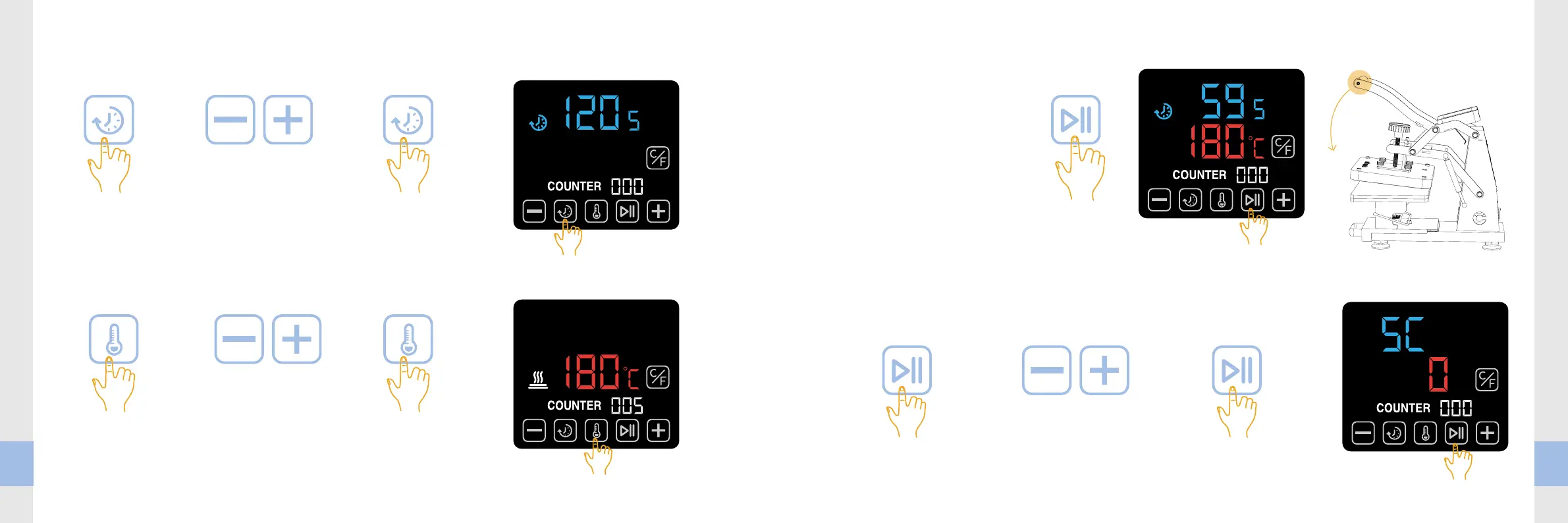
3. How to set the time?
4. How to set the temperature?
1. Click the Time
button to enter
time setting mode;
1. Click the Temperature
button to enter
temperature setting
mode;
3. Click the Time
button again, exit
time setting mode.
3. Click the Temperature
button again, exit
temperature setting
mode.
2. Click the Plus or
Minus button to
adjust the value;
2. Click the Plus or
Minus button to
adjust the value;
5. Start printing
6. Temperature compensation
1. Click the Start button to start the
countdown;
2. Press down the handle also can start
the countdown automatically;
3. Click the Start button again at any
time to stop the countdown.
If the actual temperature of the heater does not match the value displayed on the screen,
the temperature compensation value needs to be adjusted.
Enter the exact temperature difference value to be made up. For example, if the actual temperature is
190℃ while the value displayed is 180℃ , then enter 10 as temperature difference value.
1. Long press the Start button for 8
seconds to enter the temperature
compensation settings;
3. Long press the Start button
for 8 seconds again to exit the
temperature compensation settings.
2. Click the Plus or
Minus button to
adjust the value;
brildor.com


 To Next Page