
 Need help?
Do you have a question about the Brildor Combo Craft Express and is the answer not in the manual?
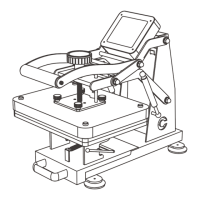
Mechanism for adjusting the pressure applied during heat pressing.
Lever used to lower and raise the heating element onto the item.
Heat-resistant pad that protects the heating element and ensures even pressure distribution.
Handle to easily slide the printing bed in and out for loading/unloading items.
Interface displaying time, temperature, and usage count, used for setting parameters.
Housing for the machine's electronic components and controls.
The heated surface that transfers the design onto the substrate.
Button to turn the heat press machine on and off.
Standard attachment for heat pressing flat items like t-shirts and tote bags.
Attachment designed for applying transfers onto plates.
Specialized attachment for heat pressing hip flasks.
Attachment for heat pressing designs onto caps and hats.
Attachment used for applying transfers onto pens.
Attachment for heat pressing designs onto cylindrical items like mugs and tumblers.
A flat heating element measuring 20x30cm for general heat pressing.
A smaller flat heating element measuring 15x20cm.
A round heating element specifically for pressing plates, 8 inches in diameter.
A round heating element for pressing plates, 10 inches in diameter.
Dedicated attachment for heat pressing 30oz mugs and tumblers.
Specialized heating element for applying designs to caps.
Attachment designed for heat pressing pens.
Heating element for transferring designs onto hip flasks.
Identification of the digital display, indicators, and control buttons on the panel.
Instructions on how to toggle between Celsius (°C) and Fahrenheit (°F).
Procedure to reset the machine's number of uses counter.
Steps to enter, adjust, and exit time setting mode for printing.
Steps to enter, adjust, and exit temperature setting mode for printing.
How to initiate the countdown and halt the printing process.
Adjusting temperature compensation value for accurate heating.
Procedure to reset machine parameters to factory defaults.
Step-by-step guide for heat pressing designs onto t-shirts.
Instructions for connecting the mug/tumbler heating element to the machine.
Detailed steps for heat pressing designs onto tumblers.
Instructions for attaching the plate heating element to the machine.
Detailed steps for heat pressing designs onto plates.
Instructions for attaching the hip flask heating element to the machine.
Detailed steps for heat pressing designs onto hip flasks.
Instructions for attaching the cap heating element to the machine.
Detailed steps for heat pressing designs onto caps.
Instructions for attaching the pen heating element to the machine.
Detailed steps for heat pressing designs onto pens.
Recommended temperature and time settings for various items.
Important safety precautions for operating the heat press machine.
Answers to common issues and questions regarding print quality.
The Craft Express Combo Heat Press Machine is a versatile device designed for sublimation printing on a wide variety of items. This user manual is universal for all heater combo versions and is suitable for all colors of machines, ensuring broad applicability.
The Combo Heat Press Machine serves as a comprehensive solution for transferring designs onto various substrates using heat and pressure. It is equipped with multiple interchangeable heating attachments, allowing it to perform flat heat pressing, plate pressing, hip flask pressing, cap pressing, pen pressing, and mug/tumbler pressing. The core function involves heating a platen to a specified temperature and applying pressure for a set duration, facilitating the transfer of sublimation ink from a printed design onto the target item. The machine features a digital control meter for precise temperature and time management, ensuring consistent and high-quality results across different applications. Its slide-out drawer design enhances user convenience and safety during operation.
The machine supports a range of specialized heating attachments, each designed for specific product types:
The digital control panel allows users to precisely manage time, temperature, and other settings.
The general workflow for printing involves:
The process for installing different heating attachments generally follows these steps:
The manual provides a table of recommended printing parameters (temperature and time) for various products. These are based on Craft Express's sublimation blanks and serve as a reference. Users are advised to test their own products to find optimal parameters.
The manual includes a section addressing common printing issues:
While the manual does not explicitly detail maintenance procedures, it emphasizes safety instructions that indirectly contribute to the longevity and proper functioning of the device:
Proper handling and adherence to operational guidelines are crucial for maintaining the machine's performance and ensuring user safety. Regular cleaning of the platens and attachments, as well as checking electrical connections, would be implied best practices for any heat press machine, though not explicitly stated in this excerpt. The modular design, allowing for easy attachment changes, also facilitates focused cleaning and inspection of individual components.
 General
| Brand | Brildor |
|---|---|
| Model | Combo Craft Express |
| Category | Power Tool |
| Language | English |

 To Next Page