4. Install Latch and Strike Plate
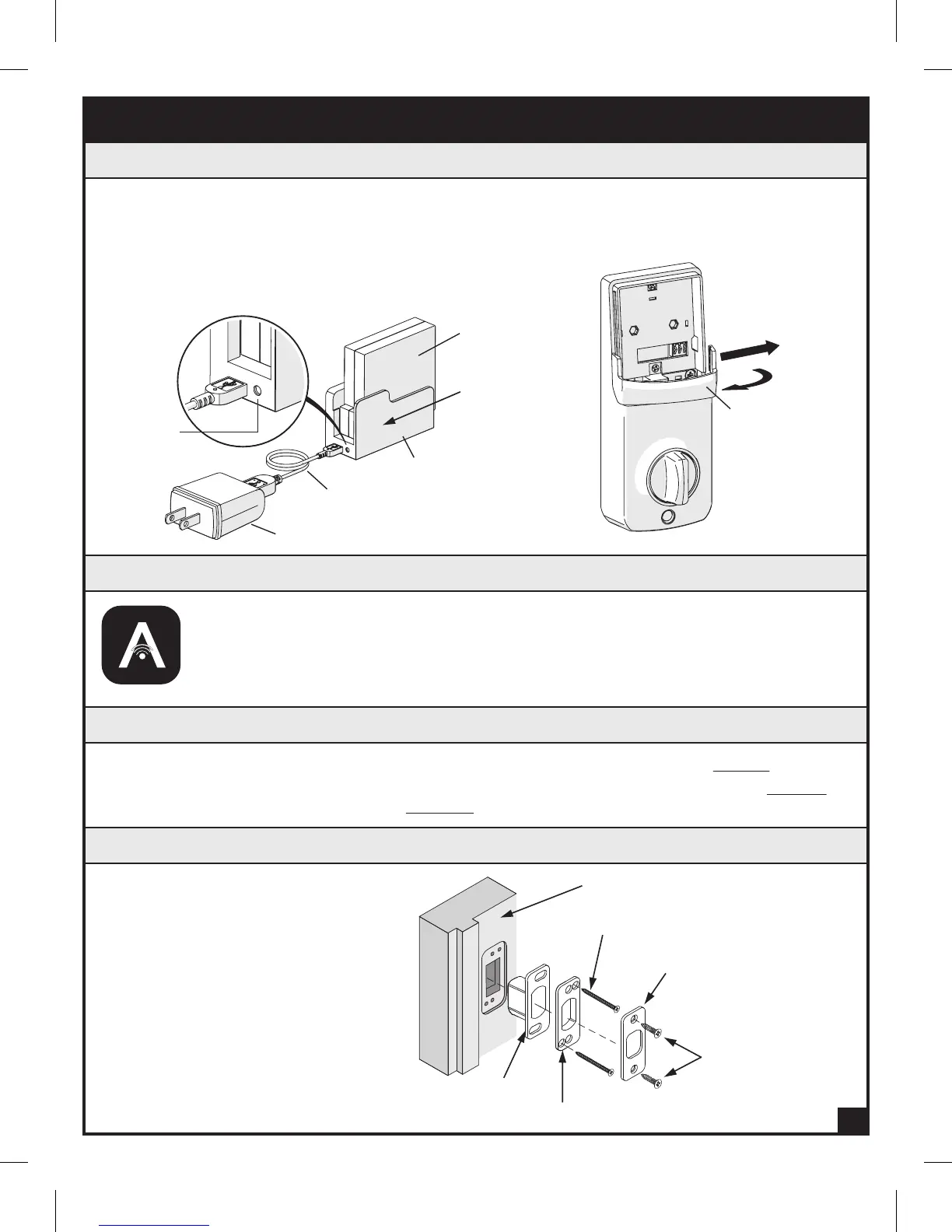
Install Strike Plate (N) in the Door Frame
Strike plate (N)
Dust box (P)
Door Jamb
3/4" Strike Screws (EE)
3" Reinforcement Screws (FF)
Reinforcement plate (O)
2. Watch the Installation Video
1. Charge Battery
3. Prep the Door
Pre-Installation Instructions
b.
a. Remove the Battery Cover (L), Rechargeable
Battery (J), Battery Charging Cradle, USB Cable
and Wall Adapter. Remove the plastic tab on the
Battery (J). Slide the Battery (J) into the Charging
Cradle from the side. Charge the Battery (J) until
the LED Light turns from red to green.
b. Carefully remove the Antenna
Cover (K) by gently pulling the
edges outward slightly and lifting.
Antenna Cover (K)
Pull edge slightly
outward
4
a. If replacing an existing deadbolt. Remove the old hardware and begin at STEP 4.
b. If installing ARRAY
™
on a new door, follow the door preparation instructions on PAGE 9
and use the template provided on PAGE 10.
• FITS DOORS 1-3/8" (35 mm) TO 1-3/4" (45 mm) THICK •
Rechargeable
Battery (J)
USB Cable
Battery
Charging
Cradle
Wall Adapter
LED Light
a.
Slide
The ARRAY
™
lock is compatible with either iOS or Android™ devices. Search for
“ARRAY
™
Lock” at the App Store or Play Store to download the free app. Once the
app is downloaded, register your lock and watch the installation video. Install your
ARRAY
™
lock (Steps 3 – 5) and then follow the instructions to add a lock or visit
www.arraylock.com/pages/installation.


 To Next Page