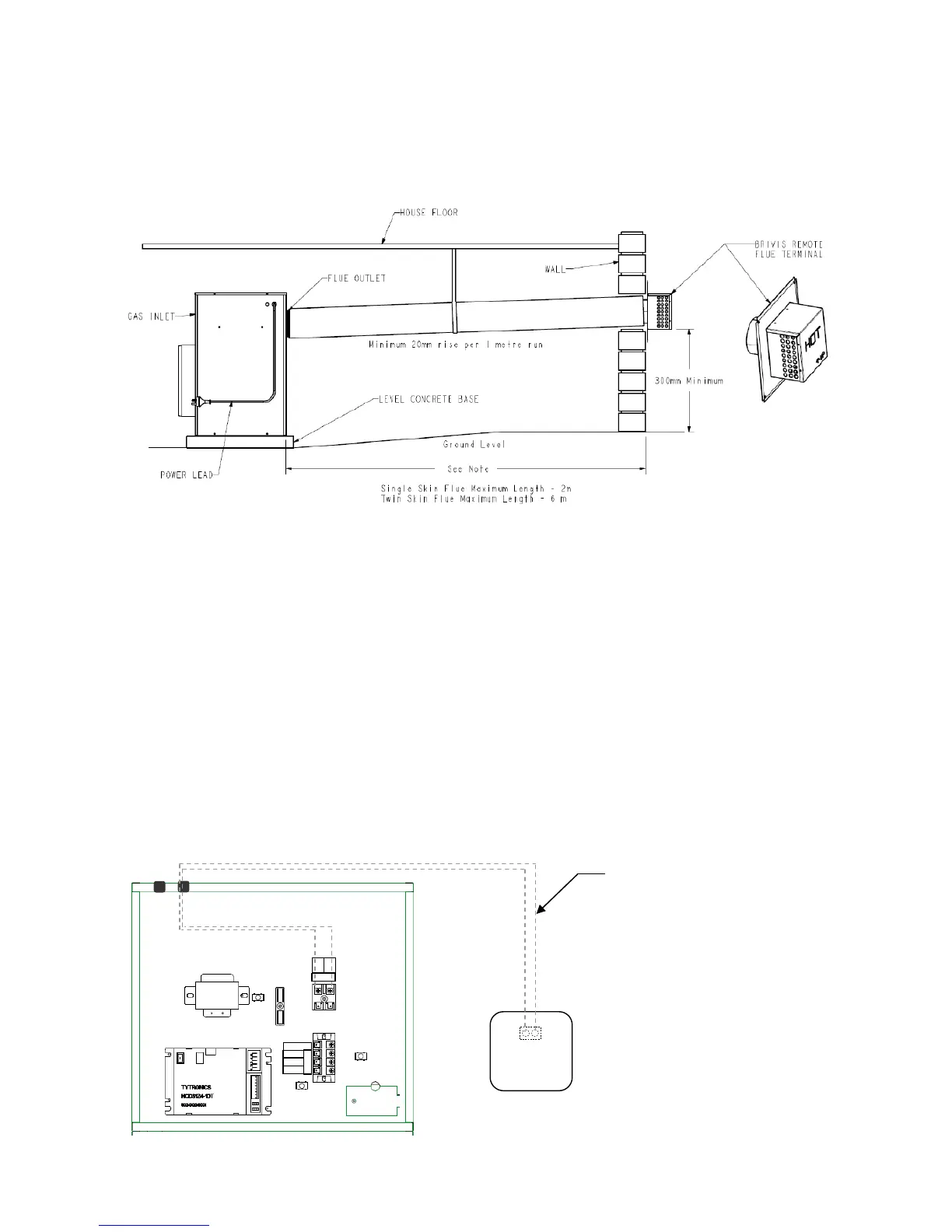
2.6.3 Brivis Remote Flue Terminal
In specific installations, for example under the floor, it is recommended that a remote terminal be used to terminate
a horizontal flue on the outside wall of the building. Please refer to instructions supplied with a Brivis Remote Flue
Terminal. Figure below depicts typical Compact Classic underfloor configuration.
2.7 Fan Speed Setting
There are three fixed fan speed options available with this unit, these are:
• High - “HIGH” (Factory Default)
• Medium - “MED”
• Low - “LOW”
To adjust the fan speed:
Ensure the power supply to the unit is OFF at the fixed switched socket outlet adjacent to the heater
Access the controls and change as required:
• For High fan speed do not adjust
• For Medium fan speed move terminal from “HIGH” to “MED”
• For Low fan speed move terminal from “HIGH” to “LOW”
• Turn the power back on once complete
2.8 Wiring Diagram
Diagram 5. Remote flue terminal installation
Part No: B018384



 To Next Page