INSTALLATION MANUAL
INSTALLATION
15
[ \
7/64”
X
3 X
Y
Z
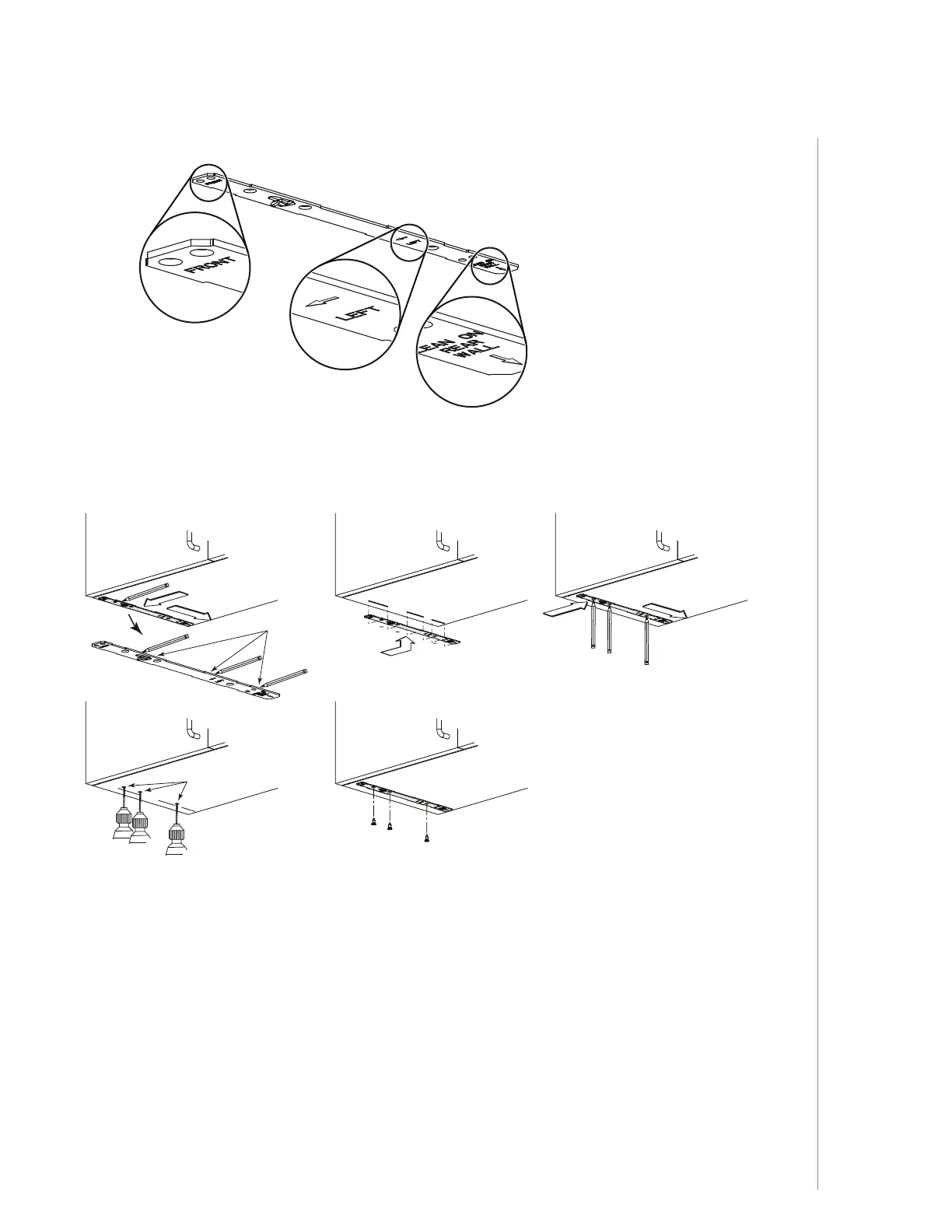
Refer to the marking on brackets to determine the correct installation side and orientation.
Align the corresponding bracket to the cabinet side, while placing rear end of bracket
against the wall. Draw a line on the outer edge of the bracket (as shown).
Slide the bracket towards the center of cabinet and align side edge to marked line,
keeping the rear end edge leaning on the wall.
Use a pencil to mark 3 holes.
Remove the bracket. Using a 7/64” drill bit, drill 3 holes where marked.
Assemble the bracket to the cabinet bottom using a Phillips screwdriver and 3 provided
countersunk wood screws. Repeat for the other cabinet side.
FRAMELESS CABINET



 To Next Page