EasyManua.ls Logo

Bronica Rangefinder RF645 - User Manual

Bronica Rangefinder RF645
33 pages
Print Icon
To Next Page IconTo Next Page
Loading...
1
RF645
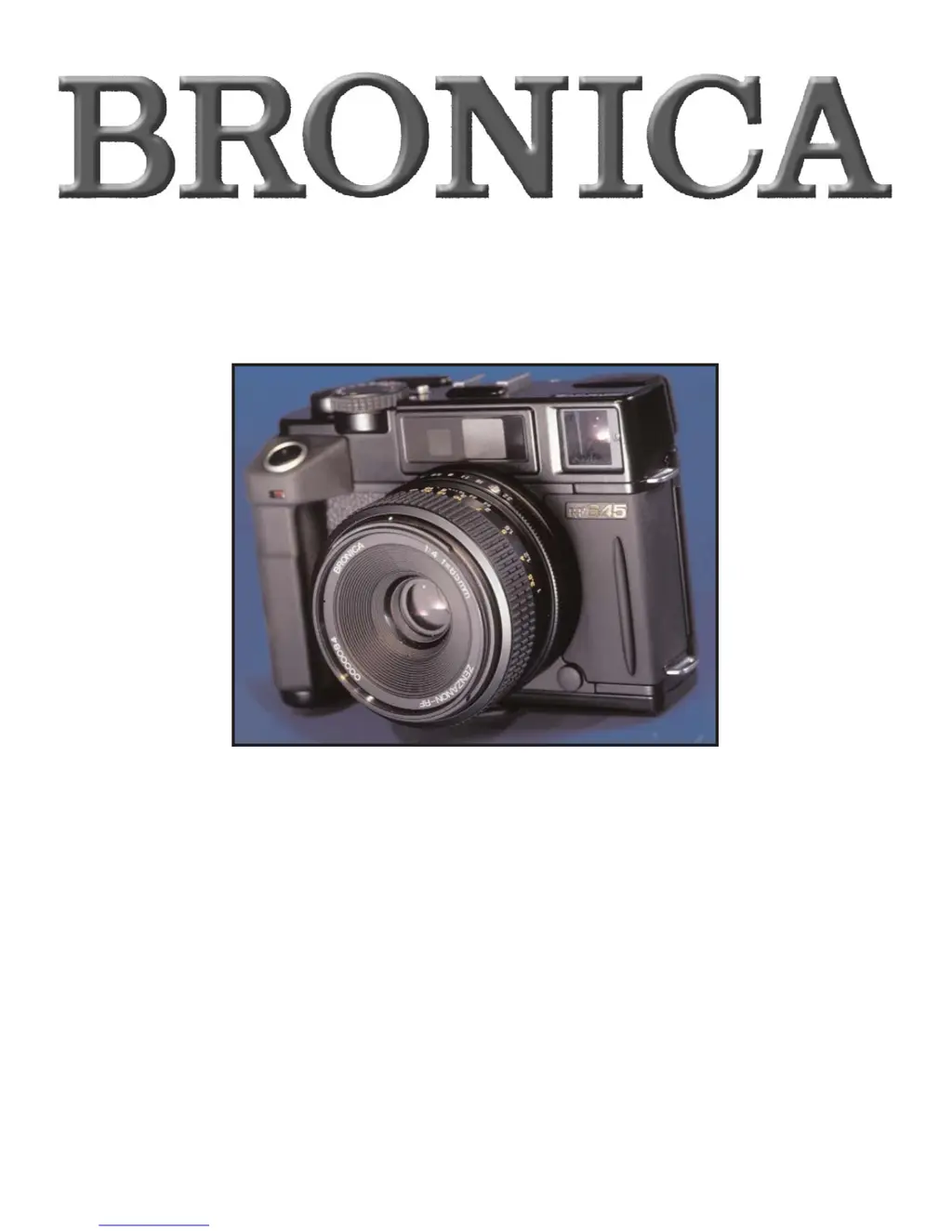
Thank you for your purchase of the Bronica RF645 medium format rangefinder camera.
Incorporating the best of Bronica's know-how and technological expertise, the Bronica
RF645 achieves a new dimension in compactness as the world's first medium format 6 x 4.5
rangefinder camera to feature interchangeable lenses, and comes with a superb line up of
lenses to take full advantage of the rangefinder camera. The RF645 employs manual film
advance lever and dual-image superimposing rangefinder focusing for maximum user con-
trol where it counts, while enhancing handling ease with Program AE, automatic shutter
cocking via a motor designed for the maximum enjoyment of photography in mind.
The features and handling procedures described in this owner's manual are based on use of
the Bronica RF645 in combination with the Zenzanon RF65mm f/4 standard lens. To obtain
best results from your new camera, please read this instruction manual carefully before use.
With proper care and handling, the unit will continue to provide pleasure and performance
for many years to come.

Questions and Answers

  • O
    Olivia WellsAug 15, 2025
    Why doesn't the shutter click on my Bronica Film Camera?
    • C
      Charles Tran Jr.Aug 15, 2025
      If the shutter on your Bronica Film Camera isn't clicking, it could be due to several reasons. First, ensure the camera has sufficient power; an exhausted battery can prevent the shutter from firing. Next, check that the main switch is turned on. Also, confirm that film is loaded and advanced to the next frame. If not, wind the film. Finally, make sure the lens is correctly mounted. If not, remount the lens correctly.
  • K
    Kari CalderonAug 18, 2025
    How to fix a Bronica Film Camera when the LCD doesn't light up?
    • Q
      qmartinezAug 18, 2025
      If the LCD on your Bronica Film Camera doesn't light up when you lightly press the shutter release, it could be due to a few reasons: * The batteries might be drained, so try loading new batteries. * The batteries might be improperly loaded, so properly replace them. * The main switch might be turned off, so turn it on.
  • D
    Daniel WardAug 21, 2025
    What to do if my Bronica Film Camera shows an “X” mark?
    • H
      Harold FrancisAug 21, 2025
      If your Bronica Film Camera shows an “X” mark, it indicates that the camera is temporarily inoperable. This could be because the film hasn't been wound to the next frame, so wind the film. Alternatively, it might mean that no film is loaded or the lens isn't properly mounted; in this case, load film or replace the lens correctly.
  • M
    mortonchristopherAug 25, 2025
    Why are my photos overexposed on my Bronica Film Camera?
    • K
      Kenneth OrtizAug 25, 2025
      If your Bronica Film Camera consistently produces overexposed film, it might be because you shot in AE lock mode. Make sure to cancel AE lock mode after shooting in this mode. Also, check to ensure you're not shooting with the lens cap on; remove it before taking pictures.
  • M
    Maria BrownAug 27, 2025
    What does it mean when the battery mark is flashing on my Bronica Film Camera?
    • A
      Angie AndersonAug 28, 2025
      If the battery mark is flashing on your Bronica Film Camera, it likely means the battery is drained. Replace the old batteries with new ones.
  • A
    Alison CardenasAug 30, 2025
    Why are my photos underexposed on my Bronica Film Camera?
    • M
      Megan VelasquezAug 30, 2025
      If your Bronica Film Camera consistently produces underexposed film, it might be because you shot in AE lock mode. Make sure to cancel AE lock mode after shooting in this mode.
  • P
    Pamela WillisSep 2, 2025
    What does the AL mark mean on my Bronica Film Camera?
    • J
      Jessica DuranSep 2, 2025
      If the AL mark is showing on your Bronica Film Camera, it indicates that the camera is in AE lock mode. To resolve this, cancel AE lock mode. If that doesn't work, try pressing the AE L button, turning off the main switch, or changing the exposure control mode.
  • J
    jennifer46Sep 5, 2025
    Why are my flash pictures overexposed with my Bronica Film Camera?
    • P
      Philip VelasquezSep 6, 2025
      If your flash pictures appear overexposed on your Bronica Film Camera, it could be due to being beyond the exposure control range. Try closing the lens aperture down or stepping back from the subject. If you exposed a black subject, set Speedlight exposure compensation on the minus (-) side, select a faster speed in manual (M) mode, or change to programmed AE (P) mode.
  • B
    Blake AndersonSep 8, 2025
    What to do if the ME button does not work on my Bronica Film Camera?
    • T
      Tamara ValdezSep 9, 2025
      If the ME button on your Bronica Film Camera isn't working, the in-finder LCD might not be activated. Press the shutter release button again to activate the LCD panel.
  • M
    Mary LamSep 12, 2025
    How to prevent blurred images with my Bronica Film Camera?
    • R
      Richard RiddleSep 12, 2025
      If your images are very blurred when using your Bronica Film Camera, it's likely due to camera shake. To resolve this, mount the camera on a sturdy tripod.

Summary

Nomenclature

Getting Started

Initial setup procedures for the camera.

Preparing to Shoot

Loading Film

Detailed steps for loading 120 or 220 film rolls.

Shooting

Shutter Release Button

Operation of the shutter button and its functions.

Viewfinder Display

Understanding the information shown on the viewfinder LCD.

Shutter Dial and Lens Aperture Operations

Selecting shutter speeds and aperture settings.

Exposure Metering System

How the camera's light metering system works.

Exposure Control Modes

Using Program AE, Aperture-priority AE, and Manual modes.

Exposure Compensation

Adjusting exposure levels manually.

AE Lock

Using the AE lock feature to maintain exposure settings.

Focusing

Achieving sharp focus using the rangefinder system.

Automatic Parallax Compensation

How parallax is automatically corrected for accurate framing.

Troubleshooting

Shutter Release Button Issues

Resolving problems with the shutter release button.

Shutter Does Not Click

Diagnosing why the shutter is not operating.

Exposure Issues

Addressing under/over exposure and blurred images.

Preliminary Checklist (Before loading film)

Bronica Rangefinder RF645 Specifications

General IconGeneral
Film Format120/220 roll film
Image Size6 x 4.5 cm
Exposure ModesAperture priority, Manual
TypeRangefinder camera
Lens MountBronica RF bayonet mount
Shutter TypeFocal-plane shutter
MeteringCenter-weighted average
ISO Range25 - 3200
FocusManual focus
Flash Sync1/125 sec
Power Source2 x CR123A 3V Lithium batteries