32
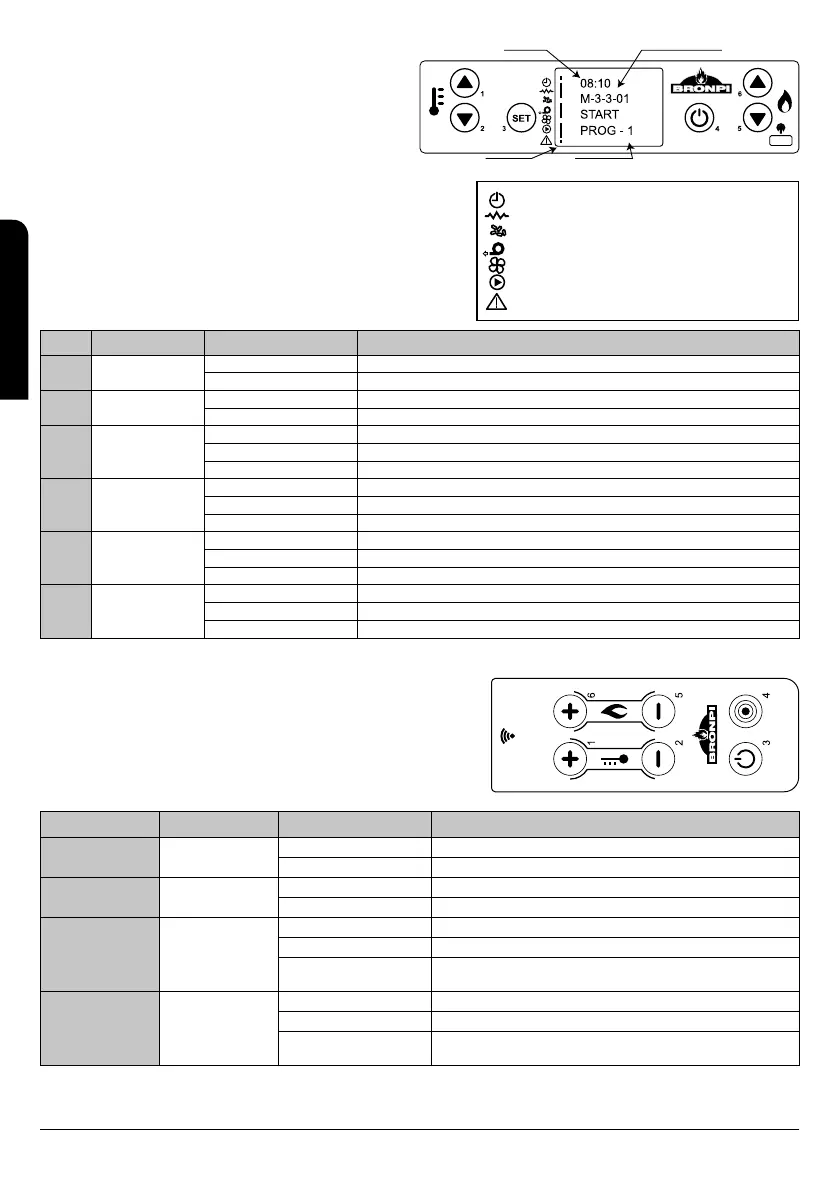
Drawing D26 shows the numbered keys and the layout of the
messages during programming or configuration of the working
parameters. Particularly:
1. The screen area marked “VALUE” shows the value that we
introduce.
2. The screen area marked “MENU LEVEL” shows the current
menu level.
Drawing D27 shows the meaning of the symbols appearing on the left hand
side of the screen. The screen lighting in the section “status” shows the
activation of the corresponding device according to the following list.
9.2 FUNCTIONS OF THE DISPLAY’S BUTTONS
Button Description Mode Performance description
*1
Increases
temperature
PROGRAMMING Modifies/Increases the value of the selected menu.
ON/OFF Increases the ambient thermostat temperature value.
*2
Decreases
Temperature
PROGRAMMING Modifies/Increases the value of the selected menu.
ON/OFF Decreases the ambient thermostat temperature value.
3 Menu (Set)
- Access the menu.
MENU Access the following level in the submenu.
PROGRAMMING Confirms the selected value and move to the following option in the menu.
4
ON/OFF
Unblocking
WORKING It switches on or off the thermo-stove pressing 2 seconds.
BLOCKING Unblocks the boiler and switches it off.
MENU / PROGRAMMING Goes back to the previous level menu and saves the modified data.
5 Decreases power
ON/OFF Decreases the output value of the thermo-stove.
MENU Moves to the previous menu option.
PROGRAMMING Goes back to the previous submenu value.
6 Increases power
ON/OFF Increases the output value of the thermo-stove.
MENU Moves to the following menu option.
PROGRAMMING Moves to the following submenu option.
(1) Pressing button nº 1 only one time we entry to the adjustment of the water temperature.
(2) Pressing button nº 2 only one time we entry to the adjustment of the room
temperature.
9.3 GENERAL INFORMATION OF THE REMOTE CONTROL
The model Omega-H has not this remote control.
The thermo-stoves are provided with a remote control by infrared to control
your thermo-stove from distance (see drawing D28). Buttons functions are the
following:
Button Description Mode Performance description
1
Increases
temperature
PROGRAMMING Modifies/Increases the value of the selected menu.
ON/OFF Increases the ambient thermostat temperature value.
2
Decreases
Temperature
PROGRAMMING Modifies/Increases the value of the selected menu.
ON/OFF Decreases the ambient thermostat temperature value.
3
ON/OFF
Unblocking
WORKING It switches on or off the thermo-stove pressing 2 seconds.
BLOCKING Unblocks the boiler and switches it off.
MENU / PROGRAMMING
Goes back to the previous level menu and saves the modified
data.
4 MENU
- Access the menu.
MENU Access the following level in the submenu.
PROGRAMMING
Confirms the selected value and move to the following option in
the menu.
D28
D26
VALUE MENU LEVEL
STATE DIALOGUE
D27
PROGRAMMING ACTIVATED
RESISTOR/LIGHTER
ENDLESS/AUGER
SMOKE EXTRACTOR
HEAT EXCHANGER (ONLY IN AIR SERIES STOVES)
PUMP
ALARM
INSTALLATION, OPERATING AND SERVICING INSTRUCTIONS HYDRO SERIES
EN


 To Next Page