15
1.It has to be paired via Bluetooth for first time use. After pairing
is completed, you can use it wirelessly. The pairing method is
as the followings:
2.For future use, make sure the knob is in Ad/PC/OS mode, and
press the BROOK-Key to activate MARINE to reconnect to the
console. Please confirm that the LED on MARINE is displayed in
green/white/yellow.
Android/PC/Mac mode
When knob is in Ad/PC/OS mode, connect MARINE to
Android device/PC/Mac (iOS device) with Micro-USB
cable and proper OTG connector.
A.Press and hold the BROOK-Key for 2 seconds to enter the
pairing mode, the LED will flash red and blue alternately.
B.Turn on Bluetooth on Android/PC/Mac, search for “P4 Battery
Pack” in Android Mode/ “P4 Battery Pack” in PC Mode/
“Wireless Controller” in Mac Mode, and then click Connect.
C.When the connection is successful, the LED will appear as
green/white/yellow.
Wired Connection
Wireless Connection
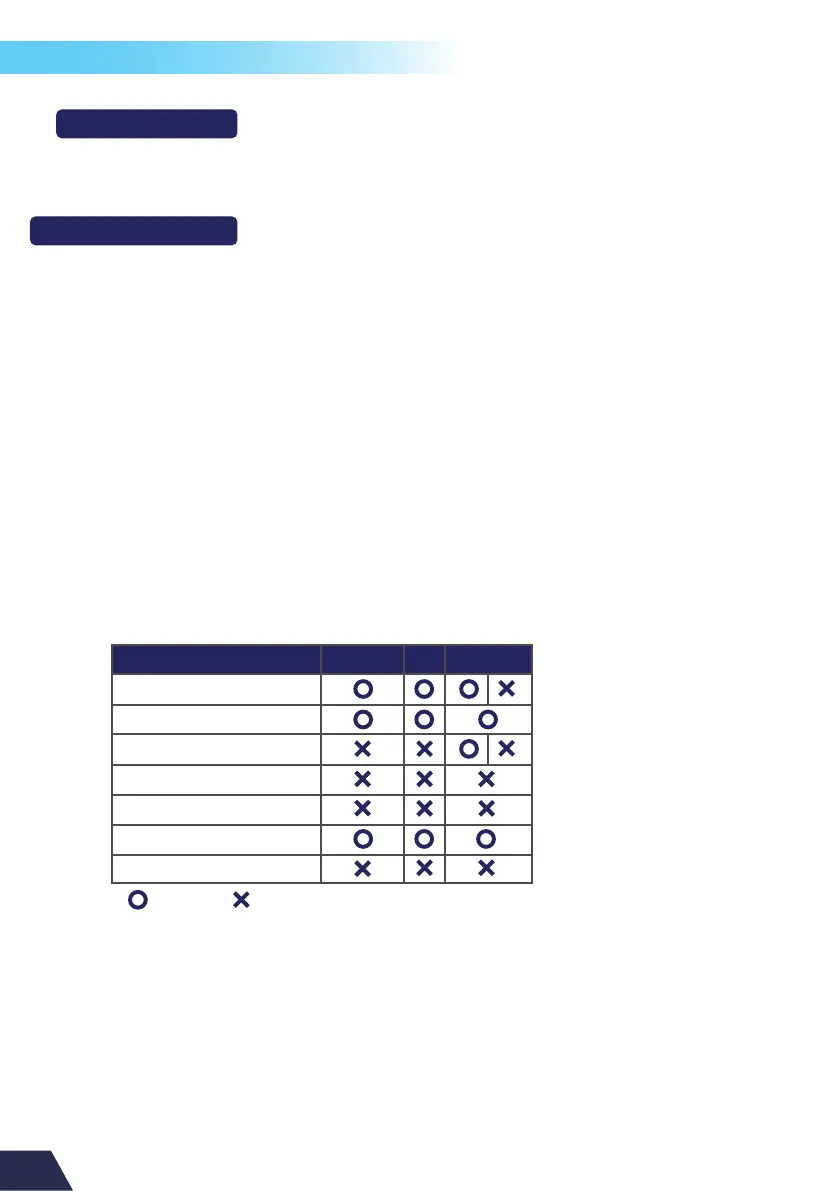
Features Supported:
Android PC Mac / iOS
Wired control
Wireless control
Audio function (Wired)
Audio function (Wireless)
Motion control
Turbo & Remap
Touch Pad
= Support = Not Support
Mac mode also supports iOS 13 and above.
Note:


 To Next Page