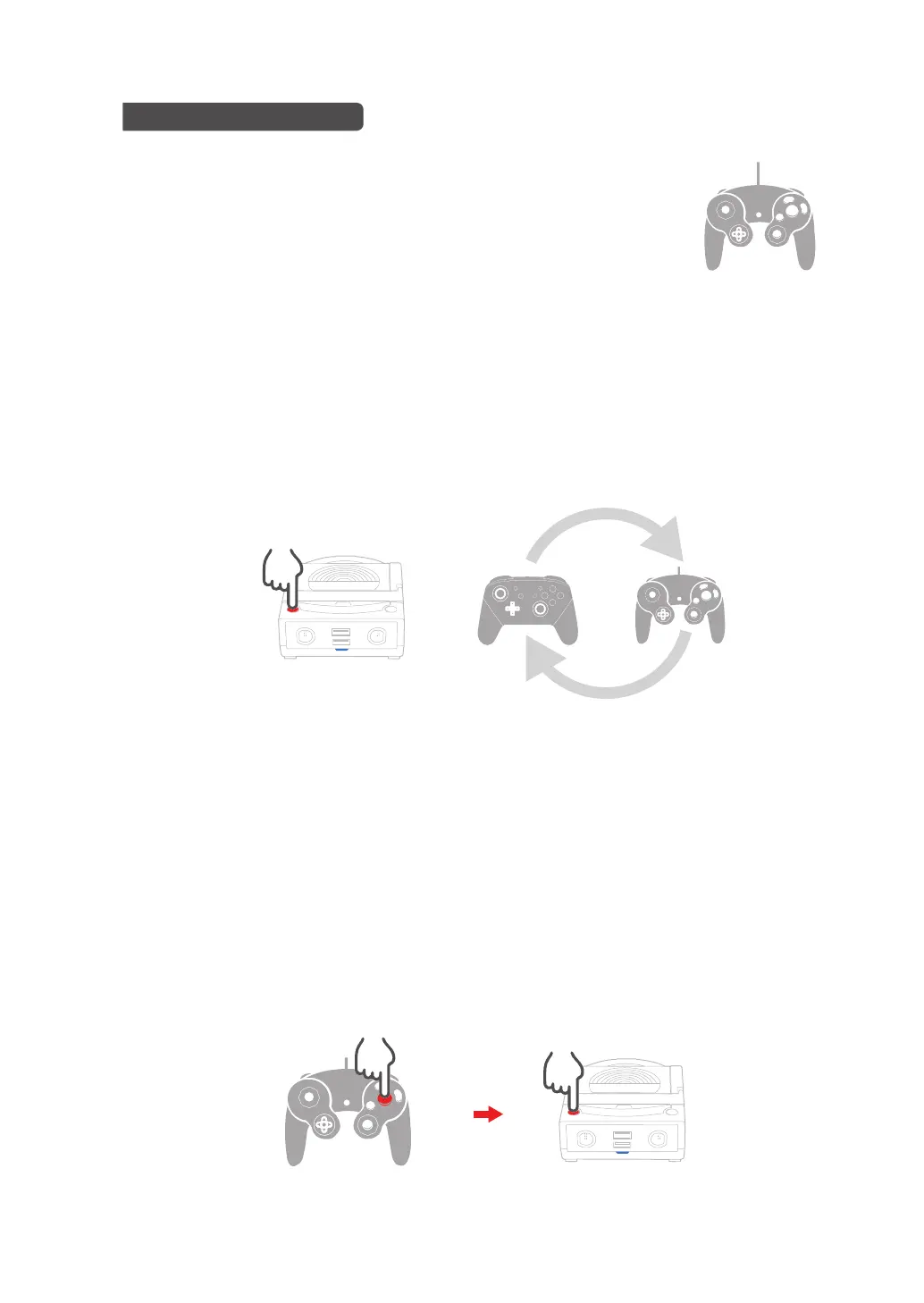
Power-Bay預設的手把輸入模式為「Switch Pro輸入模式」,但使用GameCube手把時
可手動切換為「GameCube輸入模式」。確認未按下GameCube手把上任何按鍵、按下
Power-Bay上的「Turbo設定鍵」五秒鐘後即可。再次按住「Turbo設定鍵」五秒可重新
切換為「Switch Pro輸入模式」。
Game Cube手把上有10個按鍵可被設定連發功能(X、Y、A、B、L、ZL、Left Thumb
Stick Button、R、ZR、Right Thumb Stick Button)。請依照以下步驟設定與取消:
●切換Game Cube手把的輸入模式
●為Game Cube手把按鍵設定與取消連發機能
1. 按住手把上需設定連發的按鈕(如:A)
2. 按一下Power-Bay上的Turbo設定鍵
使用Game Cube手把進行遊戲
將Game Cube手把插入Power-Bay的Game Cube手把插槽即可使用。
5s
11


 To Next Page