
 Need help?
Do you have a question about the Brookstone BIG BLUE PARTY and is the answer not in the manual?
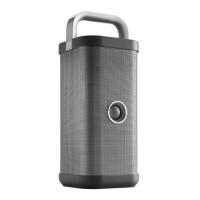
Details controls located on the top of the speaker, including the carrying handle and device stand.
Details the various input and output ports available on the speaker, including USB and audio inputs.
Explains the steps to connect the speaker to a Bluetooth device via pairing.
Describes the procedure to link two Brookstone Big Blue Party speakers for TWS pairing.
Describes how to perform a factory reset by holding the Bluetooth and Link buttons for 5 seconds.
Lists essential precautions to take before exposing the speaker to water.
The Brookstone BKS800 is a high-power wireless speaker designed for a "BIG BLUE PARTY" experience, offering robust sound and a range of features for both entertainment and utility. This device functions primarily as a portable audio system, capable of playing music wirelessly via Bluetooth or through a wired connection.
At its core, the BKS800 is a high-power wireless speaker that delivers audio for various settings, from casual listening to party environments. It supports Bluetooth pairing, allowing users to stream music wirelessly from their devices. For non-Bluetooth devices, a 3.5mm audio cable can be used to connect to the "line in" port. The speaker also features sound controls for adjusting bass, treble, and echo, as well as a microphone input for karaoke or public address functions.
A notable feature is its ability to link two BKS800 speakers together to create a True Wireless Stereo (TWS) pairing. This enhances the audio experience by providing a wider soundstage and more immersive sound. When linked, one speaker acts as the main speaker (Speaker 1) and the other as the secondary speaker (Speaker 2), with the main speaker connected to the Bluetooth device. By default, linking creates distinct right and left audio channels, but users can also configure both speakers to play the same sound.
Beyond audio playback, the BKS800 incorporates several utility functions. It acts as a power bank, allowing users to charge external devices via a USB port. This is particularly useful for keeping smartphones and other gadgets powered during extended use. Additionally, the speaker is equipped with a Qi wireless charging pad on its side, providing a convenient way to wirelessly charge compatible devices by simply placing them on the pad.
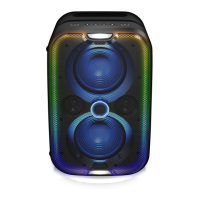
The speaker also includes various light modes—CHILL (default), MOOD, PARTY, and OFF—which can be toggled to enhance the ambiance of any gathering. These light modes add a visual element to the audio experience, making it more dynamic and engaging.
Operating the BKS800 is designed to be intuitive. The top panel houses several touch-sensitive buttons for controlling volume, Bluetooth pairing, linking, lights, and battery indication. The power button, located on the front, is touch-sensitive and used for turning the speaker on/off and for playing/pausing music. Users are advised to gently touch the power button rather than pushing it hard.
To power on the speaker, the power button needs to be touched and held for 2 seconds until the speaker powers on. Similarly, holding it for 2 seconds will power it off. The speaker has an automatic power-off feature, turning off after 15 minutes if not connected to a device, or after 30 minutes of inactivity.
Bluetooth pairing involves pressing the Bluetooth button on the top panel until the LED flashes blue, indicating pairing mode. Users then select "Brookstone BKS800" from their device's Bluetooth menu. The speaker confirms successful pairing with a "Connected" voice prompt and a solid blue LED. The device supports connecting up to two Bluetooth devices simultaneously. Disconnecting is done by selecting the speaker from the device's Bluetooth menu.
Linking two speakers for TWS involves pressing the "Link" button on both speakers until a "Linking" voice prompt is heard and their LEDs flash white. Once linked, Speaker 1's LED turns solid blue, and Speaker 2's LED turns solid white. The manual emphasizes ensuring only one speaker is paired to a Bluetooth device before linking to avoid a factory reset.
The battery indicator button on the top allows users to check the current battery level. For charging external devices, the USB charging output port is used, requiring the speaker to be powered on or plugged into a wall outlet. Wireless charging is activated by placing a Qi-compatible device on the Qi charging pad; a white LED indicates proper placement, while a red LED suggests improper placement.
The light modes are cycled through by pressing the "Lights" button on the top panel. For troubleshooting, a factory reset can be performed by pressing and holding both the Bluetooth and Link buttons for 5 seconds, which will reset the speaker to its default settings and re-enter Bluetooth pairing mode. A reset hole is also available for a hard reset using a pin if buttons are unresponsive.
The BKS800 boasts an IPX5 waterproof rating, meaning it can resist sustained, low-pressure water jet sprays. This makes it suitable for outdoor use or in environments where it might be exposed to splashes. However, proper maintenance is crucial to preserve its waterproof capabilities.
Before exposing the speaker to water, all cables must be removed, and the protective rubber seal covering the input panel must be tightly sealed. This seal is essential for preventing water damage to the speaker's internal components. After exposure to water, the speaker should be completely dried off before charging or using the AUX inputs. It is explicitly stated that the speaker should not be charged near sources of water or in wet areas to prevent damage and ensure safety.
The device contains a non-removable Lithium-Polymer battery, which requires proper recycling and disposal at the end of its life. Users are advised to contact their local waste management office for information on battery recycling. The product also carries symbols indicating that it should not be discarded as household waste and that its battery charging complies with California CEC and energy efficiency standards.
 General
| Bluetooth | Yes |
|---|---|
| Type | Portable Bluetooth Speaker |
| Brand | Brookstone |
| Model | BIG BLUE PARTY |
| Battery Life | 4.5 hours |
| Connectivity | Bluetooth |


 To Next Page