Connecting to Power
Plug the pin of the supplied power adapter into the DC 9V power port on the side of the
soundbar. Plug into an electrical outlet.
Powering ON/OFF
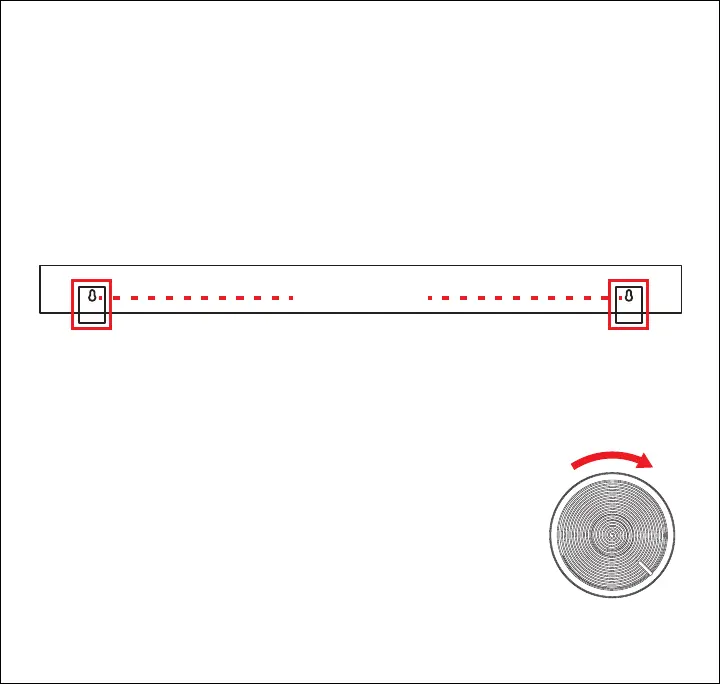
• Turn the [Volume] dial to the right until it clicks to power ON. A
tone will be heard, and the soundbar will enter Bluetooth pairing
mode. It will automatically re-pair to any nearby, previously-paired
device with Bluetooth enabled.
• Turn the [Volume] dial to the left until it clicks to power OFF.
Wall Mounting the Soundbar
1. Remove the soundbar and its contents from packaging.
2. Using a pencil, mark two spots on a wall measuring 31.5 inches apart.
3. If installing to a wooden surface, hammer a nail, or drive or drill a mounting screw (mounting
materials not included) into the wall at each marked location. If installing to drywall or a brick
surface, you may need to install plastic anchors to properly secure the mounting screws.
4. Place and hang the soundbar from its mounting holes on the back onto the installed
mounting nails or screws.
31.5 inches
5


 To Next Page