EasyManua.ls Logo

Brother b831 - Stitch Length Adjustment

Brother b831
84 pages
Print Icon
To Next Page IconTo Next Page
To Previous Page IconTo Previous Page
Loading...
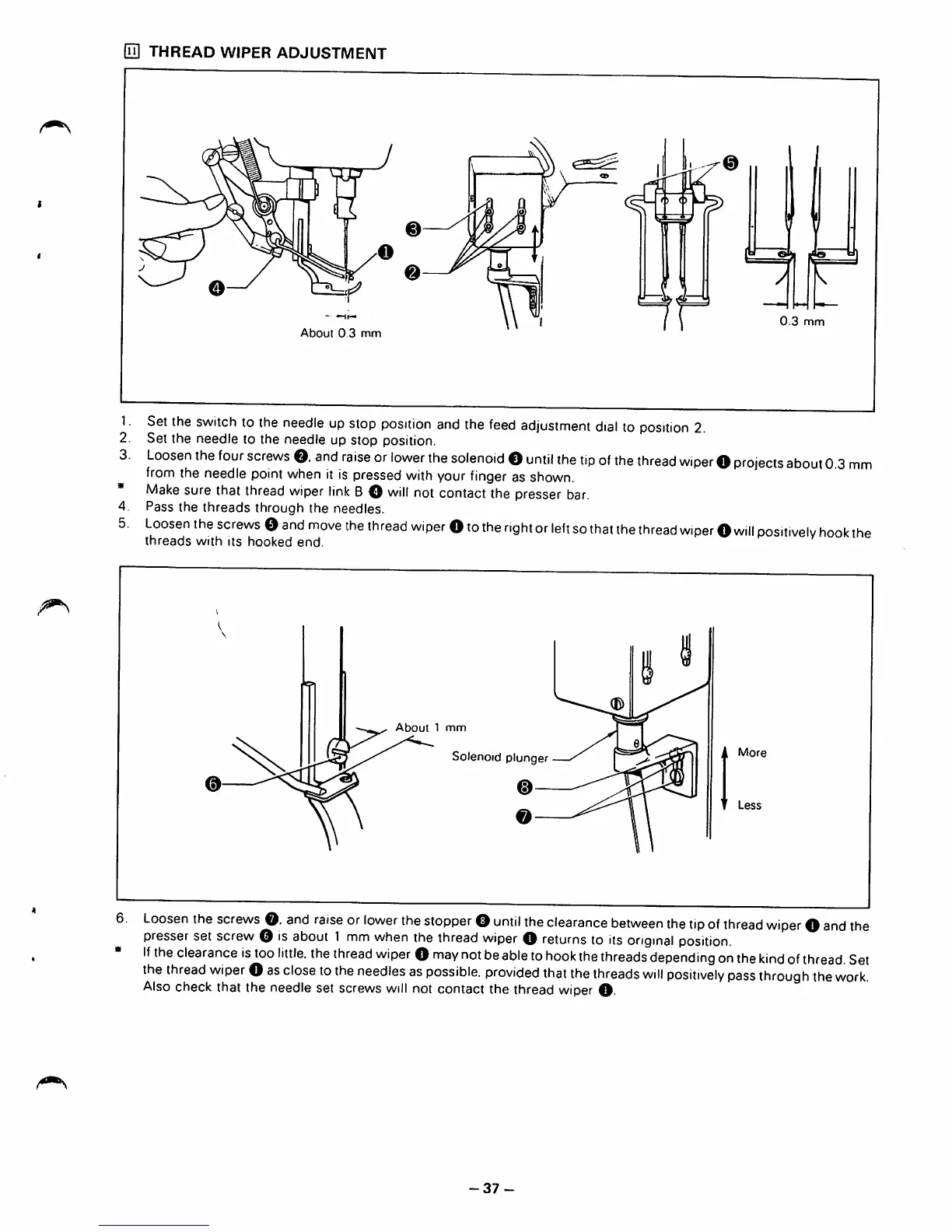
[n] THREAD WIPER ADJUSTMENT
y
About
0 3
mm
0.3
mm
Set
the
switch
to
the
needle
up
stop
position
and
the
feed
adjustment
dial
to
position
2.
Set the needle to the needle up stop position.
Loosen
the
four
screws
O.
and
raise
or
lower
the
solenoid
O
until
the
tip
of
the
thread
wiper
O
projects
about
0.3
mm
from
the
needle
point
when
it is
pressed
with
your
finger
as
shown.
Make
sure that
thread
wiper
link
BO
will
notcontact the presser
bar.
Pass the
threads
through the needles.
Loosen
the
screws
0
and
move
the
thread
wiper
O
to
the
right
or
left
so
that
the
thread
wiper
O
will
positively
hook
the
threads
with
its
hooked
end.
About
1
mm
Solenoid plunger
More
0
Less
Loosen
the
screws
O.
and
raise
or
lower
the
stopper
O
until
the
clearance
between
the
tip
of
thread
wiper
O
and
the
presser
set screw is
about
1
mm
when
the
thread
wiper
returns
to
its
original
position
If
the
clearance
is
too
little,
the
thread
wiper
O
may
not
be
able
to
hook
the
threads
depending
on
the
kind
of
thread.
Set
the
thread
wiper
O
as
close
to
the
needles
as
possible,
provided
that
the
threads
will
positively
pass
through
the
work.
Also
check that the needle set screws
will
not contact the thread
wiper
O-
-37
-

Table of Contents