KNOWING YOUR SEWING MACHINE —————————————————————————————————————————————
24
g
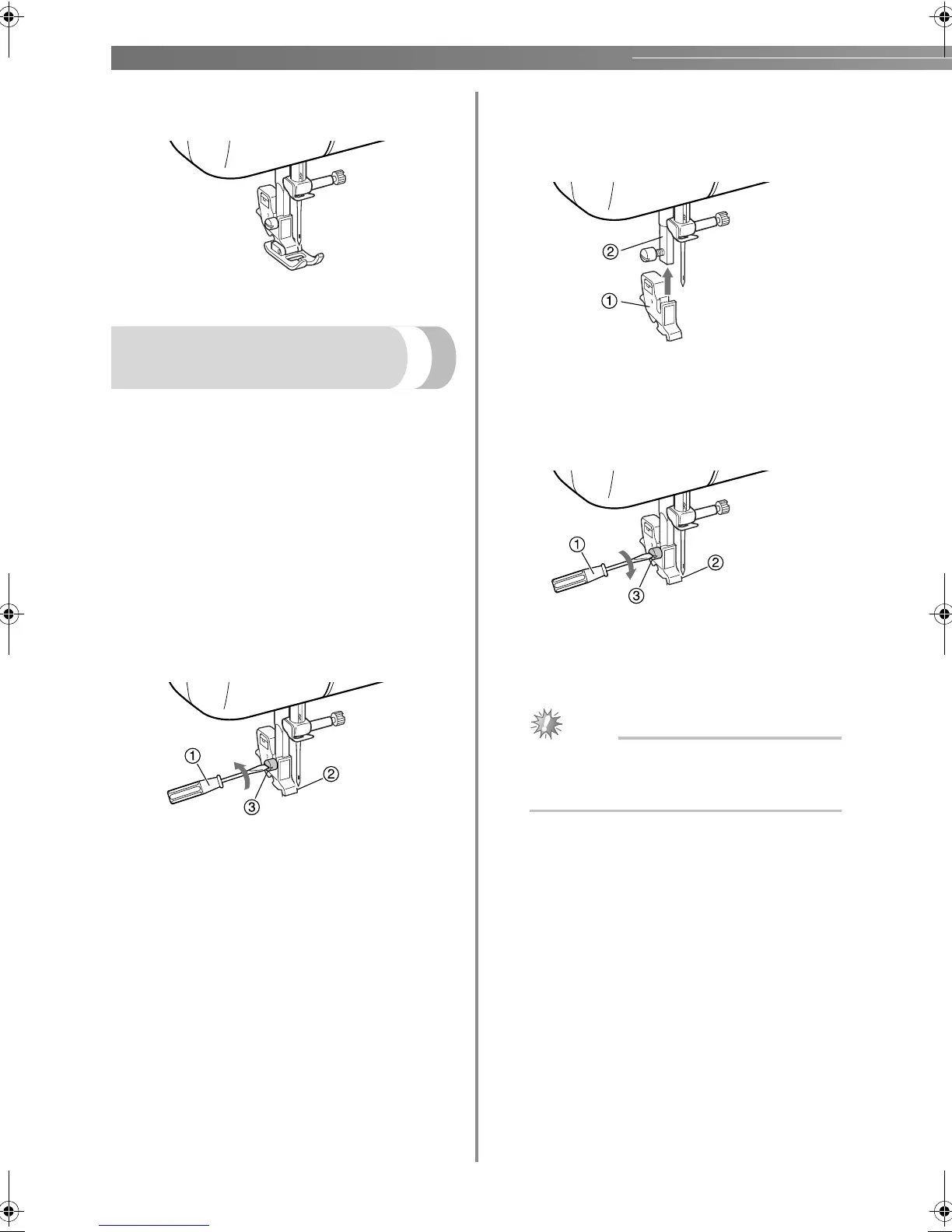
Raise the presser foot lever to check that the
presser foot is securely attached.
Removing the presser foot
holder
Remove the presser foot holder when cleaning the
sewing machine or when installing a presser foot that
does not use the presser foot holder, such as the
quilting foot. Use the screwdriver to remove the
presser foot holder.
■ Removing the presser foot holder
a
Remove the presser foot.
• For details, refer to “Replacing the presser
foot” (page 23).
b
Use the screwdriver to loosen the presser foot
holder screw.
a Screwdriver
b Presser foot holder
c Presser foot holder screw
■ Attaching the presser foot holder
a
Align the presser foot holder with the lower-
left side of the presser bar.
a Presser foot holder
b Presser bar
b
Hold the presser foot holder in place with
your right hand, and then tighten the screw
using the screwdriver in your left hand.
a Screwdriver
b Presser foot holder
c Presser foot holder screw
Note
● If the presser foot holder is not correctly
installed, the thread tension will be
incorrect.
LS2125.book Page 24 Tuesday, February 26, 2008 1:43 PM









 To Next Page