
 Need help?
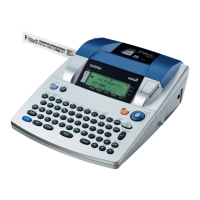
Do you have a question about the Brother PT-3600 and is the answer not in the manual?
Declares compliance with FCC rules for USA operation.
Instructions for adding spaces, letters, symbols, and new lines.
Methods for deleting characters, lines, and clearing text.
Changing fonts, sizes, styles, alignment, frames, and effects.
Using auto-format templates and printing options like preview.
Storing, recalling, and deleting text files and templates.
Identifies top view, bottom view, LCD, and keyboard components.
Important warnings and advice for safe and proper operation.
Connecting power, installing tape, and connecting to a computer.
Guide for installing P-touch Editor and printer drivers for Windows and Mac.
Instructions for applying labels and assembling custom stamps.
Navigation, key functions, typing, editing, and text manipulation.
Customizing text appearance with fonts, styles, frames, alignment, and effects.
Previewing, printing, numbering, storing, recalling, and deleting files.
Adjusting units, language, contrast, tape length, and head alignment.
Adjusting half-cutter depth and USB ID selection.
Lists available symbols, barcode characters, fonts, and text styles.
Illustrates frame patterns, shading patterns, and pre-set label templates.
 General
| Model | PT-3600 |
|---|---|
| Category | Label Maker |
| Print Technology | Thermal Transfer |
| Print Resolution | 360 dpi |
| Display | LCD |
| Keyboard | QWERTY |
| Connectivity | USB |
| Cutter | Automatic |
| Maximum Print Width | 24 mm |
| Maximum Print Height | 24 mm |
| Power Source | AC adapter or 6 AA batteries |
| Supported Operating Systems | Windows, Mac |





 To Next Page

