2.5.3 Entering the Quick Access menu and menu items
The Quick Access menu gives you access to a selection of menu items.
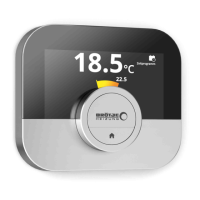
Long-press the select button to enter the Quick Access menu from the
home screen.
Turn the rotary dial forward or backward to select a menu item.
Short-press the select button to confirm the selection.
2.5.4 Returning to the previous step or home screen
You can return to the previous step of the menu or return immediately to
the home screen.
1. Short-press the home button to return to the previous step.
2. Long-press the home button to return to the home screen.
2.5.5
Scrolling through menu items and changing settings
With the rotary dial you can scroll through menu items and change values,
temperatures and time settings.
1. Turn the rotary dial to scroll through the menu items.
2. Select the menu item you want to change.
3. Short-press the select button to confirm the selection.
4. Turn the rotary dial to scroll through the submenu items.
5. Select the submenu item you want to change.
6. Short-press the select button to confirm the selection.
7. Turn the rotary dial to change the setting.
8. Short-press the select button to confirm the selection.
Fig.11
>1
.
.
.
.
.
.
.
.
.
.
.
.
.
.
.
.
.
21.0 °C
Fig.12
<1
21.0 °C
23.0
...
.....
.......
.........
Fig.13
Fig.14
...
.....
.......
.........
<1
Fig.15
2 Introduction
8 7726708 - v.01 - 18012019


 To Next Page
 Loading...