2.5.6 Screen shows no information
The display turns black when for 30 seconds:
the rotary dial is not operated,
the select button is not operated,
the home button is not operated, and
no person moves in front of the IDA.
After these 30 seconds the display is black, but the IDA is still active and
no information is lost.
If the IDA is not operated for 3 minutes in total, it goes in stand-by mode.
Any unconfirmed setting or selection is lost now.
Important
Press a button, turn the rotary dial or use the presence sensor
to activate the display.
The IDA will display the home screen after activation.
On delivery the presence sensor is active. You can switch off
the presence detection.
For more information, see
Presence sensor, page 23
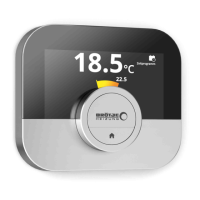
2.6 Description of the display
1
Current temperature (or target temperature)
2
Temperature scale
3
Control mode icon
4
Main screen information box
5
Main screen information box
6
Filling needed icon, Zone icon or Error icon
The temperature scale in the main screen shows the difference between
the current and target temperature. The white line represents the current
temperature. The target temperature is displayed in small digits next to the
scale. The temperature scale is visible when the current temperature
differs from the target temperature.
Important
The IDA displays the current temperature in a large font by
default. You can change the display of the temperature to show
the target temperature.
For more information, see
Screen shows no information, page 9
Main screen setting, page 23
Changing the display settings, page 25
2.6.1 Description of the icons in the display
Possible icons in the display (depending on the configuration of your
installation).
Tab.1 Control mode icons
Manual mode: Manual mode is ac
tive
See
Changing the mode quickly, page 13
Changing the temperature in manual mode, page 13
Anti-frost mode: Anti-frost mode is
active
See
Changing the mode quickly, page 13
Activating antifrost mode, page 19
Fig.16
Fig.17
2 Introduction
7726708 - v.01 - 18012019 9


 To Next Page
 Loading...