©Bruno Independent Living Aids, Inc.
®
VPL-3100 OPERATOR 08-15-2019
7
OPERATION
EMERGENCY OPERATION
Bruno offers an optional hand wheel for the VPL-3100
to serve in case of a power failure or non-operation.
If your lift is not equipped with a hand wheel and you
would like to order one, please contact an authorized
Bruno dealer. Contact a dealer as well if you require
assistance in operating the hand wheel.
Using the hand wheel
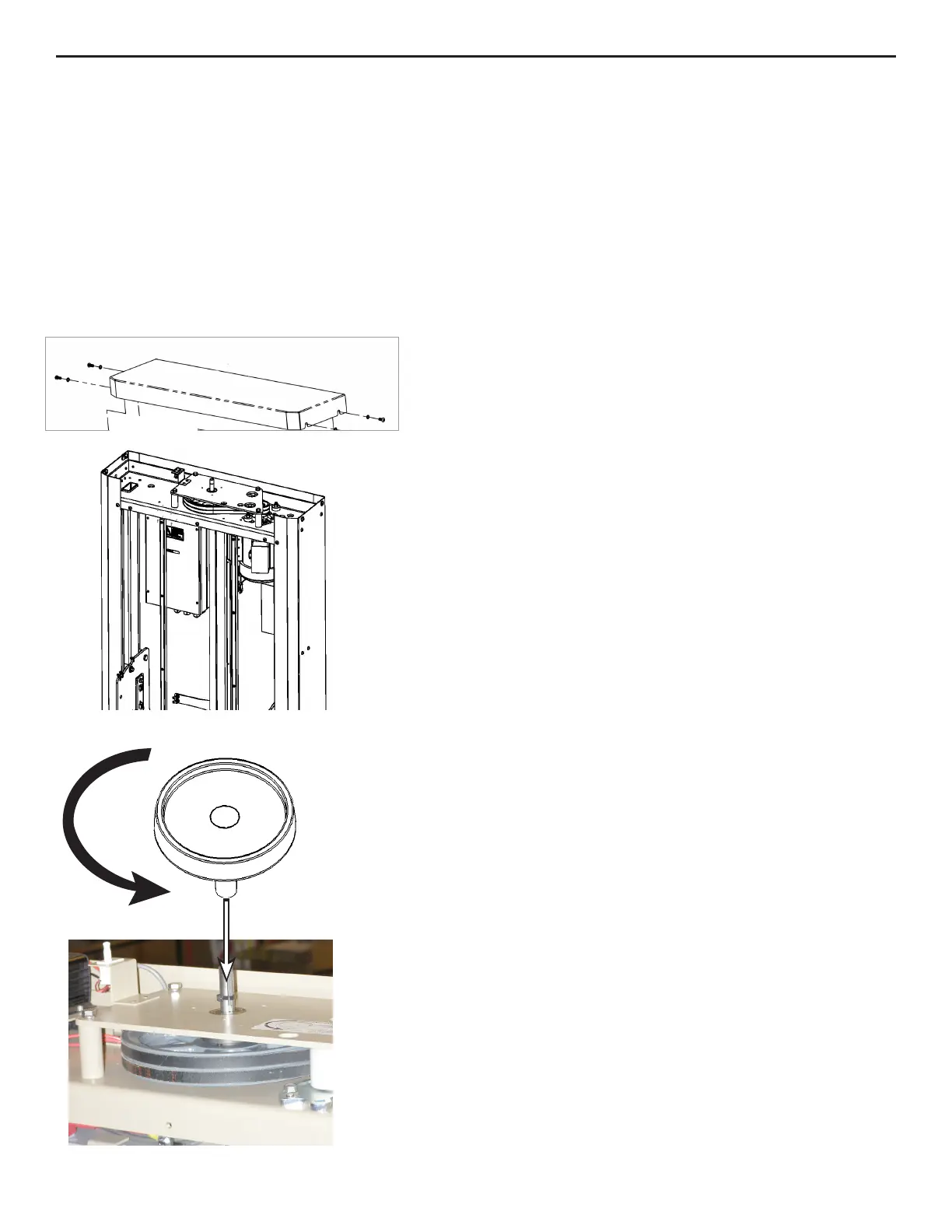
1. Loosen the two (2) screws on each side of the top
cover (see left).
2. Slide the top cover up and off.
3. Locate the emergency hand wheel on top of the
lift.
4. Insert the hand wheel into the brake shaft opening
as shown.
5. Turn the wheel counterclockwise to lower the lift.
6. After safe exit of the passenger and mobility device,
determine and remedy the cause of the incorrect
operation.
Contact an authorized Bruno dealer if you require
assistance.
7. Remove and store the emergency hand wheel.
8. Reinstall the top tower cover and tighten the four
(4) screws shown.


 To Next Page