SETUP for BDP-1 & iPod Touch/iPhone/iPad:
Connect the BDP-1 to your household computer
network by connecting the Ethernet port on the
BDP-1 to a wireless (WiFi) router using a CAT-5 (or
CAT-6) cable.
Plug in a USB drive (Flash drive or hard disc drive)
containing compatible music files into one of the
BDP-1’s USB ports. Note: on Window’s PC’s you
may have to have Bonjour (see Glossary) installed.
Bonjour is installed as part of Apple OS’s.
Launch your web browser and enter the bryston-
bdp-1.local in the address box. When using
iPhone, iPod Touch or iPad, Apple iOS-4 is recom-
mended.
Select the Bryston-MINI client application (Bryston-
MAX is intended for web browsers using full size
displays). When the application connects to the
BDP-1, and assuming that one or more USB drives
are connected, the display should show “USB”.
Expand “USB” to display folders and/or song lists
and use the control buttons to control playback.
or
Download and install the free iPad/iPhone/iPod
Touch program mPoD on your iPad/iPhone/iPod
Touch and under Connection Preferences enter
bryston-bdp-1.local You can now use your iPad/
iPhone/iPod Touch to remotely control the BDP-1
and playback any compatible music files located
on the USB drives connected to it.
SETUP for BDP-1 & NETWORKED COMPUTER:
Connect the BDP-1 to your household computer
network by connecting the Ethernet port on the
BDP-1 to a wireless (WiFi) router using a CAT-5,
CAT-5e OR CAT-6 cable.
Plug in a USB drive (Flash drive or hard disc drive)
containing compatible music files (AIFF, FLAC, WAV,
MP3, M4A) into one of the BDP-1’s USB ports. Note:
on Window’s PC’s you may have to have Bonjour
(see Glossary) installed. Bonjour is installed as
part of Apple OS’s.
Select the Bryston-MAX application (the Bryston-
MINI application is intended for web browsers
using small screens). When the application con-
nects to the BDP-1, and assuming that one or more
USB drives are connected, the display should show
“USB”. Expand “USB” to display folders and/or
song lists and use the control buttons to control
playback.
or
Download and install the Minion add-on to the
Firefox web browser (both programs are free from
mozilla.org) and enter bryston-bdp-1.local in
SETUP CONNECTION PREFERENCES.
You can now use your iPad/iPhone/iPod Touch to
remotely control the BDP-1 and playback any com-
patible music files located on the USB drives con-
nected to it.
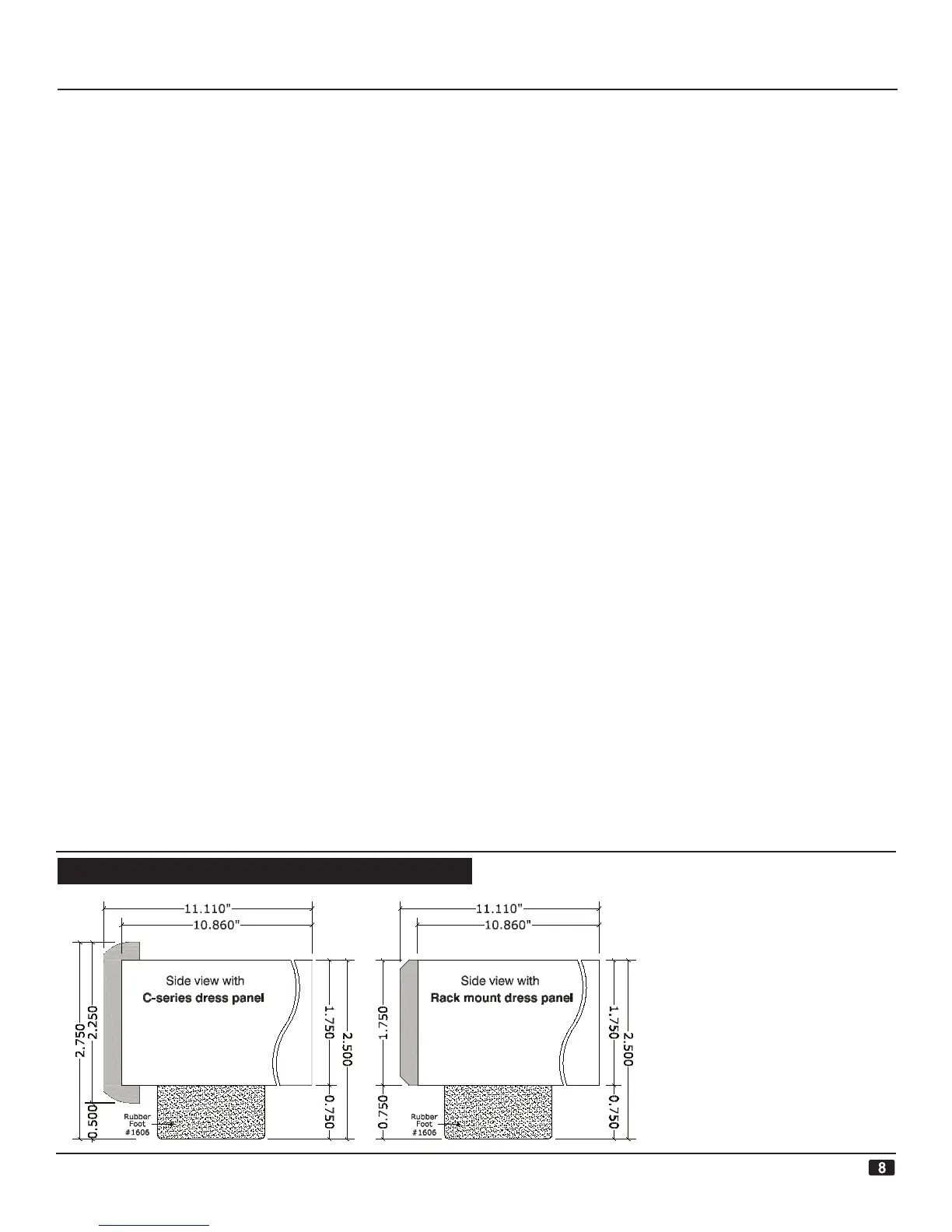
BDP-1 DIGITAL PLAYER
• Shipping Wt: 15.2 Lbs (6.9 Kg)
• Maximum width is determined by
the front dress panel. There are two
types available; the C-series dress
panels, in black or silver, are 17”
wide. The rack mount dress panels
are also 17” wide, but they allow the
addition of rack mount adaptor brack-
ets to either side of the unit allowing
it to be mounted in a standard 1U
(1.75” high x 19” wide) rack space.
The chassis is 16.985 inches wide.
DIMENSIONS:


 To Next Page