BT Versatility
Quick reference User Guide
2
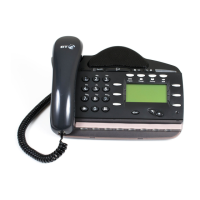
How to use your BT Versatility Feature Phones
Phone Setup
To select a different Ringing Tone or Display Contrast
Select Þ Program
Press the Scroll Down Key (î)
Select Þ Ringing options and select a different ringing tone
Select Þ Contrast Options and select a different level of contrast
Answering and making calls
Answer a call that is ringing on the Featurephone using the handset
Pick up the handset or
Select Þ Answer the call and/or pick up the handset.
Answer a call that is ringing on the Featurephone using hands-free
Select Þ Answer the call .
Make an external call
Pick up the handset
Press the Line Key or Key 9 and Key the number.
Make an internal call
Select Þ Internal call
Select Þ Ext. no. , or.
Key the Extension number (20 - 51), and
Pick up handset, or press.
Transferring calls
Note: The following instructions assume you are on a call.
Transfer a call to an internal number
Select Þ Internal transfer
Select Þ
Ext. no. and when the call is answered
Select Þ
Transfer .
Transfer an external call to an external number
Select Þ External transfer
Select an available Line as indicated by “à” and then
Key the external number and when the call is answered
Select Þ Transfer .


 To Next Page