EasyManua.ls Logo

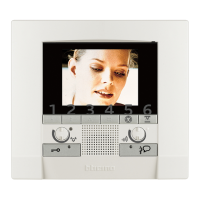
Bticino 344252 - User Manual

Bticino 344252
7 pages
Print Icon
To Next Page IconTo Next Page
Loading...
344252
05/17-01 PC
LE05200AB
BTicino SpA – Viale Borri, 231 – 21100 Varese – Italy – www.bticino.com
160–165 cm
90–130 cm
Altezza consigliata salvo diversa normativa vigente.
Recommended height, unless different regulations are specified.
Hauteur conseillée sauf autre norme en vigueur.
Empfohlene Höhe falls die gesetzlichen Vorschriften nichts anderes
vorschreiben.
Altura recomendada salvo normativa vigente diferente
Aanbevolen hoogte behoudens andere normen in voege.
Altura aconselhada a não ser se a norma em vigor for diferente.
Προτεινόμενο ύψος με εξαίρεση διαφορετικό κανονισμό.
 ,     .
• Zalecana wysokość z zastrzeżeniem innych obowiązujących
przepisów.
• Geçerl normatf tarafından farklı şeklde belrlenenler harç olarak,
tavsye edlen yükseklk.

Installazione a parete
Wall mounting
installation
Installation murale
Wand-Installation
Instalación mural
Wandinstallatie
Instalação de parede
• Επιτοίχια εγκατάσταση
 
• Instalacja naścienna
• Duvara montaj

27 mm
90 mm
140 mm
1 2
3
4
Question and Answer IconNeed help?

Do you have a question about the Bticino 344252 and is the answer not in the manual?

Summary

BTicino Video Doorphone Installation Guide

Recommended Installation Height

Guidance on the optimal height for installing the video doorphone unit.

BTicino Video Doorphone Front Panel Overview

Status Indicator LEDs

Explanation of red and dual-colour LEDs for call exclusion, lock status, and operation.

Control Buttons and Functions

Description of buttons for call, communication, lock release, and lighting control.

Audio Components Identification

Details on the integrated microphone and loudspeaker for audio.

BTicino Video Doorphone Back Panel and Safety

Back Panel Connection Terminals

Details on terminals for external call buttons, BUS connection, and micro-switch.

Essential Installation Safety Precautions

Crucial safety rules for indoor installation, protection from water, and ventilation.

BTicino Video Doorphone Configuration Options

Programmable Pushbutton Modes

Guide to selecting operating modes for programmable pushbuttons (M=0 to M=9).

Door Lock Status Monitoring

Explanation of how the 'door lock LED' indicates the lock's open or closed state.

BTicino Video Doorphone System Functionality

Entrance Panel and Door Lock Operations

How to activate the entrance panel and control the door lock via the system.

Call and Intercom Routing

Configuration for routing calls to floor bells and intercom units.

BTicino Video Doorphone Communication Features

Multi-Unit Intercom Configuration

Setting up intercom communication between multiple configured units.

Push to Talk (PTT) Feature

Using the Push to Talk function for clearer, less disturbed conversations.

BTicino Video Doorphone Call Routing Settings

Ringtone Assignment for Calls

Selecting specific ringtones for floor calls, intercom, and main station calls.

Summary

BTicino Video Doorphone Installation Guide

Recommended Installation Height

Guidance on the optimal height for installing the video doorphone unit.

BTicino Video Doorphone Front Panel Overview

Status Indicator LEDs

Explanation of red and dual-colour LEDs for call exclusion, lock status, and operation.

Control Buttons and Functions

Description of buttons for call, communication, lock release, and lighting control.

Audio Components Identification

Details on the integrated microphone and loudspeaker for audio.

BTicino Video Doorphone Back Panel and Safety

Back Panel Connection Terminals

Details on terminals for external call buttons, BUS connection, and micro-switch.

Essential Installation Safety Precautions

Crucial safety rules for indoor installation, protection from water, and ventilation.

BTicino Video Doorphone Configuration Options

Programmable Pushbutton Modes

Guide to selecting operating modes for programmable pushbuttons (M=0 to M=9).

Door Lock Status Monitoring

Explanation of how the 'door lock LED' indicates the lock's open or closed state.

BTicino Video Doorphone System Functionality

Entrance Panel and Door Lock Operations

How to activate the entrance panel and control the door lock via the system.

Call and Intercom Routing

Configuration for routing calls to floor bells and intercom units.

BTicino Video Doorphone Communication Features

Multi-Unit Intercom Configuration

Setting up intercom communication between multiple configured units.

Push to Talk (PTT) Feature

Using the Push to Talk function for clearer, less disturbed conversations.

BTicino Video Doorphone Call Routing Settings

Ringtone Assignment for Calls

Selecting specific ringtones for floor calls, intercom, and main station calls.

Bticino 344252 Specifications

General IconGeneral
TypeVideo Internal Unit
Model344252
BrandBticino
MountingWall-mounted
ColorWhite
Compatibility2-wire system
DisplayLCD
Power Supply27 Vdc
Operating Temperature0°C to +40°C

Related product manuals