
 Need help?
Do you have a question about the Bticino Axolute Outdoor 349140 and is the answer not in the manual?
Provides essential safety and usage guidelines to prevent damage and ensure proper operation.
Lists all items included in the Axolute Entrance Panel package for verification.
Details the advanced functionalities and capabilities of the Axolute Entrance Panel.
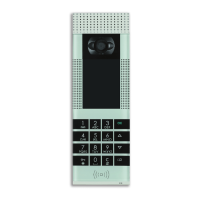
Identifies and illustrates the external components of the Axolute Entrance Panel.
Explains the function and usage of the navigation keys for interaction and selection.
Describes how to input characters and use the keypad for device operation.
Illustrates and identifies the connectors and ports on the rear of the entrance panel.
Outlines the two primary system types for integration: SCS BUS and IP Ethernet.
Details the use of physical configurators for setting the panel's address and tune.
Step-by-step guide for securely mounting the Axolute Entrance Panel to a wall.
Guides users on configuring the panel using dedicated PC software like TiContacts.
Explains USB and Ethernet connection methods for linking the panel to a PC.
Describes how to perform various settings and adjustments directly via the device keypad.
Details methods for accessing the installer menu using a password or Administrator badge.
Provides an overview of the icons representing different functions within the installer menu.
Allows adjustment of microphone and loudspeaker volumes for optimal audio performance.
Enables adjustment of display brightness and contrast for clear visibility.
Enables configuration of the camera position for optimal viewing angles.
Allows setting the current date and time for accurate device operation.
Manages resident access badges, including adding new badges and deleting existing ones.
Enables selection of the user interface language and pre-recorded voice messages.
Sets passwords for door lock access and for entering the installer configuration menu.
Configures network parameters for connecting the panel via an Ethernet network.
Sets the installation address (P) for the Axolute EP within an SCS BUS system.
Allows selection of the ringtone to be played on the handset during a call.
Enables customization of device voice prompts by recording or managing messages.
Manages apartment entries and associates residents with specific apartments.
Saves all performed configuration changes before exiting the current menu or function.
Details how to initiate calls by browsing or searching the resident directory.
Explains how to make a call directly by entering a specific extension number.
Guides on making calls by selecting a block, floor, and then the specific extension.
Lists common error messages and provides corresponding troubleshooting steps and solutions.
Provides key technical specifications including operating temperature and power supply voltage.
 General
| Brand | Bticino |
|---|---|
| Model | Axolute Outdoor 349140 |
| Category | Intercom System |
| Language | English |



 To Next Page