46
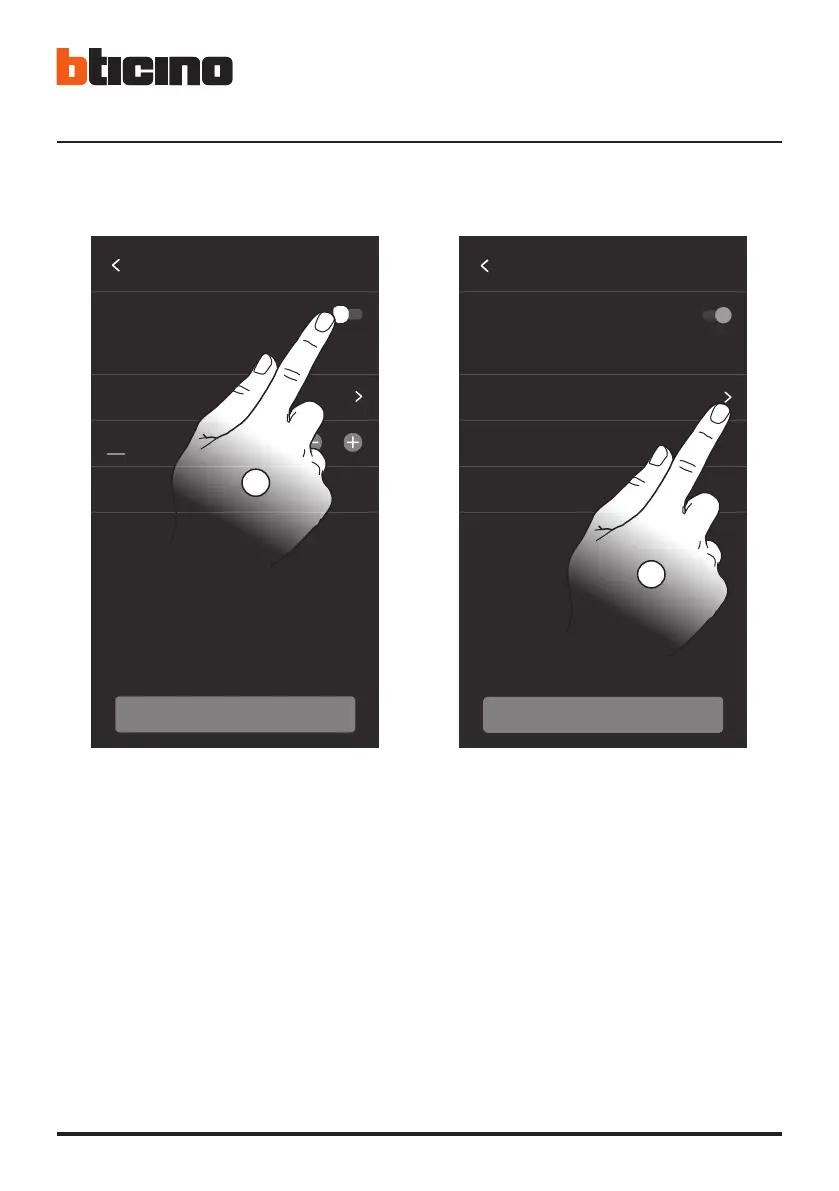
• 4. Tocca per abilitare l’aggiornamento automatico di
ora e data, tramite un server NTP.
5. Tocca per impostare il fuso orario della tua zona.
• 4. Touch to set the automatic time and date update
through the NTP server.
5. Touch to set your time zone.
• 4. Toucher pour activer la mise à jour automatique
de la date et de l’heure via un serveur NTP.
5. Toucher pour régler le fuseau horaire de la zone
du lieu d’installation.
• 4. Berühren, um das Datum und die Uhrzeit
automatisch über einen NTP-Server zu aktualisieren.
5. Berühren, um die Zeitzone einzustellen.
• 4. Toque para habilitar la actualización automática
de la fecha y la hora mediante un servidor NTP.
5. Toque para configurar el huso horario de su zona.
• 4. Raak het scherm aan om het automatisch updaten
van de datum en de tijd met een NTP-server te activeren.
5. Raak het scherm aan om uw tijdzone in te stellen.
• 4. Tocar para ativar a atualização automática de
hora e data, através um servidor NTP.
5. Tocar para configurar o fuso horário da sua região.
• 4. Dotknij, aby włączyć automatyczną aktualizację
godziny i daty przez serwer NTP.
5. Dotknij, aby ustawić strefę czasową swojego obszaru.
10 : 45
Timezone Rome (GMT +01)
Set date and time
automatically from network
Time will be set automatically once the device
is connected to internet
DATE AND TIME
16 / 06 / 2021
CONTINUE
4
Time
Date
Timezone Europe/Rome
16/06/2021
10:45:16
Set date and time
automatically from network
Time will be set automatically once the device
is connected to internet
CONTINUE
DATE AND TIME
5





 To Next Page