EasyManua.ls Logo

Bticino Classe100 V16E - User Manual

Bticino Classe100 V16E
16 pages
Print Icon
To Next Page IconTo Next Page
Loading...
1
www.bticino.com
ST-00000467-
344672
B
A
C
A B C
164 mm 165 mm
20,5 mm
2
11
10
3
4*
6
5*
8
1
9
7
EN 08/07/2019
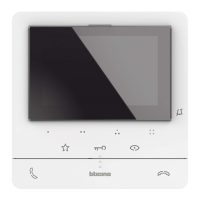
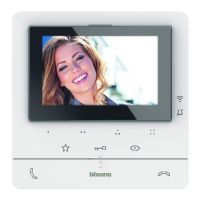
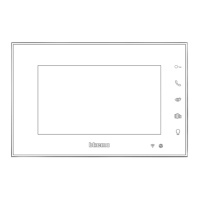
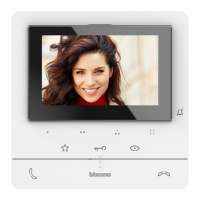
Classe100 V16E Handsfree video internal
unit with Inductive loop
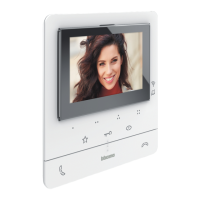
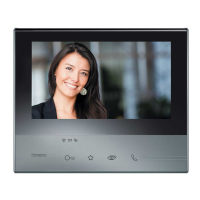
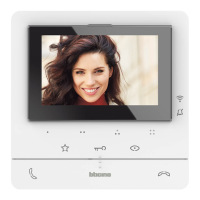
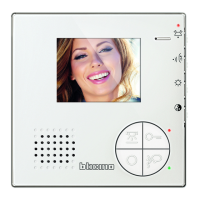
2 WIRES handsfree video internal unit with 5” colour LCD display.
It has 2 physical keys for the control of the main video door entry functions – answer
and end a call – and 3 capacitive keys that allow the door lock release, the entrance
panel activation/scrolling and the customisation of most frequently used quick
action – e.g. staircase light control, intercom, additional door lock activation, generic
activations.
The device has a side joystick to adjust: colour, brightness and display contrast, audio
and call tone volume.
There is a call exclusion notification LED.
The installation can be made to the wall using the bracket (supplied) or using table
support to be purchased separately.
Description
Dimensional data
Power supply: 18 – 27 Vdc
Stand by absorption: 10 mA
Max. absorption: 250 mA
Maximum cable section for each clamp: 2 x 1 mm2
Operating temperature: 5 – 40 °C
Technical data
344692 Tabletop support
Related items
Front view
Legend
When pressed, the keys light up and emit a “beep (that can be deactivated by
procedure).
1. Loudspeaker
2. 5” (16:9) display
3. Bell exclusion notification LED
Red LED flashing: bell excluded
4. Programmable touch keys *
5. Door lock release touch key *
White LED flashing: active Professional Studio (Office) function
6. Entrance panel / scrolling activation touch key
7. Tactile guides for the blinds
8. Communication disabling key
Red LED flashing: call in progre
9. Microphone
10. Staircase light touch key
11. Communication enabling key
Green LED flashing: incoming call
* If the LEDs flash white when pressed, the “safe door lock” function is active and
the key is deactivated.
Question and Answer IconNeed help?

Do you have a question about the Bticino Classe100 V16E and is the answer not in the manual?

Bticino Classe100 V16E Specifications

General IconGeneral
BrandBticino
ModelClasse100 V16E
CategoryIntercom System
LanguageEnglish

Summary

Product Description and Overview

Detailed Description

Overview of the handsfree video internal unit features, physical keys, and joystick controls.

Related Items

Accessory for tabletop installation.

Technical Specifications

Details on power supply, absorption, cable section, and operating temperature.

Dimensional Data

Physical dimensions (width, height, depth) of the video internal unit.

Front View Components

Loudspeaker

Device speaker for audio output.

5 (16:9) Display

Color LCD screen for video and information display.

Bell Exclusion Notification LED

LED indicating the status of bell exclusion.

Programmable Touch Keys

Customizable keys for quick actions.

Door Lock Release Touch Key

Key for releasing the door lock.

Entrance Panel;Scrolling Activation Touch Key

Key to activate entrance panel or scroll views.

Tactile Guides for Blinds

Tactile indicators for blind operation.

Communication Disabling Key

Key to disable communication functions.

Microphone

Microphone for audio input.

Staircase Light Touch Key

Key for controlling staircase lighting.

Communication Enabling Key

Key to enable communication functions.

Rear View Components and Configuration

Slave;Master Function Microswitch

Microswitch to set the device as master or slave.

Safe Door Lock ON;OFF Micro-switch

Switch to enable/disable the safe door lock function.

Configurator Socket

Socket for device configuration settings.

Line Termination ON;OFF Micro-switch

Switch for line termination control.

Additional Power Supply Enable ON;OFF Micro-switch

Switch to enable/disable additional power supply.

2 Wires SCS BUS Connection Clamps

Terminals for SCS BUS wiring.

External Call to Floor Pushbutton Clamps

Terminals for connecting an external floor pushbutton.

Additional Bell Connection Clamps

Terminals for connecting additional bells.

Additional Power Supply Clamps

Terminals for additional power supply connection.

Joystick for Adjustments and Programming

Control for device adjustments and programming.

System Configuration

Internal Unit Number (N)

Assigning identification numbers to internal units within the system.

Entrance Panel Association (P)

Associating the device with a specific entrance panel.

Operating Mode (M)

Assigning operating modes to programmable keys.

Functional Modes and Operations

Mode M=00: Internal Intercom & EP Control

Basic intercom and door lock release functions.

Mode M=20: Professional Studio

Adds Professional Studio function to base modes.

Mode M=40: Pager

Adds Pager function to base modes.

Mode M=80: Professional Studio + Pager

Combines Professional Studio and Pager functions.

Mode M=01: Intercom & EP Control (Apartment Interface)

Intercom and door lock release with apartment interface.

Mode M=21: Professional Studio (Apartment Interface)

Professional Studio for apartment interface mode.

Mode M=41: Pager (Apartment Interface)

Pager for apartment interface mode.

Mode M=81: Professional Studio + Pager (Apartment Interface)

Combined functions for apartment interface mode.

Additional Functional Modes

Mode M=02: Intercom & EP Control (No Apartment Interface)

Intercom and door lock release without apartment interface.

Mode M=22: Professional Studio (No Apartment Interface)

Professional Studio for non-apartment interface mode.

Mode M=42: Pager (No Apartment Interface)

Pager for non-apartment interface mode.

Mode M=82: Professional Studio + Pager (No Apartment Interface)

Combined functions for non-apartment interface mode.

Further Functional Modes

Mode M=03: Intercom & EP Control (Multiple Apartments)

Intercom and door lock release for multiple apartments.

Mode M=23: Professional Studio (Multiple Apartments)

Professional Studio for multiple apartment configurations.

Mode M=43: Pager (Multiple Apartments)

Pager for multiple apartment configurations.

Mode M=83: Professional Studio + Pager (Multiple Apartments)

Combined functions for multiple apartment setups.

Expanded Functional Modes

Mode M=04: EP Activation & Intercom

Entrance panel activation and intercom functions.

Mode M=24: Professional Studio (EP Activation;Intercom)

Professional Studio for EP activation and intercom.

Mode M=44: Pager (EP Activation;Intercom)

Pager for EP activation and intercom functions.

Mode M=84: Professional Studio + Pager (EP Activation;Intercom)

Combined functions for EP activation/intercom.

Mode M=05: Multiple Door Lock Releases

Functions for multiple door lock releases.

Mode M=25: Professional Studio (Multiple Door Locks)

Professional Studio for multiple door lock scenarios.

Mode M=45: Pager (Multiple Door Locks)

Pager for multiple door lock scenarios.

Mode M=85: Professional Studio + Pager (Multiple Door Locks)

Combined functions for multiple door locks.

Advanced Functional Modes

Mode M=06: Preset Intercom & EP Control

Preset intercom to specific handset and EP control.

Mode M=26: Professional Studio (Preset Intercom)

Professional Studio for preset intercom.

Mode M=46: Pager (Preset Intercom)

Pager for preset intercom function.

Mode M=86: Professional Studio + Pager (Preset Intercom)

Combined functions for preset intercom.

Mode M=10: General Intercom & EP Control

General intercom to all system handsets and EP control.

Mode M=30: Professional Studio (General Intercom)

Professional Studio for general intercom.

Mode M=50: Pager (General Intercom)

Pager for general intercom.

Mode M=90: Professional Studio + Pager (General Intercom)

Combined functions for general intercom.

Mode M=12: Intercom Among Apartments

Intercom function between apartments.

Mode M=32: Professional Studio (Intercom Among Apartments)

Professional Studio for intercom between apartments.

Mode M=52: Pager (Intercom Among Apartments)

Pager for intercom between apartments.

Mode M=92: Professional Studio + Pager (Intercom Among Apartments)

Combined functions for intercom among apartments.

Inter-Apartment Communication Modes

Mode M=13: Intercom Among Apartments

Intercom function among apartments with interface.

Mode M=33: Professional Studio (Intercom Among Apartments)

Professional Studio for intercom among apartments.

Mode M=53: Pager (Intercom Among Apartments)

Pager for intercom among apartments.

Mode M=93: Professional Studio + Pager (Intercom Among Apartments)

Combined functions for intercom among apartments.

Device Adjustments and Settings

Use of the Joystick

Navigating menus and selecting settings using the joystick.

Joystick Symbol Legend

Explanation of symbols and actions for joystick navigation.

Adjustments Menu Navigation

Activating the Display

Activating the display from standby mode.

Selecting Adjustment Pages

Navigating through different adjustment pages using joystick.

Professional Studio - Office Function

Activate/deactivate the Professional Studio-Office function.

Ringtone Volume Adjustment

Adjusting the ringtone volume.

Exiting the Menu

Exiting the current menu.

Function Settings

Activate;Deactivate Professional Studio-Office

Enabling the automatic door lock activation function.

Ringtone Volume Adjustment

Adjusting the ringtone volume level (1-8).

Audio;Video Parameter Adjustments

Modifying Parameters During Connection

Adjusting volume, color, contrast, and brightness.

Parameter Selection and Adjustment

Selecting and adjusting speaker volume, image brightness, contrast, and color.

Settings Menu

Accessing the Settings Menu

Accessing the settings menu by holding the joystick.

Selecting Settings Pages

Navigating through settings pages using the joystick.

Enable;Disable Key Sound

Enabling or disabling the beep sound for key presses.

Associate Ringtone to Event

Assigning ringtones to different call events.

Exiting the Menu

Exiting the settings menu.

Key Sound and Ringtone Configuration

Enable;Disable Key Sound

Function to enable or disable the beep sound on key presses.

Associate a Ringtone to an Event (Call)

Modifying ringtones for different call types.

Call Type Ringtone Selection Table

Table mapping call types (icons) to ringtone selections.

Special Functions

Ringtone Selection for Calls

Selecting ringtones for different call events.

Door Status Function

Notifies the status of the door lock (open/closed).

Paging Function

Sending voice messages through system speakers.

Paging Function Use

Steps for using the paging function: broadcast and end message.

Safety and Inductive Loop Use

Safe Door Lock Function

Prevents door lock opening when unit is in standby.

Enabling the Safe Door Lock Function

Procedure to enable the safe door lock function via microswitch.

Inductive Loop Use

Using the device with hearing aids (T) selector.

Inductive Loop Positioning

Recommended positioning for optimal magnetic coupling.

Related product manuals