48
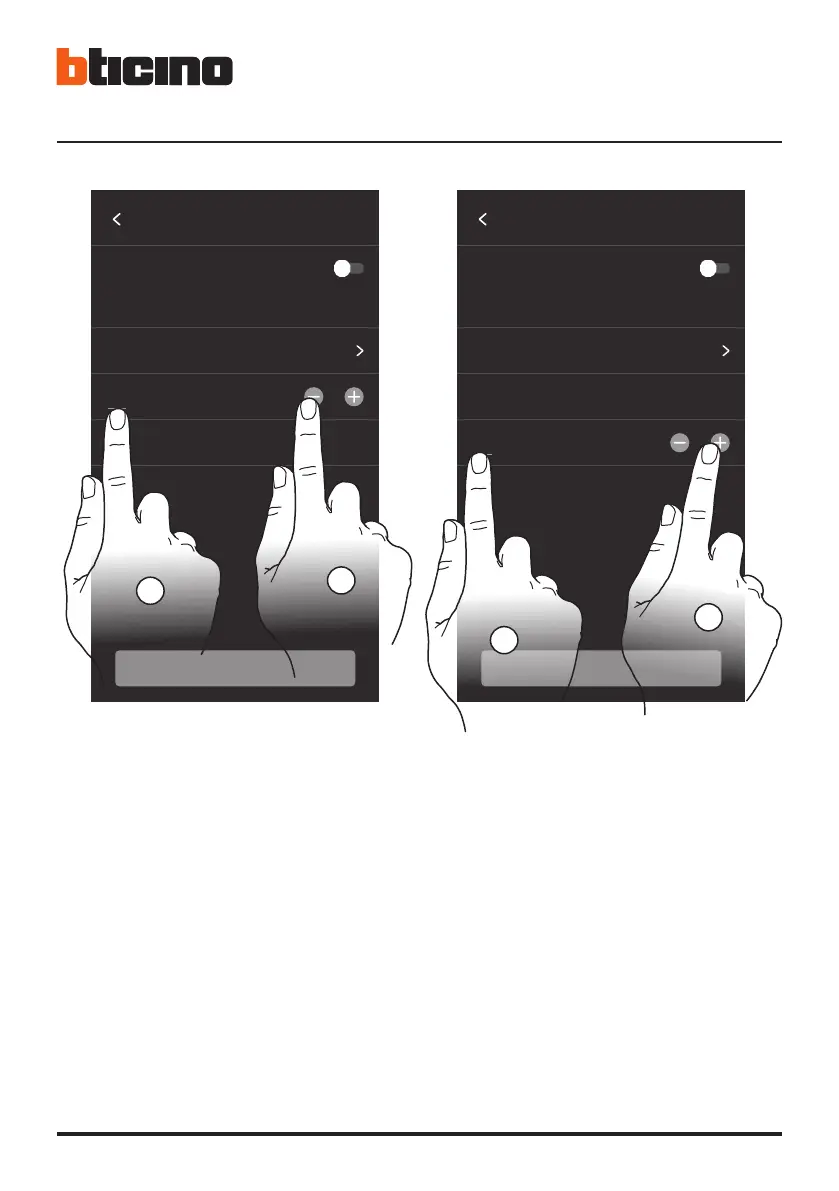
• 9. Seleziona il dato da modificare.
10. Tocca per aumentare o diminuire il valore.
• 9. Select the data to change.
10. Touch to increase or decrease the value.
• 9. Sélectionner la donnée à modifier.
10. Toucher pour augmenter ou abaisser la valeur.
• 9. Den zu ändernden Wert wählen.
10. Berühren, um den Wert zu erhöhen oder verringern.
• 9. Seleccione el dato que quiere modificar.
10. Toque para aumentar o disminuir el valor.
• 9. Selecteer het te wijzigen gegeven.
10. Raak het scherm aan om de waarde te verhogen
of verlagen.
9. Selecionar o dado a modificar.
10. Tocar aqui para aumentar ou diminuir o valor.
• 9. Wybierz dane do modyfikacji.
10. Dotknij, aby zwiększyć lub zmniejszyć wartość.
Timezone Rome (GMT +01)
Set date and time
automatically from network
Time will be set automatically once the device
is connected to internet
CONTINUE
DATE AND TIME
16 / 06 / 2021
10 : 45
9
10
10 : 45
Timezone Rome (GMT +01)
Set date and time
automatically from network
Time will be set automatically once the device
is connected to internet
CONTINUE
DATE AND TIME
16 / 06 / 2021
9
10







 To Next Page