54
DOOR ENTRY
Door entry parameters
N address
P address
Intercom
Camera
Activation
CONTINUE
01
01
Professional studio
When enabled by user, professional studio auto opens
door lock each time someone rings
19
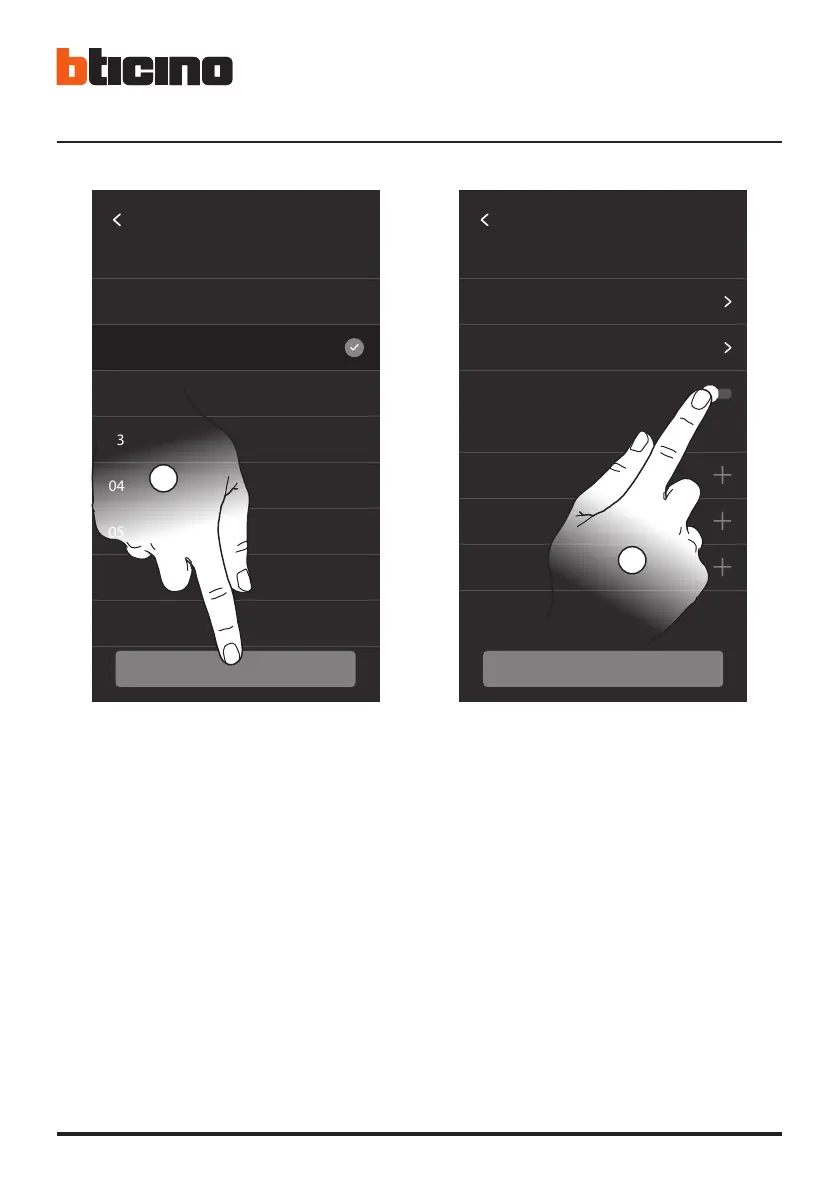
• 18. Tocca per confermare.
Configurando l’indirizzo del Posto Esterno principale
(P), vengono inseriti in automatico gli oggetti:
Posto esterno; Serratura; Luci scale.
19. Tocca per abilitare la funzione studio professionale.
• 18. Touch to confirm.
When configuring the address of the main Entrance
Panel (P), the following objects are entered automatically:
Entrance Panel; Door lock; Staircase lights.
19. Touch to enable the Professional Studio function.
• 18. Toucher pour confirmer.
En configurant l’adresse du Poste externe principal
(P), les objets sont automatiquement ajoutés:
Platine de rue ; Serrure ; lumières escaliers.
19. Toucher pour activer la fonction Bureau.
• 18. Berühren, um zu bestätigen.
Durch die Konfiguration der Haupt-Türstation (P)
werden automatisch folgende Objekte eingefügt:
Außenstelle; Schloss; Treppenlicht.
19. Berühren, um die Funktion Büro zu aktivieren.
• 18. Toque para confirmar.
Al configurar la dirección de la placa exterior principal
(P), se insertan automáticamente los objetos: Placa
exterior principal; Cerradura PE; Luces escalera.
19. Toque para habilitar la función estudio profesional.
• 18. Raak het scherm aan om te bevestigen.
Configureer het adres van de hoofdbuitenpost (P) voor
het automatisch invoeren van:
Buitenpost; Slot; Trappenhuisverlichting.
19. Raak het scherm aan om de functie professionele
studio te activeren.
• 18. Tocar aqui para confirmar.
Ao definir o endereço da Unidade Externa principal
(UE), são ativados automaticamente os seguintes
objetos: Posto Externo; Fechadura; Luz das escadas.
19. Tocar para ativar a função escritório profissional.
• 18. Dotknij, aby potwierdzić.
Konfigurując adres głównego Panelu Zewnętrznego
(P), obiekty są wstawiane automatycznie:
Panel zewnętrzny; Zamek; Światła schodowe.
19. Dotknij, aby włączyć funkcję Gabinet zawodowy.
P
Choose value
00
02
01
03
04
05
06
07
08
SET
18


 To Next Page