Conguration
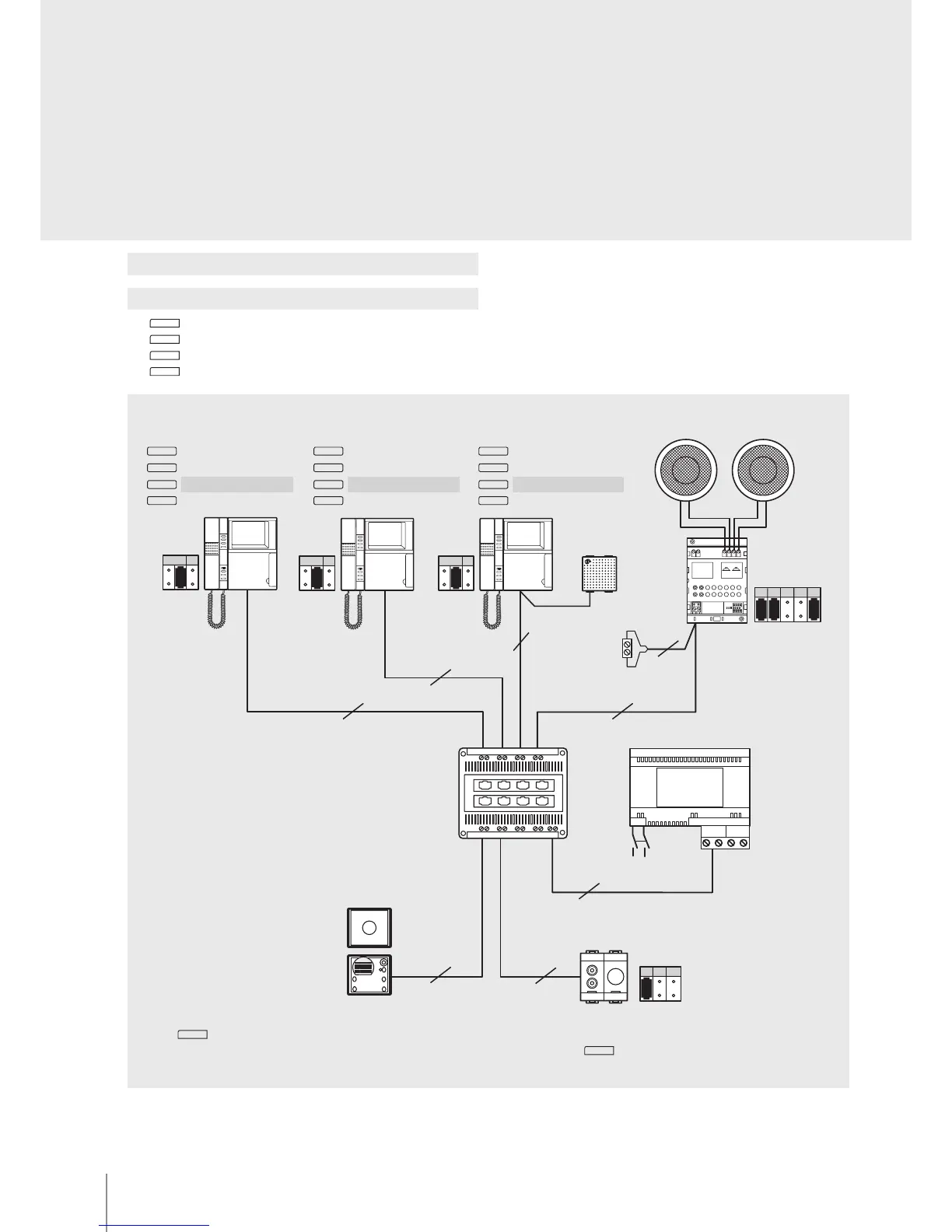
Example 9 - MOD = 6
- Key
1
Intercom
- Key
2
Intercom
- Key
3
Intercom
- Key
4
Paging function using the loudspeakers of the 2 WIRE sound system and melodic bells with M = 1
Press key
4
to communicate with the outside using the loudspeakers of the 2 WIRE sound system and the Melodic bells M = 1.
The “paging” function can be used, for example, for communications inside supermarkets or oces: press key
4
to switch the selected sound source o and activate the
audio on the loudspeakers. Once the handset has been replaced the sound source comes on again.
230 Vac
2
NP
3
MOD=7
P=0
PE
main
NP
2
2
346000
BUS 2 1
F441
2
NP
1
SCS
OUT 1
OUT
OUT2 OUT3 OUT4
IN
IN 1
IN 2
IN 3
IN 4
2 2
2
S
M2
1
M1
A
PF
M1
M2 M3
1
0
3
2
2
Celing mounted loudspeakers L4566
DIN amplier
F502
Intercom call N = 2
Intercom call N = 3
Intercom call N = 4
Paging
Intercom call N = 1
Intercom call N = 3
Intercom call N = 4
Paging
Intercom call N = 1
Intercom call N = 2
Intercom call N = 4
Paging
RCA input L4560
3499
M = 1
4
3
2
1
4
3
2
1
4
3
2
1


 To Next Page