Assiance mode :
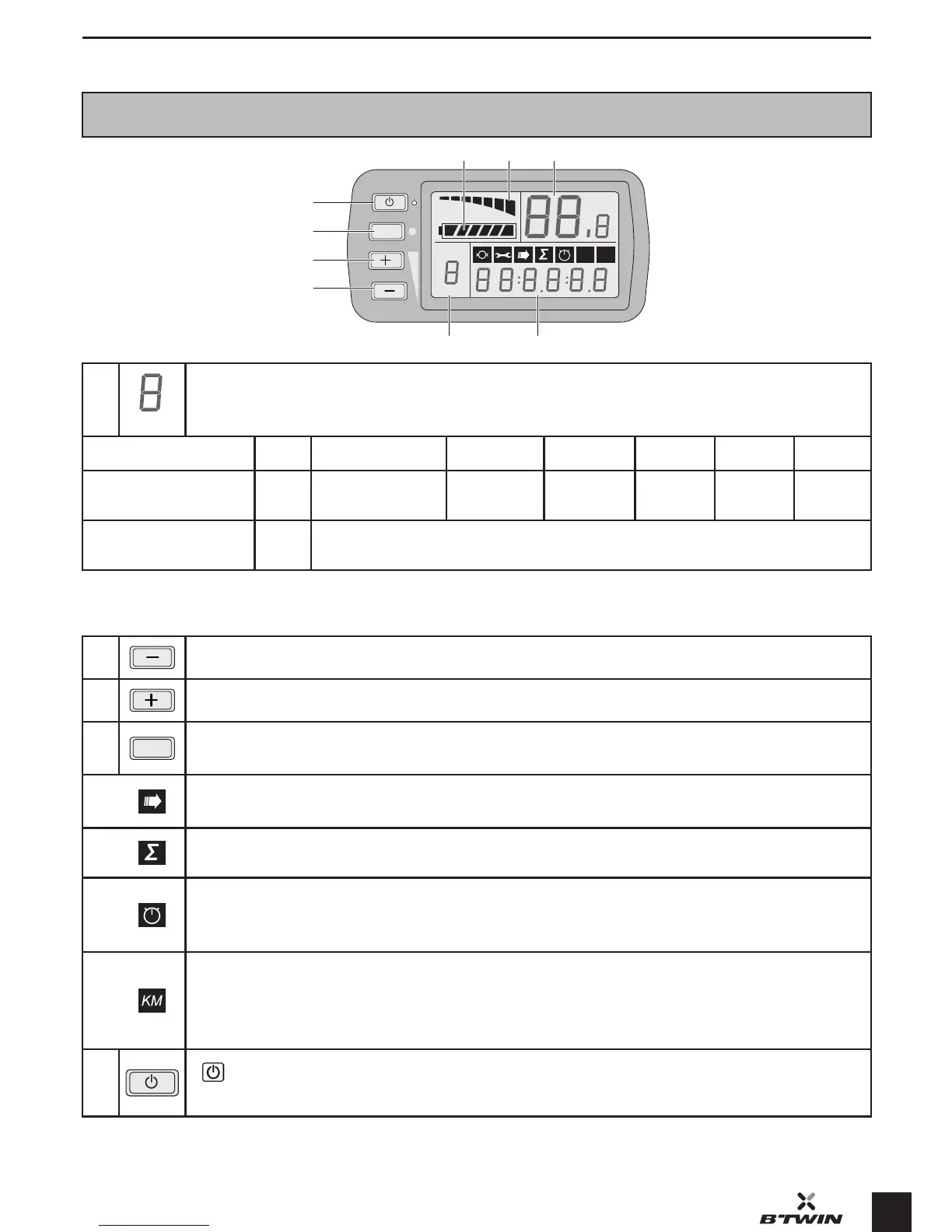
Pedalling assiance: Select the assiance mode between 1 and 6 with the «+» and «-» buttons.
Mode
0 1 (by default) 2 3 4 5 6
Maximum assian-
ce speeds***
/ 6 km/h 10 km/h 14 km/h 18 km/h 20 km/h 25 km/h
Average autono-
mous range***
/ 50 - 70 km
Pederian mode: Maintains the bike at a maximum speed of 6 km/h. Select an assiance mode between 1
and 6. Hold down the «+» button to art the motor without pedalling. The assiance will switch o when the
button is released or when a brake is depressed.
2
Button «-» : decrease the assiance mode / settings.
3
Button «+» : increase the assiance mode / settings.
4
SET
SET button: A short press of the SET button allows the successive display of the
following functions:
Shue mode:
The previous 4 functions are displayed successively.
Total diance:
Total diance covered by bike. Resetting to zero is not possible.
Trip time:
The time elapsed since the la reset.
Hold down the «–» button for 2 seconds.
Trip diance:
The diance travelled (km) since the la reset.
Press the «–» button for 2 seconds to reset to zero.
Press the «–» button for 10 seconds to change between km and miles.
5
A long press allows you to switch the screen on or o.
A short press of the button allows you to switch the bicycle’s lights on.


 To Next Page