4
UK
Telephone Helpline: 0845 146 2887
Operation
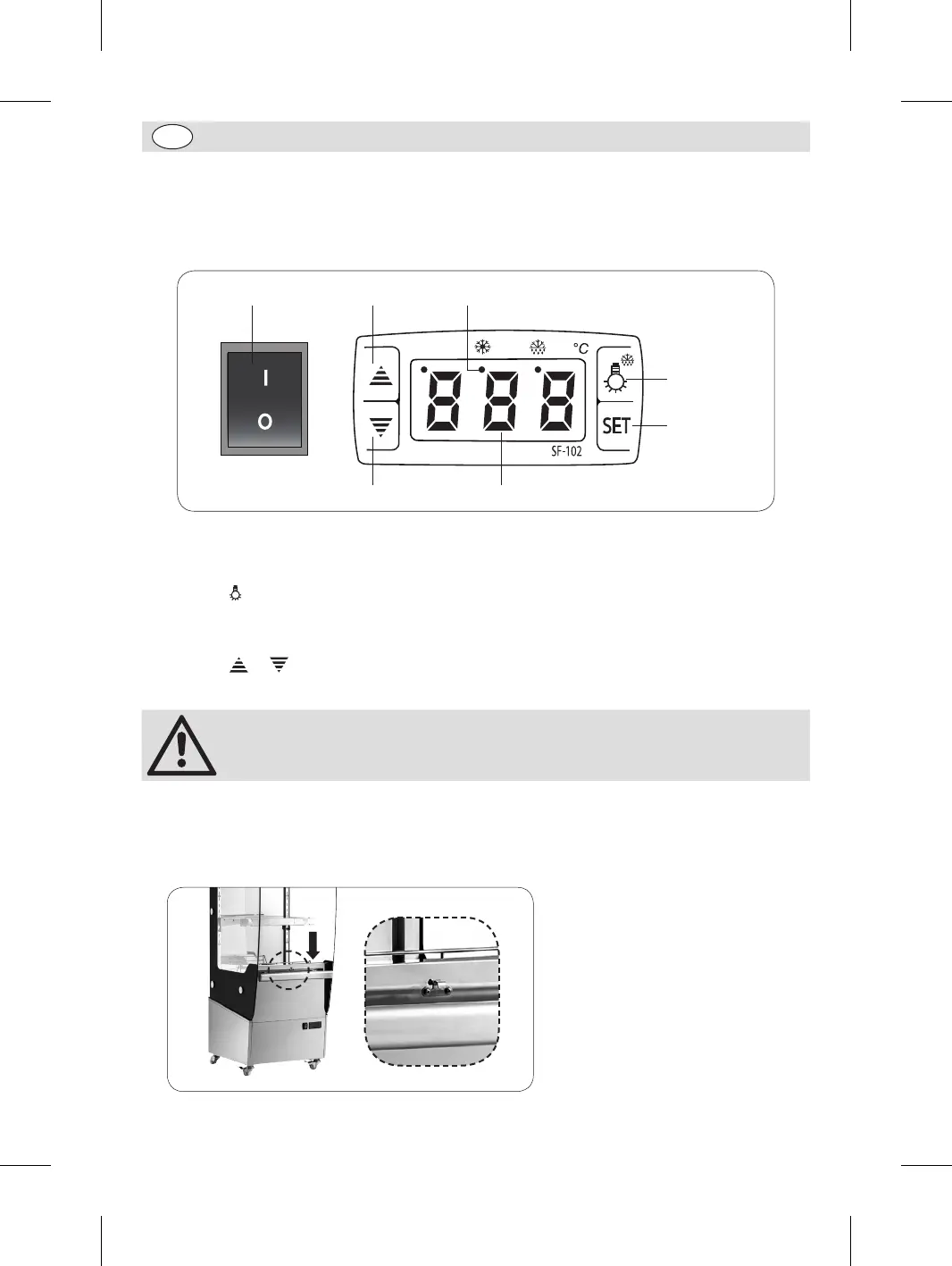
Control panel
The control panel is located below the handle on the front of the appliance.
On/off switch Up button Heating indicator
Light button
SET button
Cabinet TemperatureDown button
Turn On
1. Ensure the
on/off
switch is set to O and c
onnect the appliance to a mains power supply.
2. Set the on/off switch to I.
3. Press the button to turn the light On or Off as required.
Setting the Operating Temperature
1. Press the SET button. The previously set temperature is displayed.
2. Press the or button to display the required temperature (Range: 30°C - 80°C).
3. Press the SET button to store the temperature.
Note for the Heating Indicator: The LED will be on during heating up and off
when the set temperature is reached and maintained constantly.
4. The appliance is now ready for food to be displayed and kept warm.
Using the Night Curtain
• If necessary, extend the plastic night curtain downward and hook it into place.
CW146_UK_A5_v1_171206.indb 4 2017/12/6 10:31


 To Next Page