11
1. Place a cup under the discharge outlets.
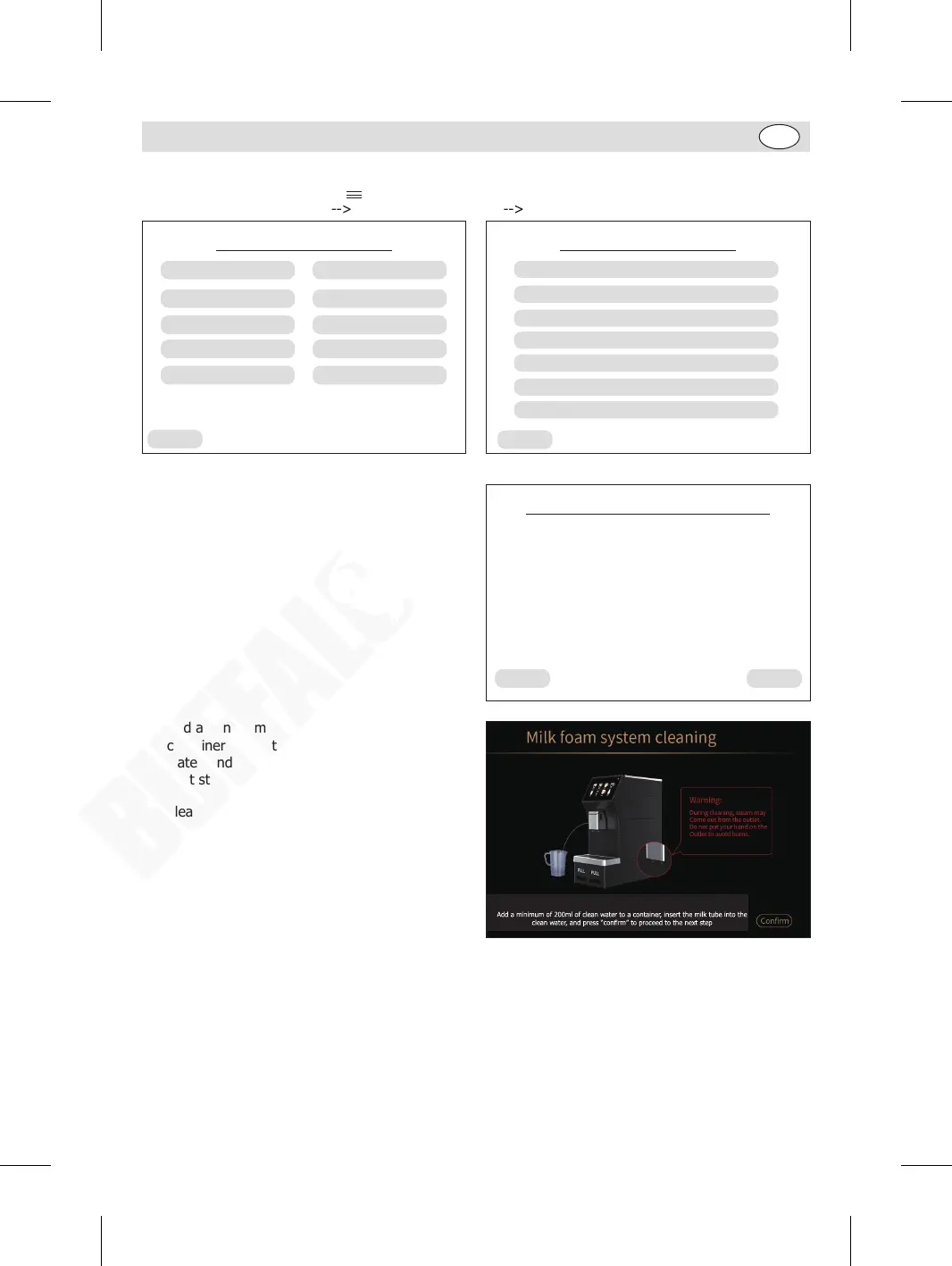
2. When in home page, press “ ” on the upper right corner to enter the Menu page. Then follow the
sequence “Service menu” “Maintenance settings” “Milk Foam System steam cleaning”.
Back
Service menu
Language setting
Beverage settings
Maintenance settings
Pre-brewing
Water hardness
Brightness setting
Coffee temperature
Statistics
Audible alarm
Standby time
Back
Maintenance settings
Brewing System cleaning using tablets
Milk Foam System cleaning using tablets
Milk Foam System steam automatic cleaning
Milk Foam System steam cleaning
Descaling cleaning
Restore default settings
Engineering settings
3. Press “Yes”.
No
Milk Foam System cleaning
Yes
Do you need to clean the Milk Foam System?
4. Add a minimum of 200ml of clean water to a
container, insert the milk tube into the clean
water, and press “Confirm” to proceed to the
next step.
5. Please wait until the machine has finished its
cleaning cycle.
GM949_EN_A5_v1_20240528.indb 11GM949_EN_A5_v1_20240528.indb 11 2024/5/28 11:272024/5/28 11:27


 To Next Page