12
Menu setup
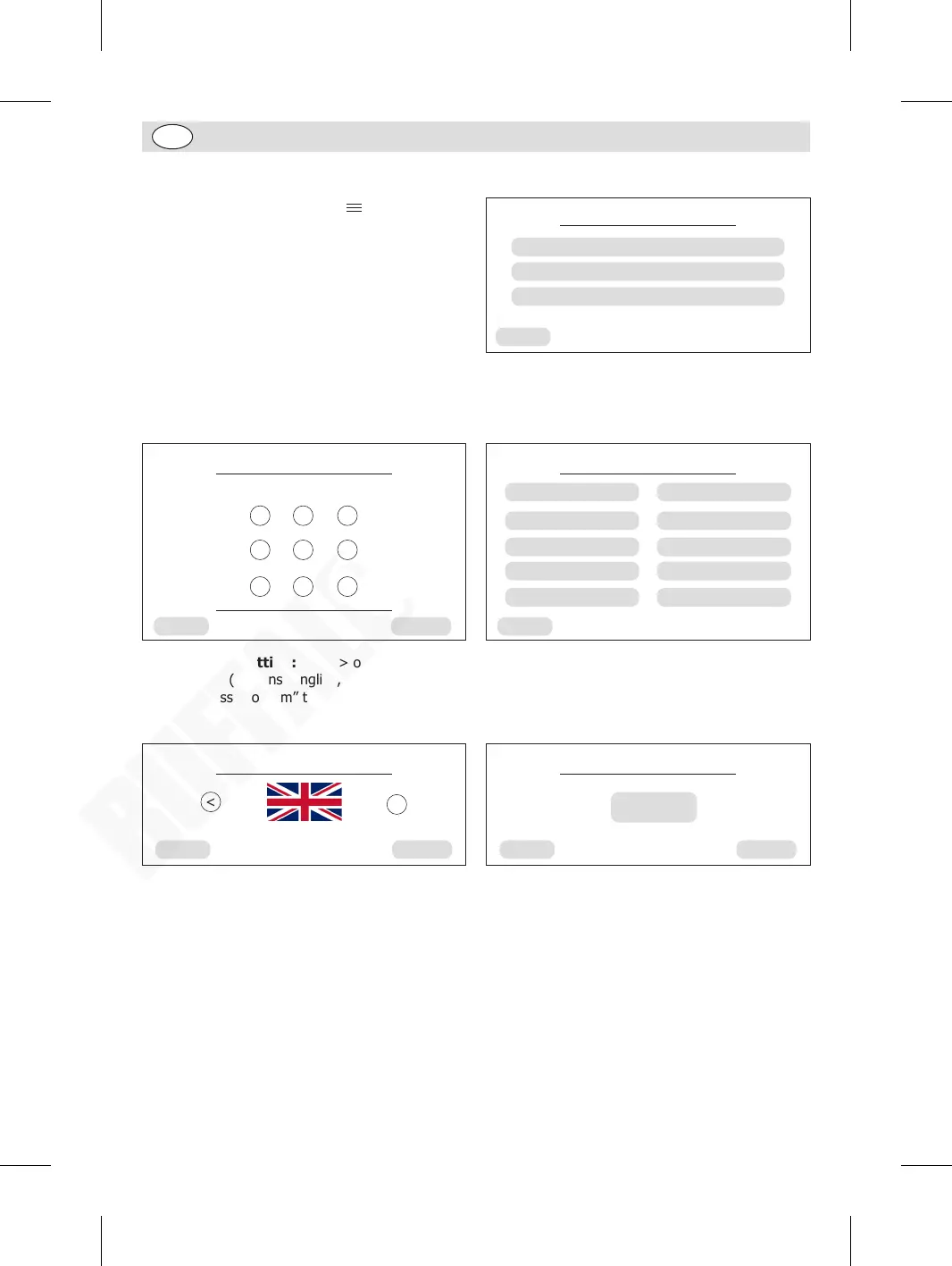
• When in home page, press “ ” on the upper
right corner to enter the Menu page.
• Sub-menus (Brewing Unit quick rinse, Milk Foam
System rinse, Service menu) will be shown.
• Press the desired item to set up.
• To exit, press “Back” to back to home page.
Menu
Brewing Unit quick rinse
Milk Foam System quick rinse
Service menu
Back
Service menu setup
When in Menu page, press “Service menu” to enter Service menu page. Enter the password (Initial
password: 123456) and press “Confirm” to show all items under the service menu. Press a desired item
to enter relative setup page.
Back
1 2 3
4 5 6
7 8 9
Confirm
Service menu
Please enter password and press confirm
Back
Service menu
Language setting
Beverage settings
Maintenance settings
Pre-brewing
Water hardness
Brightness setting
Coffee temperature
Statistics
Audible alarm
Standby time
1. Language setting: Press > or < to select
language (Options: English, Dutch, French),
then press “Confirm” to back to previous page.
2. For better tasting coffee the default setting
for Coffee pre-brewing is Turned on. If not
desired, press the toggle button in the screen
centre. Tip: When “TURN ON” is displayed this
indicates pre-brewing is switched on.
Language settings
Back Confirm
<
English
<
Pre-brewing
Back Confirm
TURN ON
3. Brightness setting: Press > or < to select Brightness from 5 to 100.
4. Coffee temperature: Select from High, Medium, Low.
5. Audible alarm: When in an abnormal state, the appliance will beep and show the alarm screen.
The default setting is “TURN ON”. If not desired, just press the toggle button in the screen centre to
deactivate.
6. Water hardness: Press > or < to select from 0 to 5. Tip: Setting 1 is for soft water areas and
setting 5 is for hardwater areas that are problematic to Limescale buildup. To prolong the lifetime of
the machine we recommend keeping on setting 4 or 5.
GM949_EN_A5_v1_20240528.indb 12GM949_EN_A5_v1_20240528.indb 12 2024/5/28 11:272024/5/28 11:27


 To Next Page