13
The Driver Information Center (DIC) on the instrument cluster displays a variety of vehicle
system information and warning messages.
Driver Information Center
Menu Items
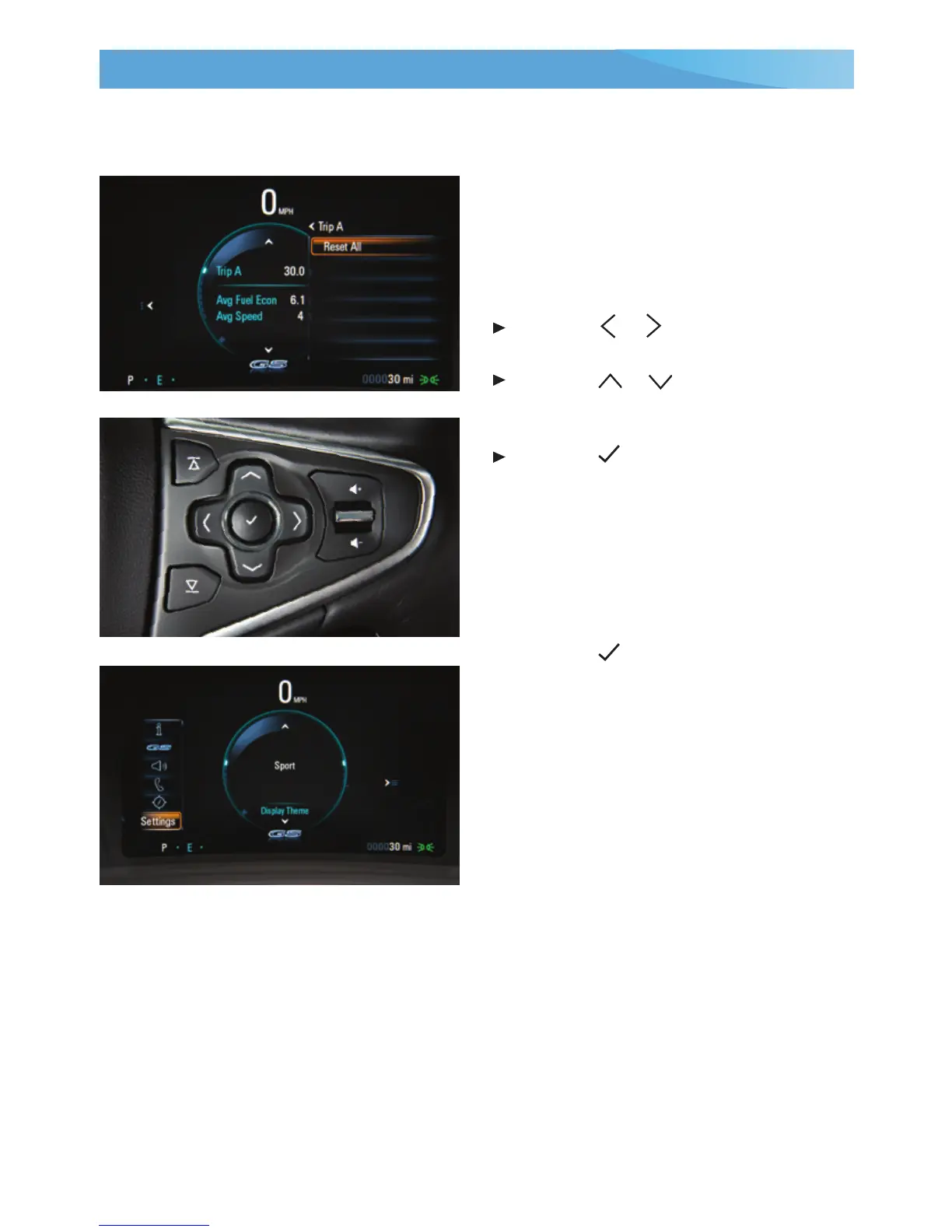
Use the controls on the right side of the
steering wheel to view the Info (includes
the trip odometers and fuel information),
Performance
F
, Audio, Phone, Navigation,
and Settings menus.
Press the
or
button to move
between the display zones.
Press the
or
button to move
through the displayed menu or
submenu.
Press the button to open a menu or
select/deselect a setting.
Reset an Item
1. Use the controls to display the item.
2. Use the controls to display the Reset
option.
3. Press the
button to reset or clear
the item.
Recongurable Instrument Cluster
1. Use the controls to display the Settings
menu.
2. Select Display Theme.
3. Select the desired cluster theme.
See Instruments and Controls in your Owner Manual.
F
Optional equipment














 To Next Page