EasyManua.ls Logo

Buick Regal 2016 - Infotainment System; Infotainment Power and Volume; Accessing Infotainment Applications; Interaction Selector Function

Buick Regal 2016
20 pages
Print Icon
To Next Page IconTo Next Page
To Previous Page IconTo Previous Page
Loading...
8
Infotainment System
Refer to your Owner Manual for important safety information about using the infotainment system
while driving.
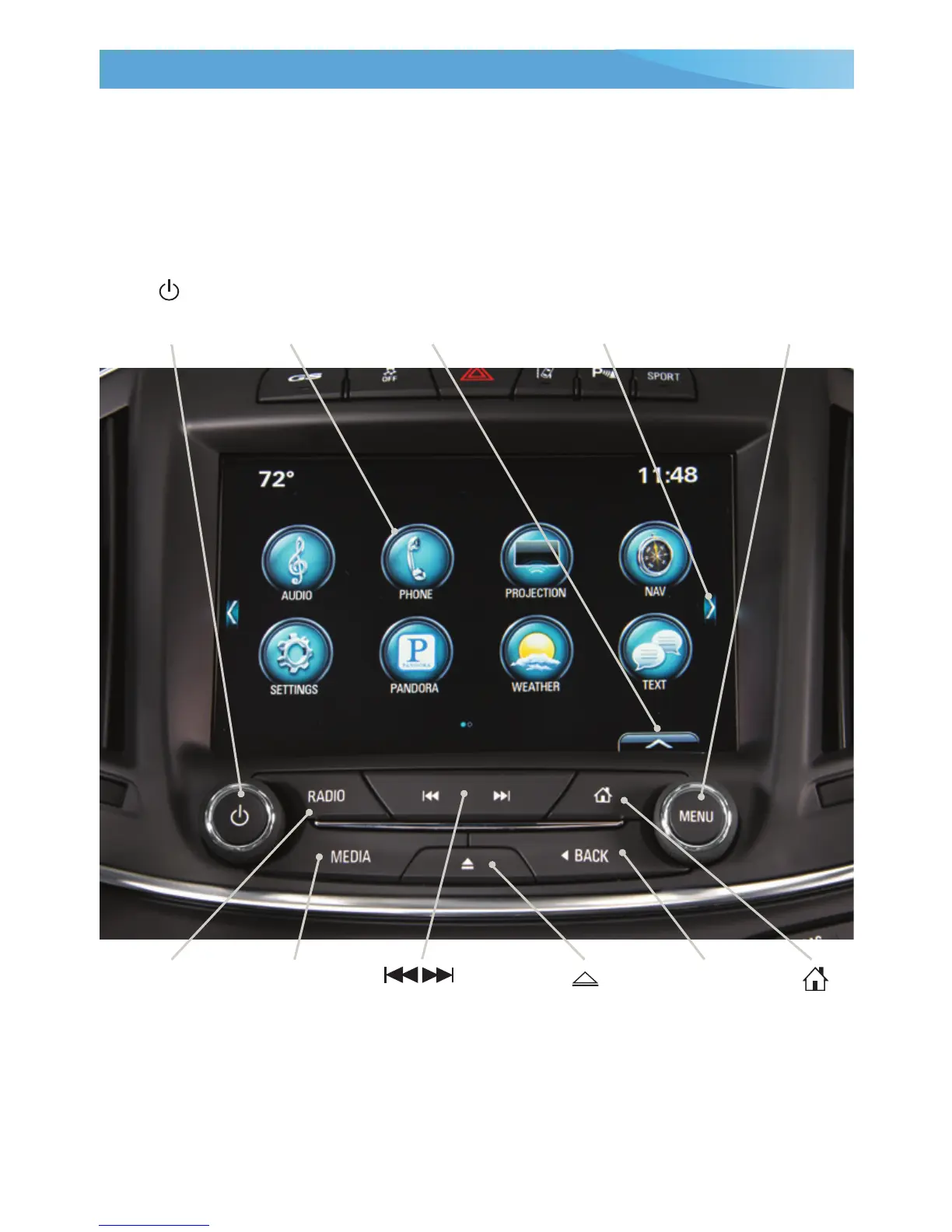
The infotainment system controls include the audio system buttons, touch screen,
steering wheel controls and voice recognition.
Power/
Volume
RADIO:
Select AM,
FM, XM
F
Applications:
Touch the
screen icon
to access the
application
Home
screen
Interaction
Selector:
Display the
favorites list
Additional Pages:
Touch to view
additional pages of
applications
(if available)
Eject CD
Previous or next
radio station,
track or le
BACK:
Move back
one level in
the menus
MENU:
Tune radio
stations/Open
and select
menus
MEDIA:
Select the
media source
See your Infotainment System Owner Manual.
F
Optional equipment

Related product manuals