Need help?
Do you have a question about the Bunker Hill Security 45891 and is the answer not in the manual?
Essential safety guidelines for using the product to prevent injury and damage, including proper use, part checks, and operator caution.
Steps to open the safe using the electronic keypad and turning the knob within the time limit.
Instructions for closing and locking the safe door by turning the knob in the opposite direction.
Procedure for setting a new access code for the electronic lock using the internal red button.
Guide on replacing the safe's batteries when indicated by the red and green LED lights.
Steps to bypass the electronic lock and open the safe using the emergency key.
Instructions for securing the safe to wood or concrete surfaces using provided fasteners and tools.
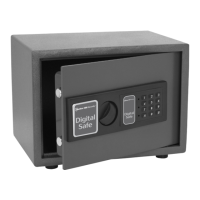
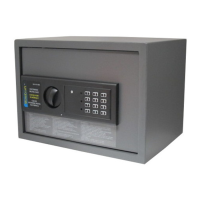
The Bunker Hill Electronic Digital Safe, Model 45891, is a robust security device designed to protect valuable items. This manual provides comprehensive instructions for its installation, operation, and maintenance, ensuring users can effectively utilize its features.
The primary function of the Bunker Hill Electronic Digital Safe is to provide secure storage for personal and business valuables. It employs an electronic keypad locking mechanism, offering a modern and convenient alternative to traditional key-only safes. The safe is designed to deter unauthorized access through its sturdy construction and electronic security features. In addition to the electronic lock, it includes an emergency key override system, providing a reliable backup in case of electronic malfunction or forgotten codes. The safe is suitable for various environments, from homes to offices, and can be mounted to a surface for enhanced security against theft.
The Bunker Hill Electronic Digital Safe offers several user-friendly features that make it easy to operate while maintaining a high level of security.
Opening the Safe: To open the safe, users simply input the default code "159" on the electronic keypad, followed by either the "A" or "B" key. A green light will illuminate, indicating that the code is correct. Once the green light is on, the knob must be turned within five seconds to open the door. If the knob is not turned within this timeframe, the entry code will need to be re-entered. This time-sensitive mechanism adds an extra layer of security, preventing prolonged attempts at unauthorized access.
Closing the Safe: Closing the safe is straightforward. After placing items inside, the user simply closes the door and turns the knob in the opposite direction from opening. This action engages the locking mechanism, securing the safe.
Changing the Code: The safe comes with a preset default code, "159," which users are strongly encouraged to change immediately for personalized security. To change the code, first open the safe using the current code. Inside the door, near the hinge, there is a small red button. Pressing this button will cause a yellow light on the front control panel to illuminate, signaling that the safe is ready to accept a new code. Users can then input a new code, consisting of one to eight characters, followed by either the "A" or "B" key. The safe will beep twice to confirm that the new code has been successfully accepted. If the safe beeps three times, it indicates that the code was not accepted, and the process must be repeated. This feature allows users to customize their security and change the code as often as desired, enhancing protection.
Emergency Key Override: A critical feature of this safe is its emergency key override system. The safe comes with two emergency keys, which are invaluable in situations where the electronic code is forgotten or the batteries are depleted. To use an emergency key, the user must first detach the front panel of the safe. This is done by gently peeling off a sticker located to the left of the keypad, which reveals a screw. After removing this screw, the panel can be gently removed to expose the secret key-operated lock. The emergency key is then inserted into this lock and turned. Simultaneously, the knob is turned, and the door can be pulled open. After accessing the safe, the keypad and sticker should be replaced. A crucial warning is provided: NEVER LOCK THE EMERGENCY KEYS IN THE SAFE! This ensures that the backup access method is always available, even if the electronic system fails.
Installation Features: The Bunker Hill Electronic Digital Safe is designed for secure installation, offering options for both wood and concrete surfaces. The safe includes four concrete fasteners, a felt pad, and a hole template to assist with mounting.
Mounting to a Surface: Before installation, users should open the safe to access the included mounting template and fasteners. The template should be placed against the desired mounting surface and taped into position. A critical warning is provided to ensure no wires, cables, or pipes are in the path before drilling or driving nails.
Wood Surface Installation: For wood surfaces, a nail (not included) can be used to mark the hole placements. Then, an 1/8-inch diameter pilot hole should be drilled into each marked location. The safe is then positioned over these holes and secured using four 1/4-inch diameter self-tapping screws (not included). This method provides a stable and secure attachment to wooden structures.
Concrete Surface Installation: For concrete surfaces, a small pilot hole is drilled through the template to mark the hole placements. Next, four holes are drilled in the correct locations using a concrete drill bit, ensuring the holes are the same diameter as the fasteners and 2 inches deep. The fasteners are then hammered into the holes, flat side first. A wood block should be used between the bolt and the hammer to protect the threads during this process. Finally, the safe is placed over the bolts (with the nuts removed), and the nuts are tightened onto each bolt. As the nuts are tightened, the fasteners expand inside the cement, securely anchoring the safe in place. This robust installation method significantly enhances the safe's resistance to removal.
Proper maintenance ensures the longevity and reliable operation of the Bunker Hill Electronic Digital Safe.
Battery Replacement: The safe operates on four "AA" batteries. A clear indicator for battery replacement is when both the red and green lights on the control panel illuminate simultaneously. To change the batteries, first open the safe using the current code or the emergency key. The battery compartment is located on the inside of the door. The battery cover slides off, allowing access to the used batteries. These should be removed, and four new "AA" batteries inserted. It is important to test the code after changing the batteries, before closing the door again, to ensure the electronic system is functioning correctly with the new power source. This simple maintenance step is crucial for uninterrupted electronic access.
General Care: The manual emphasizes the importance of using the right product for the job and avoiding modifications or unintended uses. Regular checks for damaged parts are recommended, with any damaged components needing repair or replacement by a qualified technician. The manual also highlights the importance of common sense and caution during operation, as these factors cannot be built into the product itself.
No Replacement Parts: A notable point in the manual is that there are no replacement parts available for this specific product. This implies that in case of significant damage or malfunction beyond battery replacement, the entire unit might need to be replaced. Therefore, careful handling and adherence to all instructions are paramount to preserve the safe's functionality.
In summary, the Bunker Hill Electronic Digital Safe, Model 45891, is a secure and user-friendly storage solution with robust electronic and mechanical locking mechanisms. Its ease of operation, customizable code, emergency override, and secure installation options make it a reliable choice for protecting valuables, provided users follow the detailed instructions for its use and maintenance.
 General
| Material | Steel |
|---|---|
| Lock Type | Electronic |
| Fire Resistant | No |
| Battery Type | AA |
| Color | Black |

 To Next Page