13
LEVEL 2 PROGRAMMING
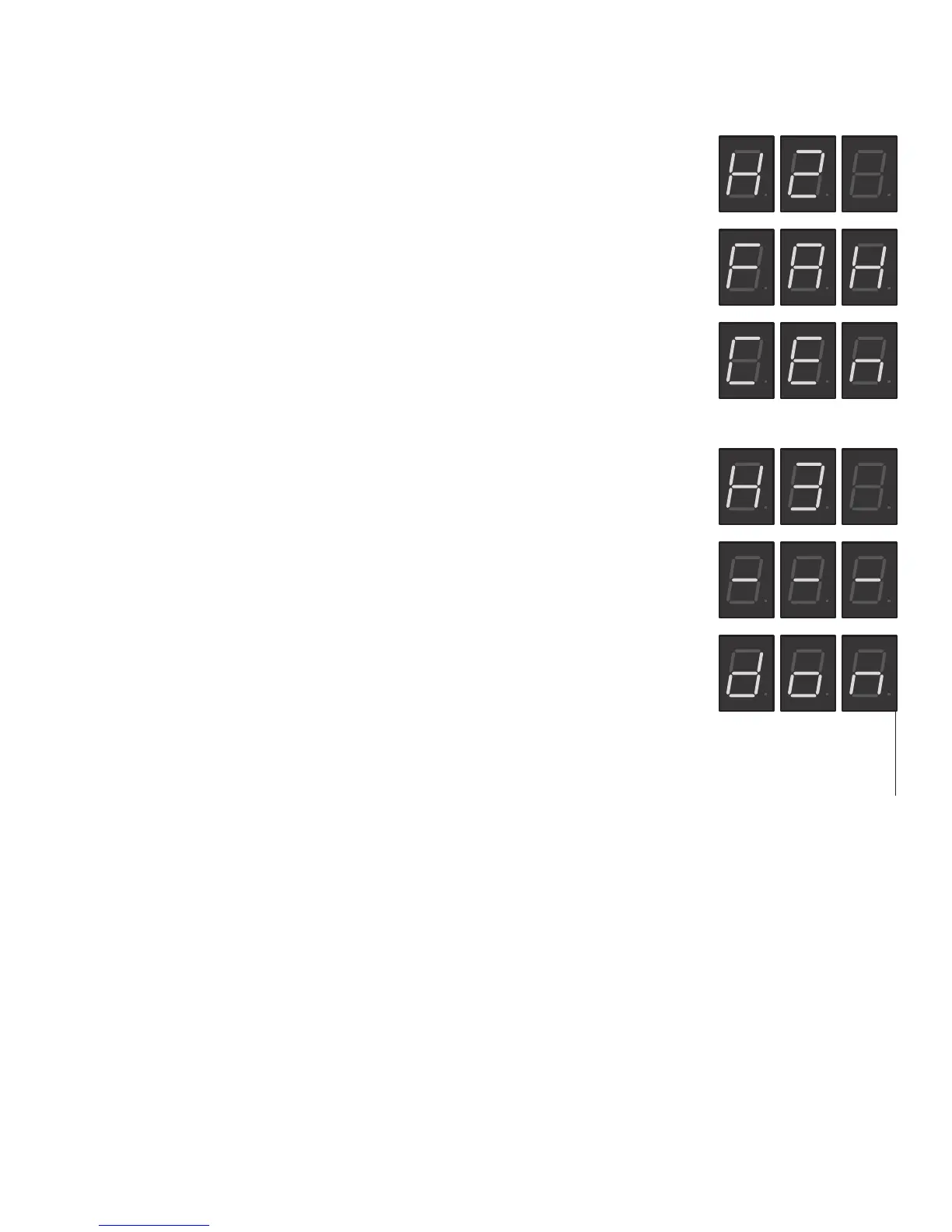
H2 - F° OR C° SELECTION
1. To enter Level 2 Programming, press and hold the
upper hidden
button until H2
appears on the display. Release the
upper hidden
button. The display will show
either FAH (Degrees in Fahrenheit) or CEn (Degrees in Centigrade).
2. Press and release the (+) or (-) buttons to alternate between FAH and CEn.
3. After setting FAH or CEn, to exit Level 2 Programming, press and release the
upper
hidden
button twice. Display will show, software version, then main screen.
H3 - RESTORING FACTORY DEFAULTS
1. To restore Factory Defaults (This clears all settings that were previously entered),
press and release the
upper hidden
button until H2 appears on the display (ap-
proximately 6 seconds). Release the
upper hidden
Button, then press and release
the
upper hidden
Button once more. The display will read H3, then show (- - -).
2. Press and hold both (+) and (-) buttons to initiate the resetting of the factory
default settings. The display (- - -) will flash on and off during this time.
3. When the factory default numbers are loaded in, the display will stop flashing,
then read don (DONE). You can now release the two buttons.
NOTE: If you release the two buttons at any time before the display reads don, the Fac-
tory Default numbers will not be entered. The old numbers will remain in the memory.
PROGRAMMING - H5-ELEMENT Continued
46819 043012


 To Next Page