Short-time timer insert
Operation
| 1473-1-7950 — 4 —
Pos: 12 /#Neustruktur#/Modul-Struktur/Online-Dokumentation/Überschriften (--> Für alle Dokumente <--)/1. Ebene/A - F/Bedienung @ 11\mod_1279185541 649_15.docx @ 83043 @ 1 @ 1
4 Operation
Pos: 13 /#Neustruktur#/Modul-Struktur/Online-Dokumentation/Überschriften (--> Für alle Dokumente <--)/2. Ebene/S - T/Tastenbelegung @ 23\ mod_1336978335991_15. docx @ 209274 @ 2 @ 1
4.1 Key assignment
Pos: 14 /DinA4 - Anleitung en Online/Inhalt/ti mer-controler- Jalousiesteuerung/ 6465/Tastenbelegu ng - 6465 @ 21\mod_132758845 3710_15.docx @ 137290 @ @ 1
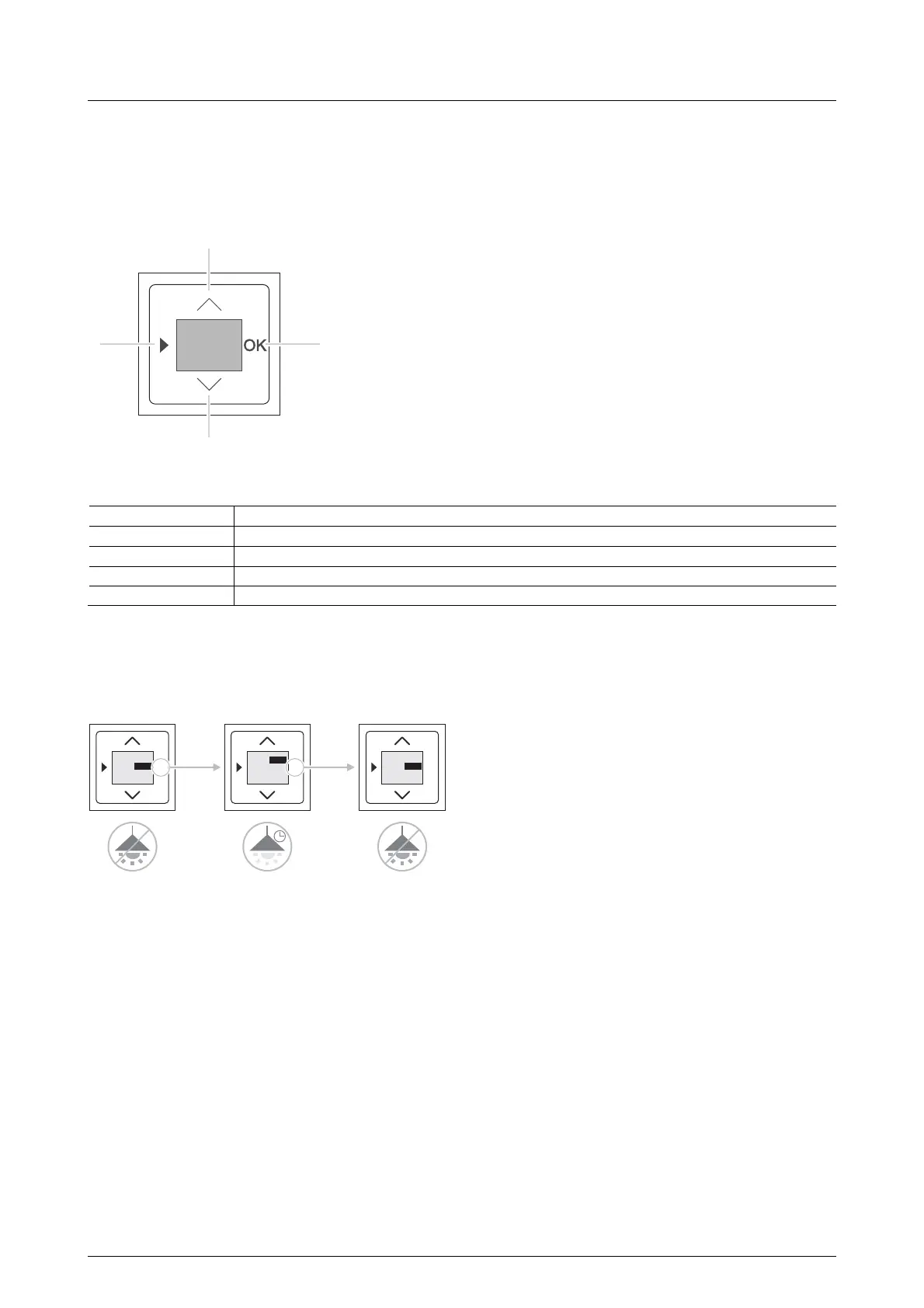
Fig. 1: Key assignment
No. Function
1 Call up programming mode 1 or 2.
2 Raise the value in programming mode by one meter (+).
3 Start or stop the short-time timer.
4 Lower the value in programming mode by one meter (-).
Pos: 15 /DinA4 - Anleitung en Online/Inhalt/ti mer-controler- Jalousiesteuerung/ 6465/Timer start / Timer start / stopp - 6465 @ 21\ mod_1327589517435_15. docx @ 137353 @ 2 @ 1
4.2 Start / stop timer
The following description shows the example of lighting connected to a timer.
Fig. 2: Start / stop timer
To start and stop the timer carry out the following steps:
1. Activate the "OK" button.
- The lighting is switched on.
- The timer counts down the preset time.
2. After it has counted down the preset time, the timer stops automatically.
- The lighting is switched off.
- The timer again displays the preset time.
3. To stop the preset time early, press the "OK" again.
- The lighting is switched off.
- The timer again displays the preset time.
The timer is again ready to start.
Pos: 16 /#Neustruktur#/Modul-Struktur/Online-Dokumentation/Steuermodule - Online-Dokumentation (--> Für alle Dokumente <--)/++++++++++++ Seitenumbruc h ++++++++++++ @ 9\mod_1268 898668093_0.docx @ 52149 @ @ 1
0:45
00
1
2
3
4
OK
0:4500
START
OK
0:4442
STOP
OK
0:4500
START


 To Next Page