13
For any help concerning set up and use of your TV please call the Customer Helpline on page 3
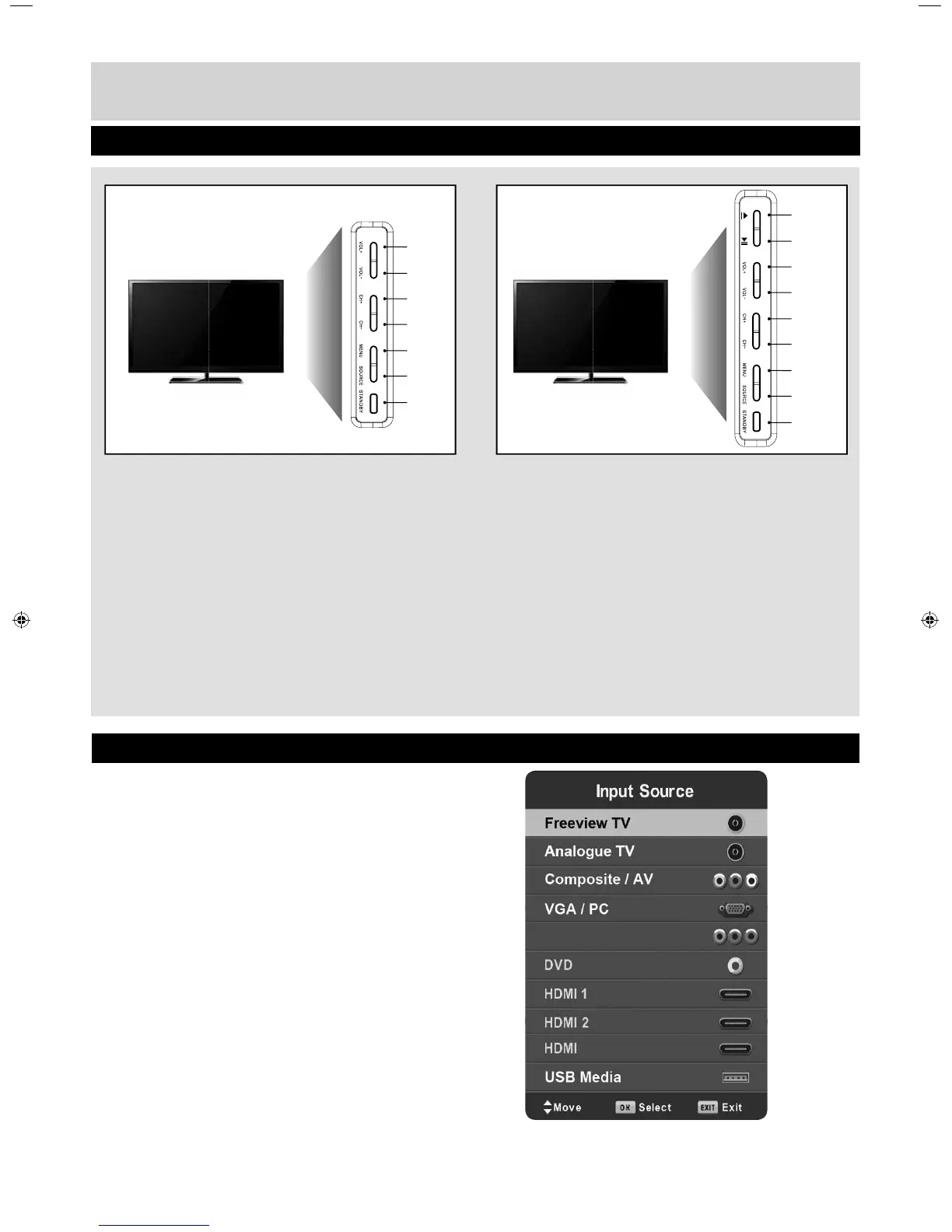
To switch between the different input/connections.
A) Using the buttons on the remote control:
1) Press [SOURCE] - The source menu will appear.
2) Press [\/] or [/\] to select the input you require.
3) Press [OK].
B) Using the buttons on the Television:
1) Press [SOURCE].
2) Scroll up / down using CH+/ CH- buttons to the
input/source you require.
3) Press Vol+ to change input/source to the one
selected.
For further information on input/connections
please view ‘Connections’ pages.
TV Buttons & Source Menu
Choosing Mode Input/Source
An example of the ‘Input Source’ menu
(will vary by model)
Component / YPbPr
3
1
2
3
4
5
6
7
1. Volume up and menu right
2. Volume down and menu left
3. Programme/Channel up and menu up
4. Programme/Channel down and menu down
5. Displays Menu/OSD
6. Displays the input source menu
7. Standby Power On/Off
1. Stop/Eject DVD
2. Play/Pause DVD
3. Volume up and menu right
4. Volume down and menu left
5. Programme/Channel up and menu up
6. Programme/Channel down and menu down
7. Displays Menu/OSD
8. Displays the input source menu
9. Standby Power On/Off
1
2
3
4
5
6
8
7
9
For TV models with
built in DVD player
User Guide - BUSH-MAN-0021 - 40-233I-WB-5B2-FHKUPS-FHKDUPS-UK.indd Sec1:13User Guide - BUSH-MAN-0021 - 40-233I-WB-5B2-FHKUPS-FHKDUPS-UK.indd Sec1:13 26/05/2015 14:30:0026/05/2015 14:30:00



 To Next Page