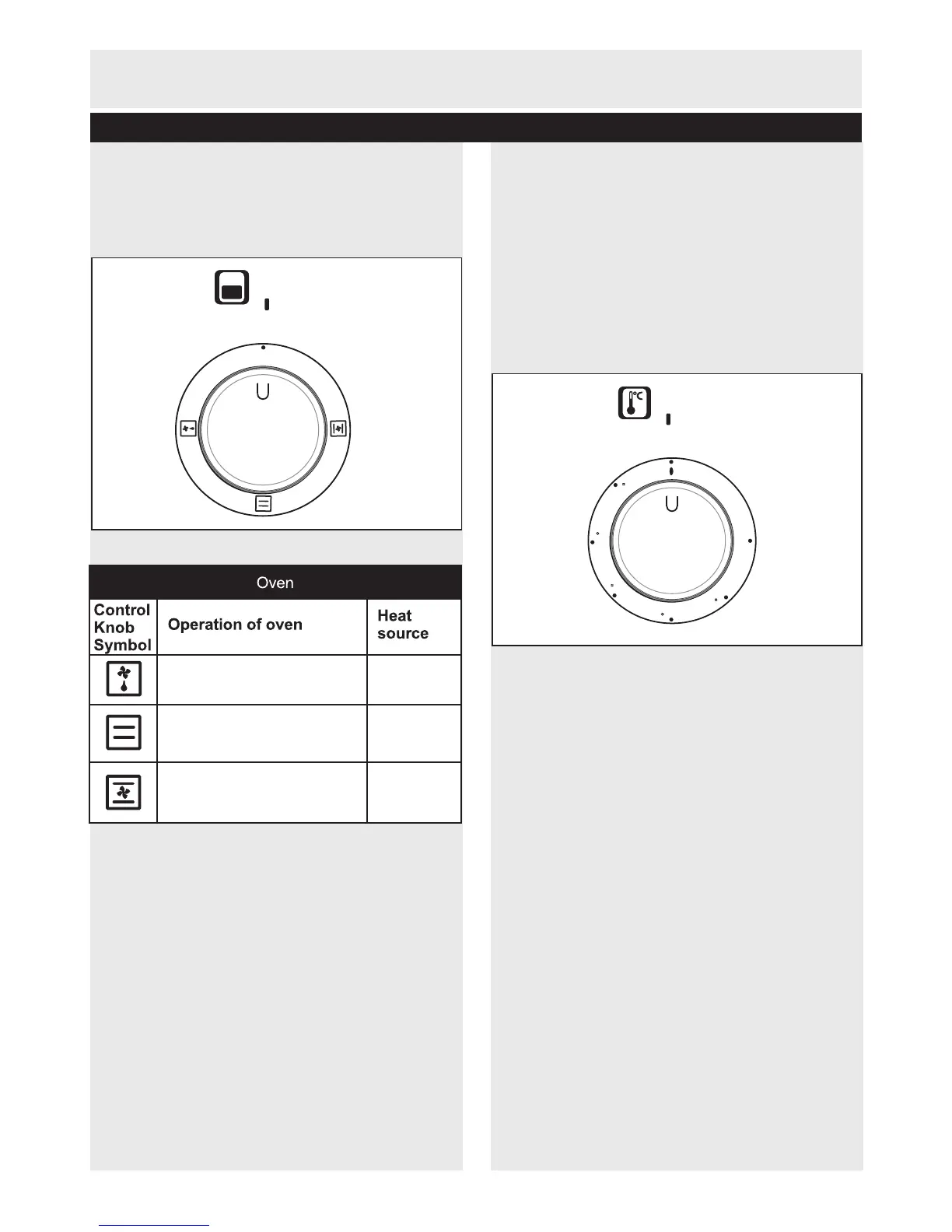
Main oven function control knob
1. Use the main oven function control as shown in
figure 10 to select the oven function you require
(see the Functions Table below).
Thermostat control knob
1. When you have selected the oven function you
must then set the temperature of the oven.
2. Turn the oven thermostat control knob as
shown in figure 11, to the temperature setting
you require. When the temperature inside your
oven reaches the set value, the thermostat will
switch off the heating elements and the
thermostat light will go off, as shown in figure 5
on page 8.
NOTE:
When the temperature falls below the set value,
the thermostat will be turned on the heating
elements and the thermostat light will come on
again.
Performance tips
1. Pre-heat the oven for 10 minutes.
2. After cooking, turn the oven function control
knob and the thermostat knob to 0.
3. To cool the oven, keep the oven door open. As
the oven will be hot, keep away from the oven
until the appliance is fully cooled.
11
User Instructions
Customer Helpline 0845 600 4632
Using the Main oven
0
0
50
50
100
100
150
150
200
200
250
250
MAX
MAX
0
0
The oven light and fan will
be switched on.
None
Top and
bottom of
the oven
Top and
bottom of
the oven
The oven's light, top and
bottom heaters
will be switched on.
The oven's light,
bottom heaters and
fan will be switched on.
top and
Figure 10
Figure 11


 To Next Page