User instructions
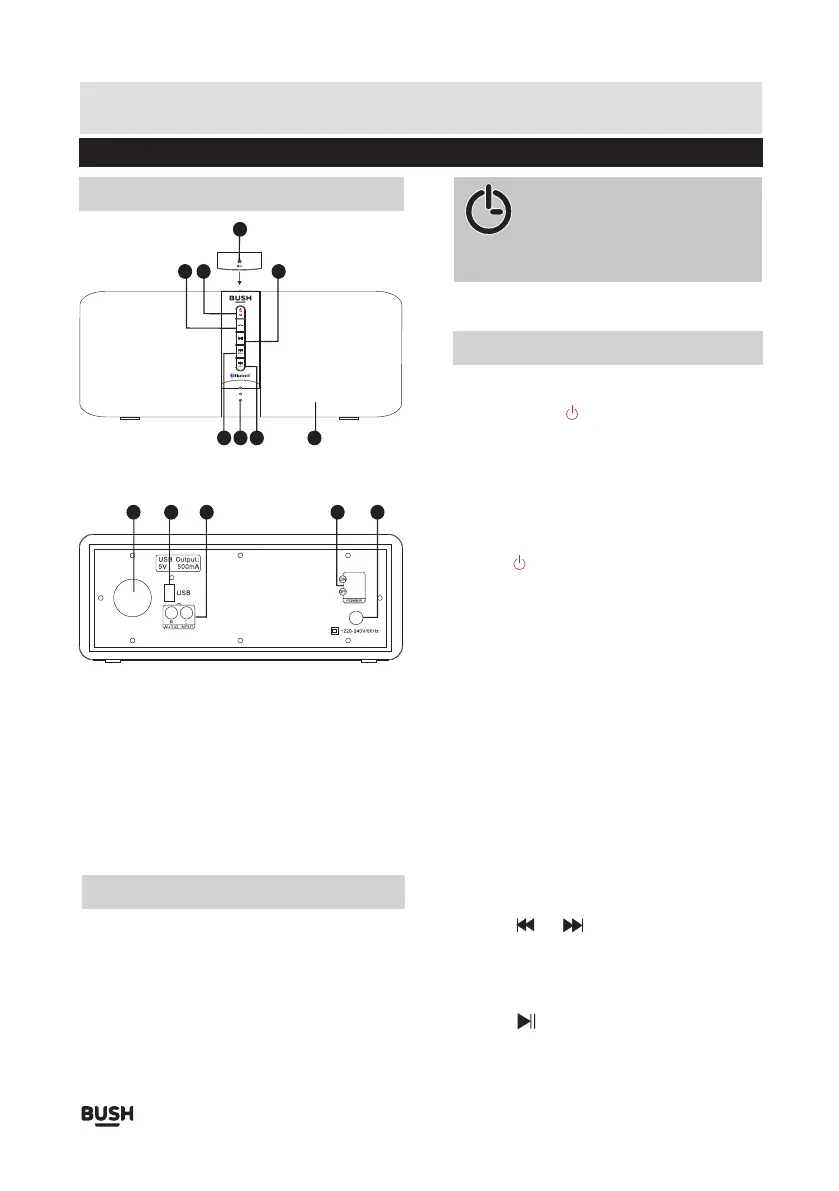
PANELS
1
2
3
4
8
5
6
7
9
10 13
11
6
12
1. Microphone
2. Phone button
3. Standby / Mode
4. Play/ Pause
5. Next / Volume+
6. Indicator
7. Previous / Volume-
8. Speaker
9. Speaker ventilation
10. USB port
11. Left/Right Audio
input sockets
12. Power switch
13. Power input
CONNECTING MAINS POWER
• Check the voltage marked on the rear rating plate is
the same as the voltage in your area.
• Connect the mains plug to the wall socket and switch
the mains switch (12) on the back of the unit to ON.
Standby mode
Switching modes
USB, and AUX IN.
the different mode.
Skip tracks
or the next track.
Press and hold the /M button for 3s to turn on the
unit or to put the system into standby mode.
To switch between the available modes: Bluetooth,
Press the /M button to cycle through the options,
and the indicator light will use different colors to show
Indicator light shows different mode status
Bluetooth mode: the indicator flashes blue quickly.
USB mode: the indicator flashes yellow slowly.
Aux in mode: the indicator is solid yellow.
Adjust the volume
Press and hold the VOL+ or VOL- buttons to adjust the
volume to a comfortable level.
Standby
mode: the indicator lights red.
Press the or buttons to skip to the previous
Play or pause the music
Press the button to pause or resume the playing.
GENERAL OPERATION
NOTE: This unit is designed to enter
STANDBY mode automatically after 15
MINUTES (approximately) of inactivity.
Press the STANDBY button to wake the unit.
Page 3



 To Next Page